
This PromptMonitor review is based on my hands-on testing of PromptMonitor’s dashboards, prompt tracking, citation data, analytics modules, pricing, and onboarding.
I tested PromptMonitor on nenawow.com during the 7-day free trial. I created a real project, ran through every major dashboard, and spent close to an hour logging what worked and what did not. This is what I found.
PromptMonitor is an AI visibility platform built to track how your website appears inside AI-generated answers. It monitors prompt responses across large language models, identifies the URLs those models cite, and suggests content moves based on what AI engines are actually saying. That is a different job from what most SEO tools do. Worth keeping that difference in mind before you decide if it fits your workflow. If you are still figuring out what AI visibility even means for your site, my guide to what AI visibility is and why it matters is a good place to start first.
Table of Contents
TL;DR — PromptMonitor Review
PromptMonitor is a purpose-built AI visibility platform that focuses on prompt tracking, AI mentions, and URL-level citation intelligence. I tested it on NenaWow during the 7-day free trial and found the interface fast, intuitive, and easy to set up.
| Category | My Take |
|---|---|
| Best Feature | Sources dashboard with URL-level citation data |
| AI Models | ChatGPT, Claude, Gemini, DeepSeek, Grok, Perplexity |
| Setup | ⭐⭐⭐⭐⭐ — About 1 minute |
| Interface | ⭐⭐⭐⭐⭐ — Clean and fast |
| AI Visibility Tracking | ⭐⭐⭐⭐⭐ |
| Citation Tracking | ⭐⭐⭐⭐⭐ |
| Actions & Recommendations | ⭐⭐⭐⭐½ |
| LLM Analytics | ⭐⭐⭐⭐ |
| Pricing | From $29/month |
| Free Trial | 7 days |
| Best For | SEOs, content marketers, agencies, and brands tracking AI visibility |
| Main Drawback | LLM Analytics requires server-side middleware |
| My Overall Score | 4.8/5 |
My verdict: PromptMonitor is one of the more focused AI visibility tools I’ve tested. Its biggest strength is showing which specific URLs AI models cite, rather than giving you just another visibility score. The Growth plan looks like the sweet spot for most users, while Pro is expensive at $129/month.
One caveat: I could not verify long-term reporting accuracy from a single 7-day test, so I would treat that as an area requiring longer-term testing.
What Is PromptMonitor?
PromptMonitor is a prompt-first AI visibility platform, not a traditional SEO suite. It does not track keyword rankings or backlinks. What it tracks is whether your website gets mentioned, cited, or recommended inside AI-generated responses from models like ChatGPT and Gemini.
The platform is built for brands, SEO teams, and content marketers who want to understand their position in AI search, not just Google Search. That audience is growing fast. AI visibility software like this sits at the intersection of GEO vs SEO, brand monitoring, and LLM analytics — and PromptMonitor is one of the few tools I have tested that was built specifically for this problem from day one.
PromptMonitor Features
Prompt Tracking
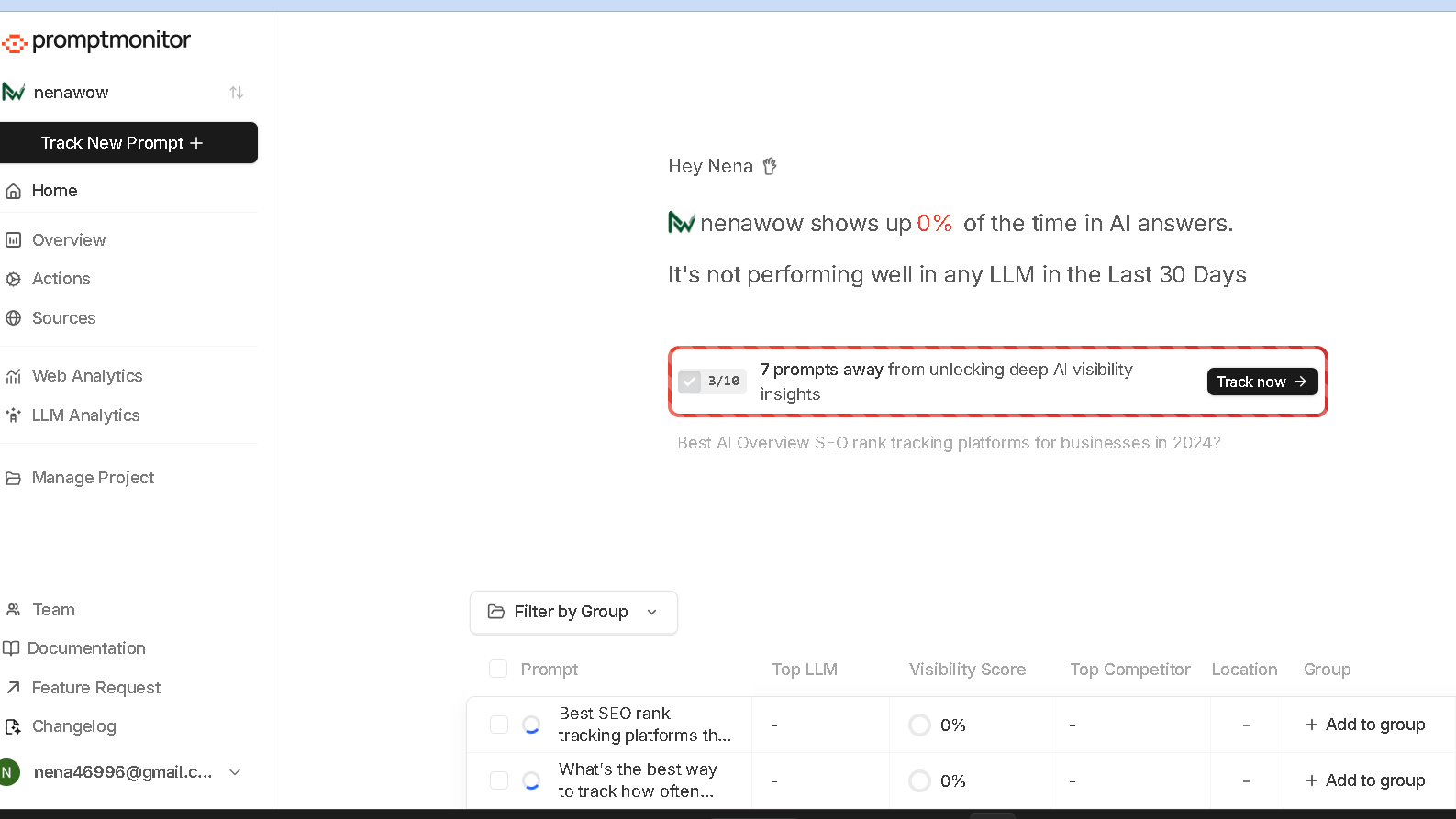
The core workflow starts with prompts. You enter the questions you want to monitor — things like “best AI visibility tools” or “how to track ChatGPT mentions” — and PromptMonitor runs those prompts through AI models on a set refresh schedule. It then captures what each model said, whether your site appeared, and what other domains got cited instead. That last part matters. Knowing who is being cited when you are not is the whole point.
During testing I noticed that prompt tracking feels much more intentional here than in tools where it is bolted on as an afterthought. You are not just running keyword checks. You are asking the same questions your audience is typing into ChatGPT and Gemini and watching what comes back. That shift in framing changes how you think about content gaps.
Sources Dashboard
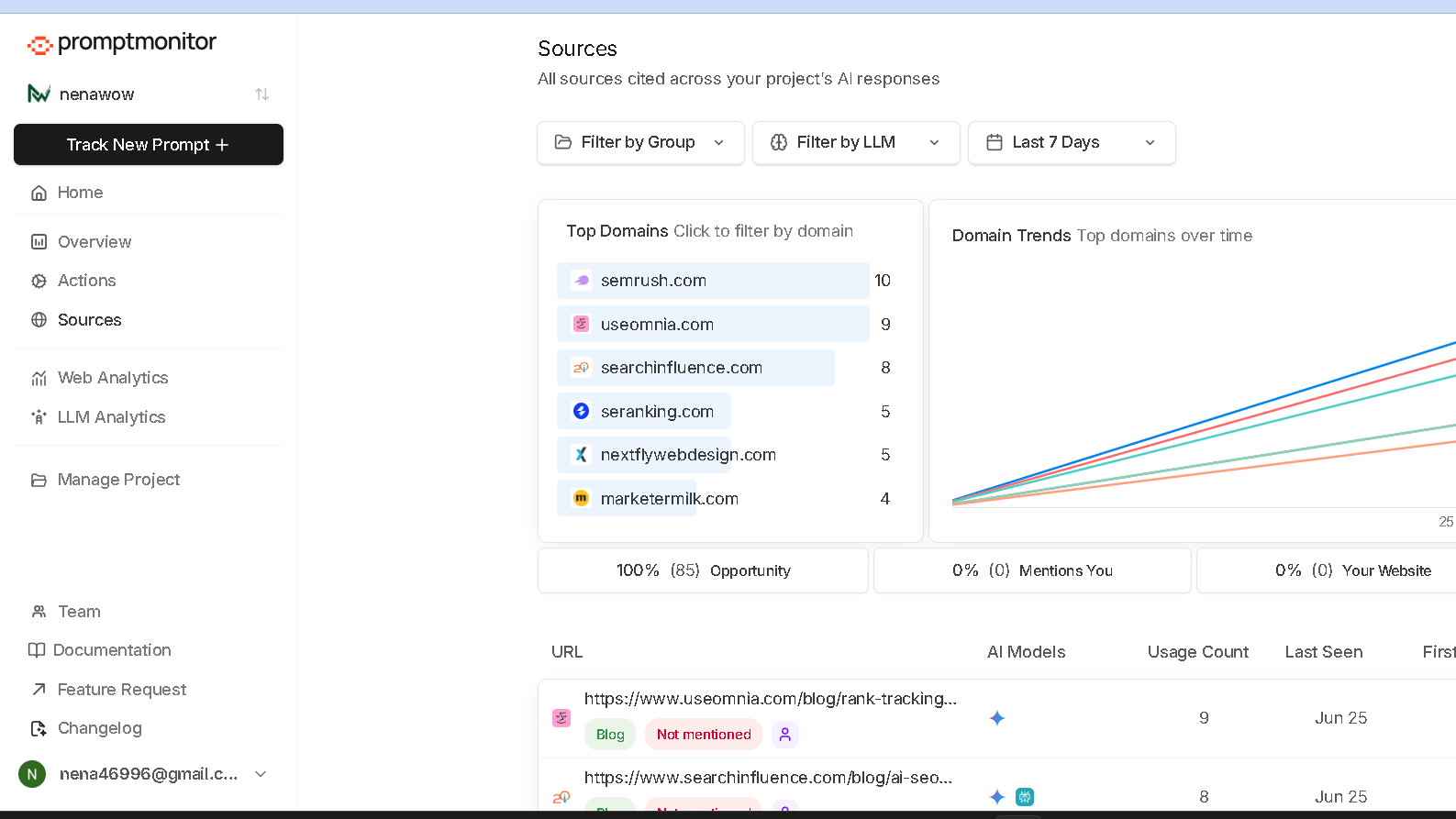
The Sources dashboard was the strongest feature I found during testing. Instead of just showing a visibility score, it surfaces the actual domains that AI models are citing in response to your tracked prompts. I saw entries for semrush.com, marketermilk.com, seranking.com, and several others — each with a URL, the AI model that cited it, a usage count, and first and last seen dates. That gap between where citations are going and where your site is not — that is actionable data.
There was also an Opportunity score attached to sources where my site had not appeared. That score did not make the gap feel abstract. It made it feel like a to-do list. For anyone trying to build AI citations from scratch, this is the feature I would come back to every week.
AI Visibility Overview
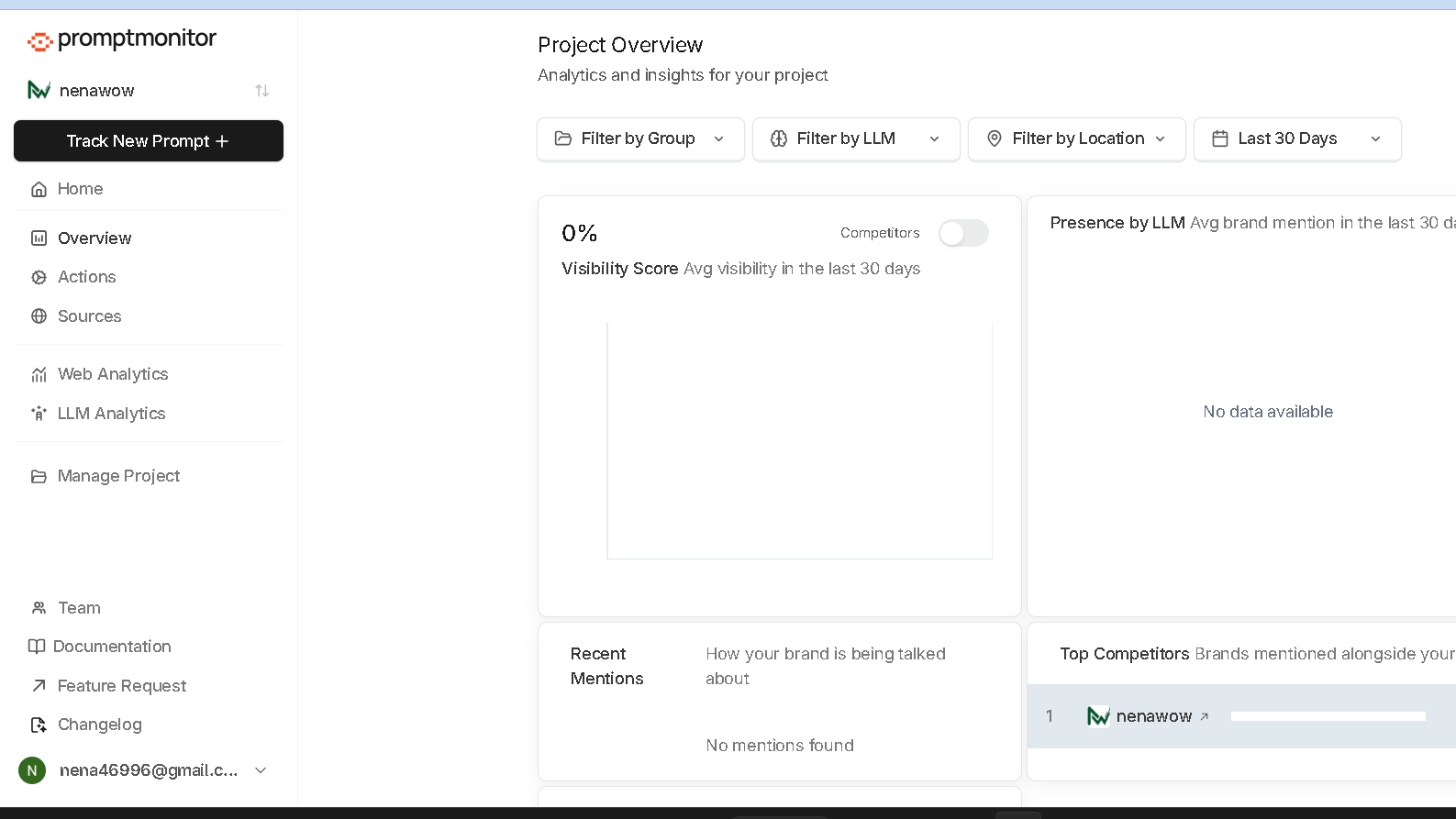
The main Overview dashboard shows four core metrics: Visibility Score, Presence by LLM, Recent Mentions, and Top Competitors. Since my project was brand new during testing, the Visibility Score showed 0 percent with no meaningful LLM visibility in the prior 30 days. That is expected behavior. But the filtering options — by LLM, location, group, and date range — showed me exactly how the data would build over time.
The structure was clear even when the numbers were empty. That is not always the case with newer tools in this space.
Actions
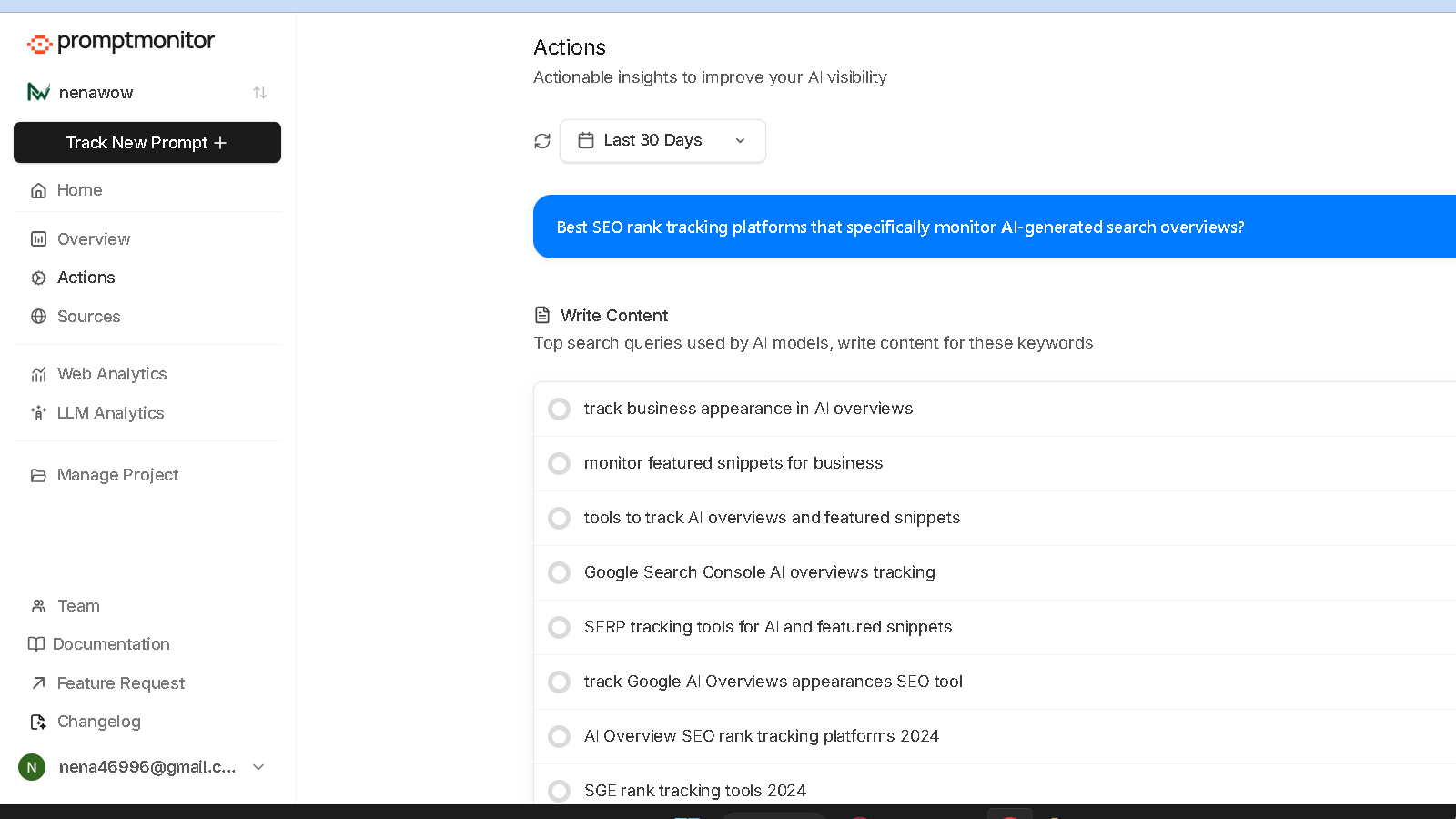
The Actions dashboard surfaces content ideas based on what AI models are actually being asked. During my session, I saw suggestions like “track business appearance in AI Overviews,” “monitor featured snippets,” and “AI Overview rank tracking platforms.” Each suggestion was tagged to the AI model that generated it — Gemini or ChatGPT. That distinction matters because what Gemini surfaces and what ChatGPT recommends can point in different directions.
One thing I noticed: semantically similar prompts produced nearly identical recommendations. That tells me PromptMonitor clusters related topics internally rather than treating each prompt as a clean standalone. In practice, this keeps the Actions list from getting noisy. But it also means you will want to use distinct, well-separated prompts to get varied insights.
Website Analytics
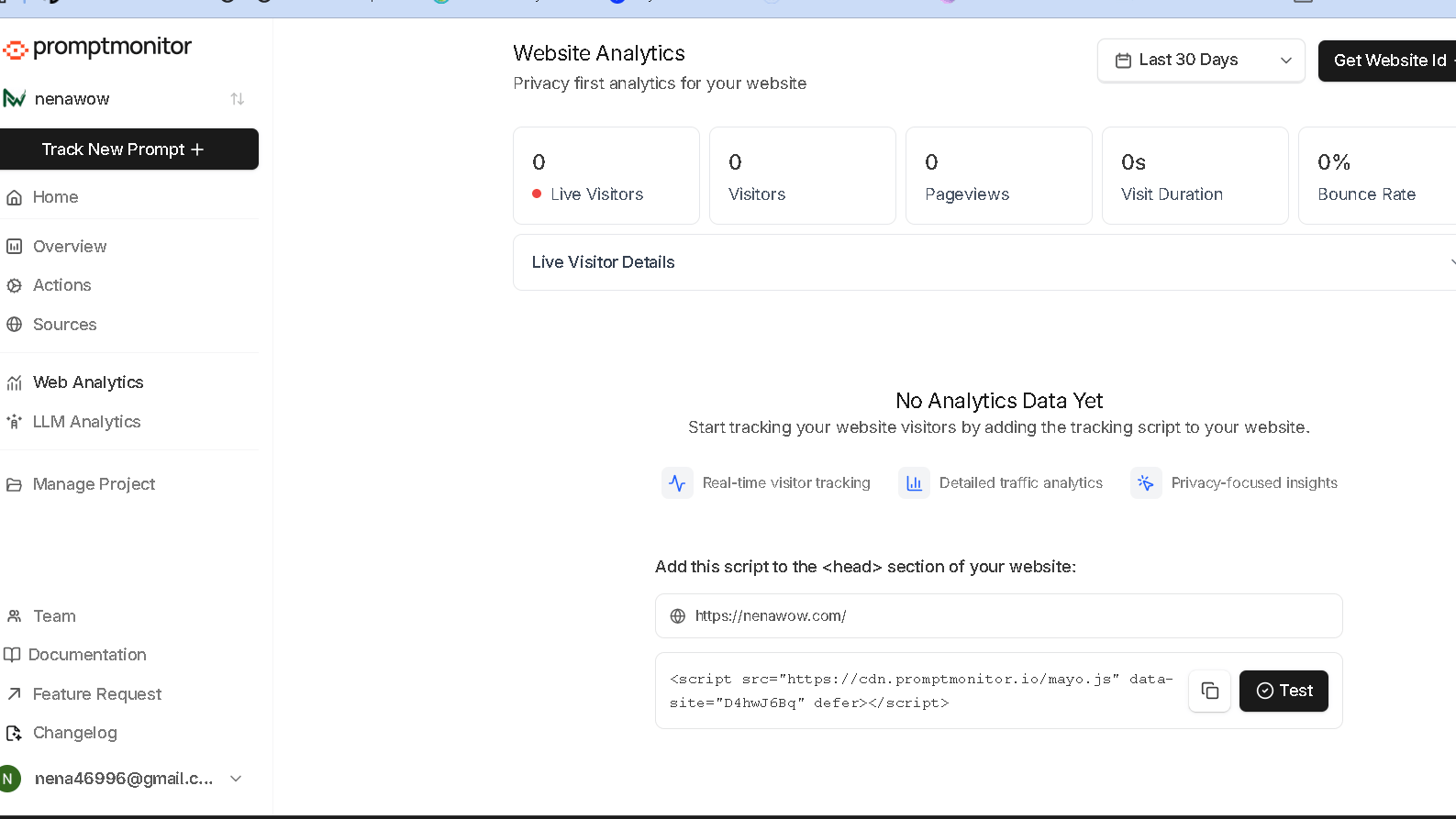
PromptMonitor includes a lightweight analytics module with standard metrics — visitors, pageviews, visit duration, and bounce rate. It is privacy-focused and does not require a third-party integration. To activate it, you install a small JavaScript tracking script, which is exactly what you would expect from any analytics layer. This feature is not the reason to choose PromptMonitor, but it is a useful extra rather than a distraction.
LLM Analytics
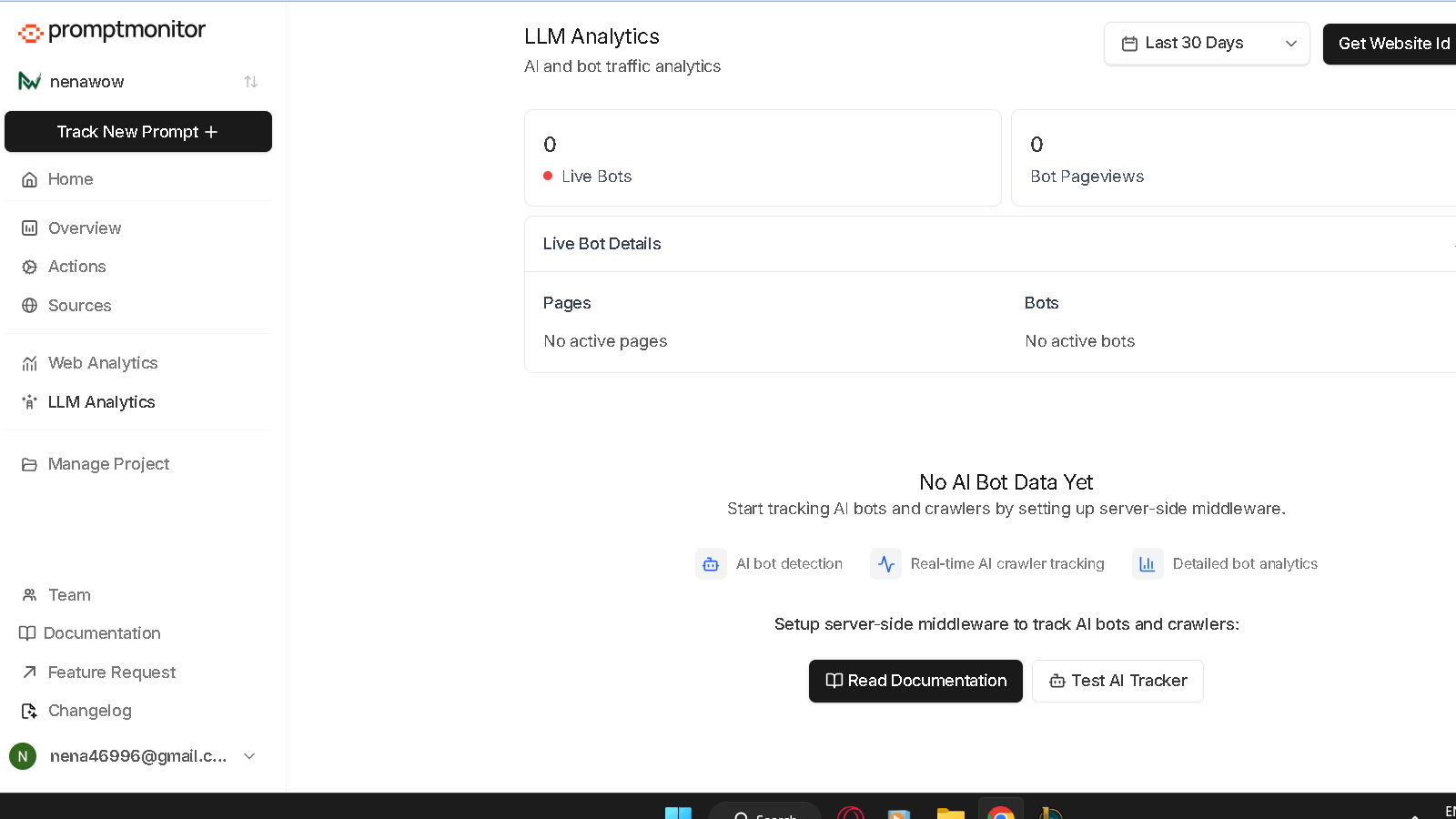
The LLM Analytics section tracks AI bot traffic to your site — live bots, bot pageviews, and real-time crawler details. The idea is to separate AI crawler activity from human traffic. That is useful if you want to understand how often models like GPT-4 or Gemini are actively crawling your pages. The catch is that this feature requires server-side middleware before it goes live. For developers and technical SEOs, that is not a barrier. For beginners, it adds a setup step that is not covered during standard onboarding.
What surprised me most about this module is how few tools in the best AI visibility tools category offer anything like it. Real-time AI bot monitoring at the URL level is rare. The setup complexity is the only real friction here.
AI Search Bot Analytics
Connected to LLM Analytics, the bot tracking module identifies which AI crawlers are visiting, how often, and what they are touching. For brands running high-stakes content strategies, knowing that Perplexity’s crawler hit your product page six times this week is meaningful signal. You will not find this inside Google Analytics or Search Console. The setup complexity is the only real friction here.
My Hands-On Testing
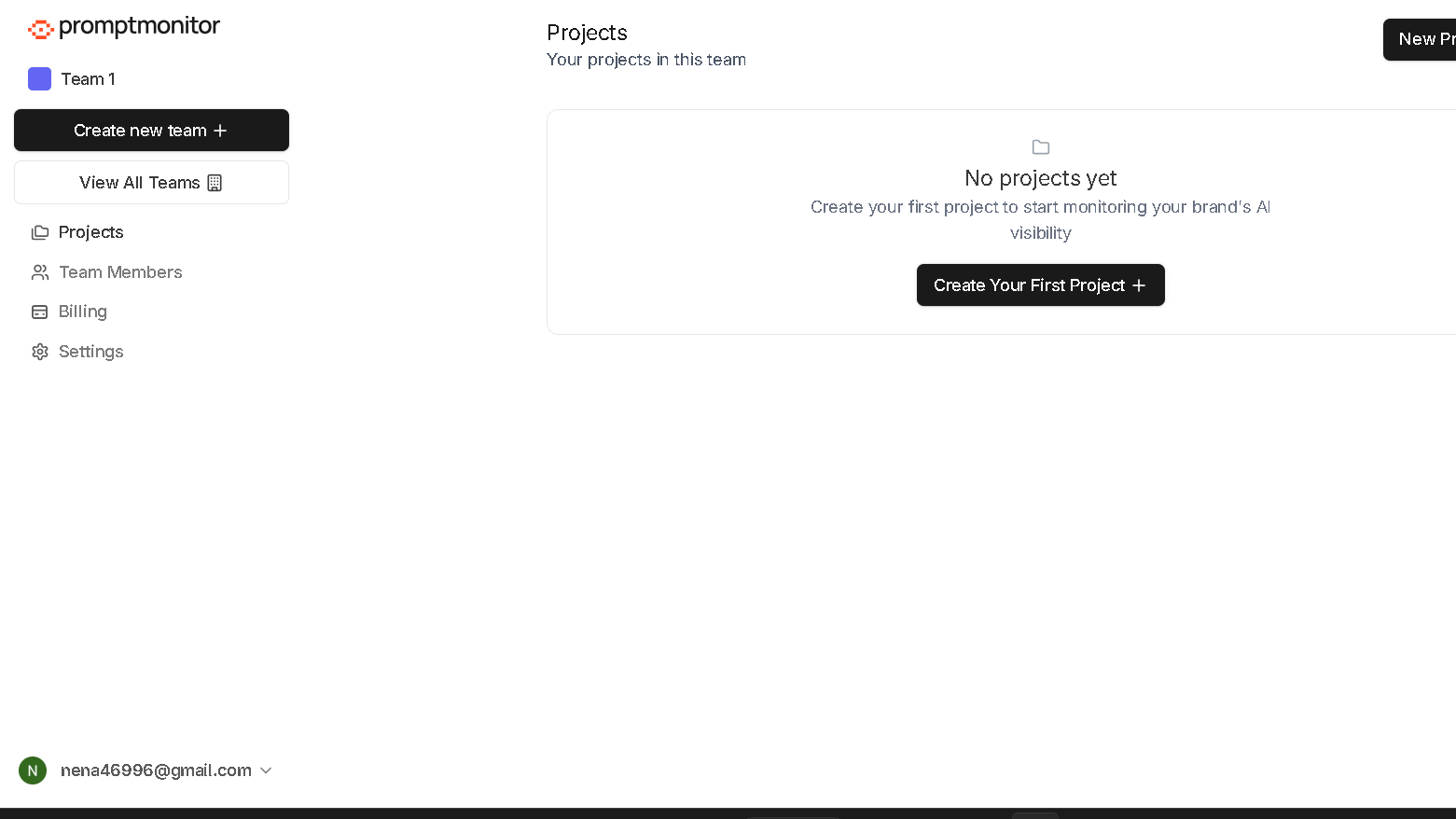
I signed up for the free trial and went straight to project creation. I entered the nenawow.com domain, and within about one minute the first dashboard was live. No long indexing wait. No stalled report generation, and no complicated setup flow. It just dropped me in.
In my 60-minute setup and exploration test, every section loaded immediately. No crashes, no broken pages, no lag between navigation clicks. I rated the interface 5 out of 5 on speed and stability across all sections I visited. That is not common even among tools with much longer development histories.
What I could not test fully in a single session was reporting accuracy over time. Long-term accuracy in AI visibility tools is a real question across the whole category — independent tests have shown discrepancy rates above 90 percent between some monitoring platforms. PromptMonitor may perform better than average, but I cannot confirm that from a first session. A 30 and 60-day follow-up would give a clearer picture.
PromptMonitor vs Traditional SEO Tools
This comparison comes up a lot, so it is worth stating clearly. PromptMonitor and traditional SEO platforms are not competing for the same job.
| Factor | PromptMonitor | Traditional SEO Tool |
|---|---|---|
| What it tracks | AI prompt responses and citations | Keyword rankings and backlinks |
| Primary data source | LLM outputs | Search engine index |
| Core question answered | Am I mentioned in AI answers? | Do I rank on Google? |
| Citation intelligence | URL-level, with usage counts | Not available |
| Content recommendations | Based on AI model behavior | Based on keyword volume |
| Bot tracking | AI crawlers specifically | General crawl data |
| Setup time | About one minute | Varies widely |
The short version: if you already use a tool like Semrush or Ahrefs, PromptMonitor does not replace it. It answers a different question. That is the point.
PromptMonitor Dashboard Overview
| Metric | What It Shows |
|---|---|
| Visibility Score | Percentage of tracked prompts where your site appeared |
| Presence by LLM | Breakdown of mentions by AI model |
| Recent Mentions | Latest captures of your site inside AI responses |
| Top Competitors | Domains appearing in your tracked prompt results |
| Opportunity Score | Citation gaps where competitors appear but you do not |
Filtering by LLM, location, group, and date range is available across the Overview. That level of segmentation is more than I expected at the entry level of a free trial.
Sources Dashboard
This section deserves its own look. What makes the Sources dashboard different from a standard visibility report is the URL-level citation data. You are not just seeing that semrush.com was mentioned. You are seeing which specific URL was cited, which AI model used it, how many times it has appeared, when it was first seen, and when it last showed up. That is AI citation tracking, not visibility tracking. Those are different things.
This was my favorite feature in the entire platform. The Opportunity score reframes citation gaps as content priorities rather than just rankings you failed to achieve. For anyone building an AI share of voice strategy, this is where the work actually starts.
| Field | What It Tells You |
|---|---|
| URL | The exact page being cited |
| AI Model | Which LLM referenced it |
| Usage Count | How often it appears in responses |
| First Identified | When PromptMonitor first captured the citation |
| Last Seen | Most recent appearance in AI output |
| Opportunity Score | How likely you are to capture this citation |
Prompt Tracking vs Keyword Tracking
A lot of people ask me how prompt tracking compares to the keyword tracking they already do. Here is the honest answer.
| Factor | Prompt Tracking | Keyword Tracking |
|---|---|---|
| What you are monitoring | Full questions users ask AI | Individual search terms |
| Output measured | AI-generated responses | Search engine result pages |
| Citation data | Yes — domains and URLs cited | No |
| LLM segmentation | Yes — by model | No |
| Content direction | Based on AI model behavior | Based on search volume |
| Freshness of data | Refresh schedule dependent | Varies by crawl |
| Best for | AI search strategy | Google search strategy |
In practice, you want both. Prompt tracking fills a gap that keyword tracking was never designed to cover.
Actions Dashboard
| Suggestion Type | Source Model |
|---|---|
| Track AI Overviews for your business | Gemini |
| Monitor featured snippets | ChatGPT |
| AI Overview rank tracking platforms | Gemini |
| Google Search Console AI Overview tracking | ChatGPT |
| Tools to track AI Overviews and featured snippets | Gemini |
To be fair, a few of the suggested content ideas still referenced 2024 and SGE. That tells me the prompt data feeding those suggestions has not been fully refreshed. Not a dealbreaker, but worth flagging if you are building a 2026 content calendar around these recommendations.
During testing I noticed that the model attribution next to each suggestion — Gemini vs ChatGPT — is more useful than it first looks. When two models are pointing at the same content gap from different angles, that is a strong signal the topic is worth covering.
Website Analytics
| Metric | Available |
|---|---|
| Live Visitors | Yes |
| Visitors | Yes |
| Pageviews | Yes |
| Visit Duration | Yes |
| Bounce Rate | Yes |
| Privacy-Focused | Yes |
| Installation Required | JavaScript tracking script |
The analytics module is not the reason to choose PromptMonitor. But it is a clean addition that keeps you from needing a separate tool for basic traffic data.
LLM Analytics
| Feature | Details |
|---|---|
| Live Bot Tracking | Real-time AI crawler monitoring |
| Bot Pageviews | Volume of AI bot visits |
| Live Bot Details | Crawler identity and behavior |
| Setup Requirement | Server-side middleware |
| Difficulty Level | Intermediate to advanced |
This feature works well if your team has a developer available. For solo content creators, the middleware requirement will slow down activation. That is the ceiling for this module at the beginner level.
Pros and Cons
| Pros | Cons |
|---|---|
| Onboarding takes about one minute | LLM Analytics requires server-side middleware |
| Clean, fast, modern interface | Website Analytics needs JavaScript install |
| Prompt-first workflow built from day one | Some Actions content references outdated 2024 prompts |
| Sources dashboard provides URL-level citation data | No historical data available at project launch |
| Opportunity scoring highlights citation gaps | Long-term accuracy not yet confirmed in my testing |
| Actions dashboard tags suggestions by AI model | Free trial is limited in scope |
| Separates AI crawler traffic from human traffic | Pricing jumps noticeably between tiers |
| Works as a standalone AI visibility platform | Not a replacement for traditional SEO tools |
PromptMonitor Pricing
PromptMonitor offers three paid plans, all with a 7-day free trial. Here is exactly what each one includes.
| Plan | Price | Projects | Prompts | Responses/Month | Refresh | Best For |
|---|---|---|---|---|---|---|
| Starter | $29/mo | 1 | 25 | 2,250 | Twice weekly | Small businesses and solo operators |
| Growth | $39/mo | 2 | 50 | 4,500 | Daily | Growing startups and SMBs |
| Pro | $129/mo | 5 | 150 | 14,000 | Daily | SMEs and agencies |
A few things worth noting from the pricing structure. The Starter plan does not include Website Analytics, AI Search Bot and Crawler Analytics, or CSV export — those features are Growth and above. The Pro plan also adds AI Mode and AI Overview tracking, which is a meaningful upgrade for teams tracking Google AI Overviews as a priority. All plans include support for ChatGPT, Claude, Gemini, DeepSeek, Grok, and Perplexity.
The jump from Growth at $39 to Pro at $129 is steep. That is the honest gap in the pricing ladder. For most solo SEOs and small teams, Growth covers the essentials well.
PromptMonitor vs MorningScore
I tested MorningScore separately and the difference in approach was obvious within the first ten minutes. MorningScore is a traditional SEO platform that added GEO as a new feature layer. PromptMonitor was built specifically for AI visibility from the start. That origin difference shows up everywhere — in the onboarding, the workflow, and the depth of AI-specific reporting.
| Feature | PromptMonitor | MorningScore |
|---|---|---|
| Core Focus | AI visibility and prompt tracking | Traditional SEO with GEO add-on |
| Onboarding Speed | About one minute | Longer, with report generation delays |
| Workflow Design | Prompt-first | Keyword-first with GEO layer |
| Citation Tracking | URL-level via Sources dashboard | Basic mention tracking |
| AI Model Breakdown | ChatGPT, Gemini, DeepSeek, Grok, and more | Limited LLM segmentation |
| Actions / Recommendations | AI model-tagged content ideas | Standard SEO suggestions |
| LLM Analytics | Yes, on Growth and above | No dedicated module |
| Bot Tracking | Yes | No |
| Pricing Entry Point | $29/mo | Varies |
| Best For | AI-first visibility strategy | Traditional SEO with light GEO interest |
That said, neither tool replaces the other. If you already use MorningScore for traditional SEO, PromptMonitor layers on top rather than competing with what you have.
Supported AI Models
| Model | Included From |
|---|---|
| ChatGPT (OpenAI) | All plans |
| Claude (Anthropic) | All plans |
| Gemini (Google) | All plans |
| DeepSeek | All plans |
| Grok | All plans |
| Perplexity | All plans |
| AI Mode (Google) | Pro plan only |
| AI Overviews (Google) | Pro plan only |
What surprised me most about the model list is how broad it is even at the Starter tier. Most tools in this category gate non-ChatGPT models behind higher plans. PromptMonitor includes six models from day one. That is a real value.
Analytics Modules
| Module | What It Covers | Available From |
|---|---|---|
| AI Visibility Overview | Prompt-level visibility scores | All plans |
| Sources Dashboard | URL-level citation tracking | All plans |
| Actions Dashboard | AI-sourced content suggestions | All plans |
| Website Analytics | Human visitor data | Growth and above |
| LLM Analytics | AI bot traffic | Growth and above |
| AI Search Bot Analytics | Crawler identity and behavior | Growth and above |
| CSV Export | Data export | Growth and above |
The no-setup modules are strong out of the box. The setup-required modules add real depth once you activate them, but they live behind the Growth plan threshold.
Who Should Use PromptMonitor?
The question is not whether PromptMonitor is good. Based on my testing, it is. The real question is whether AI visibility is already a priority for your site or whether you are still figuring that out. Here is how I would break it down.
| User Type | Fit | Notes |
|---|---|---|
| Freelance SEOs | Good | Starter plan covers one site well |
| Content marketers | Strong | Actions and Sources directly support content planning |
| SEO agencies | Strong | Pro plan supports five projects with daily refresh |
| Enterprise teams | Check | Custom needs may push beyond Pro |
| Bloggers and affiliate sites | Moderate | Growth plan is the sweet spot if budget allows |
| Beginners | Moderate | Interface is easy; LLM Analytics setup raises the floor |
PromptMonitor Alternatives
If PromptMonitor does not fit your needs or budget, here are the platforms I would look at next. I have tested or researched most of these directly.
| Tool | Focus | Free Option |
|---|---|---|
| HubSpot AEO Grader | Free snapshot of AI visibility across ChatGPT, Gemini, and Perplexity | Yes, fully free |
| Search Atlas | All-in-one SEO with GEO features | Free trial |
| MorningScore | Traditional SEO plus GEO layer | Free trial |
| Profound | Enterprise AI brand monitoring | Paid only |
| Goodie AI | GEO-focused visibility tracking | Free plan |
| Authoritas | Established SEO platform adding GEO | Paid |
| AIClicks | AI citation and mention tracking | Check site |
| Airefs / GetAIRefs | LLM mention tracking and AI backlinks | Check site |
The HubSpot AEO Grader is the best free starting point if you just want a baseline read before committing to paid monitoring. I used it on nenawow.com and the gap between platforms it revealed was what pushed me to start testing tools like PromptMonitor in the first place.
Final Verdict
PromptMonitor does the one thing it promises better than most tools in this category: it puts prompt tracking and citation intelligence at the center, not as an add-on. The Sources dashboard is strong. The Actions section is useful. The model breadth across all plans is better than I expected. And the interface never once crashed during my testing session.
The honest caveat is that I cannot confirm long-term reporting accuracy from a single session. That is a fair criticism of any AI visibility tool review right now — the whole category is still young and accuracy benchmarks are still being established. What I can say is that PromptMonitor’s structure, onboarding, and data model are more purpose-built for this problem than anything I have tested at a comparable price point.
Nena’s Quick Verdict
If AI visibility is already a real priority in your 2026 content strategy — not a curiosity, but an actual line item — PromptMonitor belongs in your toolkit at the Growth level or above. If you are still testing the waters, start with the free trial and run it alongside the free HubSpot AEO Grader to get a baseline before committing to a paid plan.
Final Scoring
| Category | Score |
|---|---|
| User Interface | 5 / 5 |
| Ease of Setup | 5 / 5 |
| Performance | 5 / 5 |
| AI Visibility Features | 5 / 5 |
| Citation Tracking (Sources) | 5 / 5 |
| Actions Dashboard | 4.5 / 5 |
| LLM Analytics | 4 / 5 |
| Value for Money | 4.5 / 5 |
| Overall | 4.8 / 5 |
That combination of focused scope, fast onboarding, and URL-level citation data is harder to find than it looks.
Frequently Asked Questions
What is PromptMonitor?
PromptMonitor is an AI visibility platform that tracks whether and how your website appears inside AI-generated answers from models like ChatGPT, Gemini, DeepSeek, Grok, and Perplexity. It monitors prompt responses, identifies cited sources, and suggests content moves based on what AI engines are actually saying.
How does PromptMonitor work?
You enter the prompts you want to track — questions your audience might ask an AI — and PromptMonitor runs those prompts through major language models on a set schedule. It captures each response, checks whether your site appeared, and logs which other domains got cited instead.
Which AI models does PromptMonitor support?
All plans include ChatGPT, Claude, Gemini, DeepSeek, Grok, and Perplexity. The Pro plan adds AI Mode and AI Overview tracking from Google. That is a broader model list than most tools in this category offer at entry-level pricing.
Can PromptMonitor track ChatGPT mentions?
Yes. ChatGPT is one of the primary models PromptMonitor monitors across all plans. You will see ChatGPT-specific data inside the Actions dashboard with suggestions tagged to that model.
Can PromptMonitor monitor Google AI Overviews?
Yes, but this feature is limited to the Pro plan at $129 per month. Standard AI visibility tracking across ChatGPT, Gemini, and others is available on Starter and Growth plans.
Does PromptMonitor replace Google Analytics?
No. The built-in Website Analytics module covers basic traffic data on Growth and above, but it is not a replacement for Google Analytics or Search Console. Think of it as a lightweight supplement, not a swap.
How is PromptMonitor different from traditional SEO tools?
Traditional SEO tools track keyword rankings, backlinks, and Google search positions. PromptMonitor tracks AI prompt responses, citation sources, and LLM-level brand mentions. The two categories measure different things, and you likely need both.
Does PromptMonitor require installing tracking scripts?
The core AI visibility features — prompt tracking, the Sources dashboard, and the Actions dashboard — work without any installation. The Website Analytics module needs a JavaScript snippet, and LLM Analytics requires server-side middleware. Both are available on Growth and above.
Is PromptMonitor suitable for agencies?
Yes. The Pro plan supports five projects with daily refresh and unlimited team seats, which suits agency workflows well. The Sources and Actions dashboards also produce client-ready data without much reformatting.
Is PromptMonitor worth it?
For teams where AI visibility is already a real priority, yes. The onboarding is fast, the model coverage is broad from day one, and the Sources dashboard is the strongest citation intelligence feature I have tested in this category. For users still deciding whether AI search matters to their site, the 7-day free trial gives enough signal to make that call without committing to a paid plan.