
A hands-on Koala AI review based on real publishing results, including what worked, what didn’t, and whether it’s worth the cost.
The market for AI tools is exploding. New options show up every week, each promising faster content, better rankings, and less hassle.
Honestly, picking an AI tool often depends on your workflow and what you actually need.
For those in content marketing, the biggest headache is finding something that fits into a modern workflow. This ai-powered writing tool acts as a versatile AI writer to make search engine optimization easier for digital teams. Koala AI writer is a standout choice among current SEO tools.
Choosing the right platform for content needs really can make or break your AI SEO strategy. Professional content creators often need tools that handle the heavy lifting of research.
But things are rarely that simple, especially if you want steady organic traffic.
Over the last two years, I used Koala AI to publish more than 300 articles across affiliate and info sites. Some ranked fast. Others didn’t.
Some drafts barely needed edits, while others took more work to get right.
This Koala AI review isn’t based on a couple of demo prompts.
I’m sharing what actually happened. What worked? What didn’t? How Koala AI fits into a real SEO workflow in 2026?
If you’re thinking about using it to scale content, here’s what’s worth knowing. Let’s see how it holds up under real-world demands.
Table of Contents
Quick Verdict: Is Koala AI Writer Worth It?
✅ Yes — Koala AI is worth it in 2026 if your goal is scaling SEO-focused affiliate or niche site content efficiently.
In hands-on testing across hundreds of published articles, Koala AI consistently produced well-structured, SERP-aligned blog posts that required only light editing before publishing. It’s not a replacement for strategy or backlinks — but it dramatically reduces content production time.
✅ Best For
- Affiliate marketers
- Niche site builders
- Low–medium competition SEO
- Content scaling workflows
❌ Not Ideal For
- High-authority editorial brands
- Highly competitive keywords
- Deep thought-leadership content
Yes. Koala AI is worth it in 2026 for bloggers and affiliate marketers who want to scale content production efficiently. It provides high-quality output that is well-structured and SEO-optimized. You’ll still need to edit and do solid keyword research if you want to compete.
If you’re aiming for low to medium competition keywords, Koala software can cut drafting time a lot without losing structure. It won’t replace backlinks or a good AI SEO strategy, but it does get you from keyword to published article quicker.
I wanted to see how Koala AI performed in a real SEO setting, so I used it to build a small affiliate site over four months.
Case Study: 62 Articles Published in 4 Months
To evaluate Koala AI under real SEO conditions, I used it to build a live affiliate site over four months. This was a fresh domain targeting low to medium competition keywords — no paid traffic or backlink campaigns.
📊 Case Study Snapshot
62
Informational + affiliate posts4 Months
Consistent weekly publishingKD 5–20
Ahrefs data range10–15 min
Per article (light refinement)Minimal
No outreach campaigns1–3 Days
Most posts indexed quickly📈 Performance Observations
- Steady month-over-month growth in impressions (Search Console data)
- Several page 1 rankings for low-competition keywords
- No artificial traffic spikes or paid boosts
- Growth driven purely by organic indexing
This wasn’t a demo or a throwaway test. It was a live site on targeting real search traffic in a competitive niche.
The goal wasn’t viral growth. I wanted steady, sustainable organic visibility through SEO-optimized high quality content.
- 62 informational and affiliate-focused articles
- Keyword difficulty: KD 5–20 (per Ahrefs)
- Mostly long-tail, intent-driven queries
- No outsourced backlinks
- Manual internal linking
- Standard WordPress workflow
I generated all articles using Koala AI’s SEO mode and reviewed them manually before publishing. For every article, I fact-checked claims and made sure formatting fit on-page SEO best practices.
No AI detection manipulation tools were used.
Indexing & Search Performance
Over four months:
- Most articles indexed within 24–72 hours
- Impressions rose steadily in Google Search Console
- Several posts hit page one for low-competition keywords
- Early traffic came mostly from informational queries
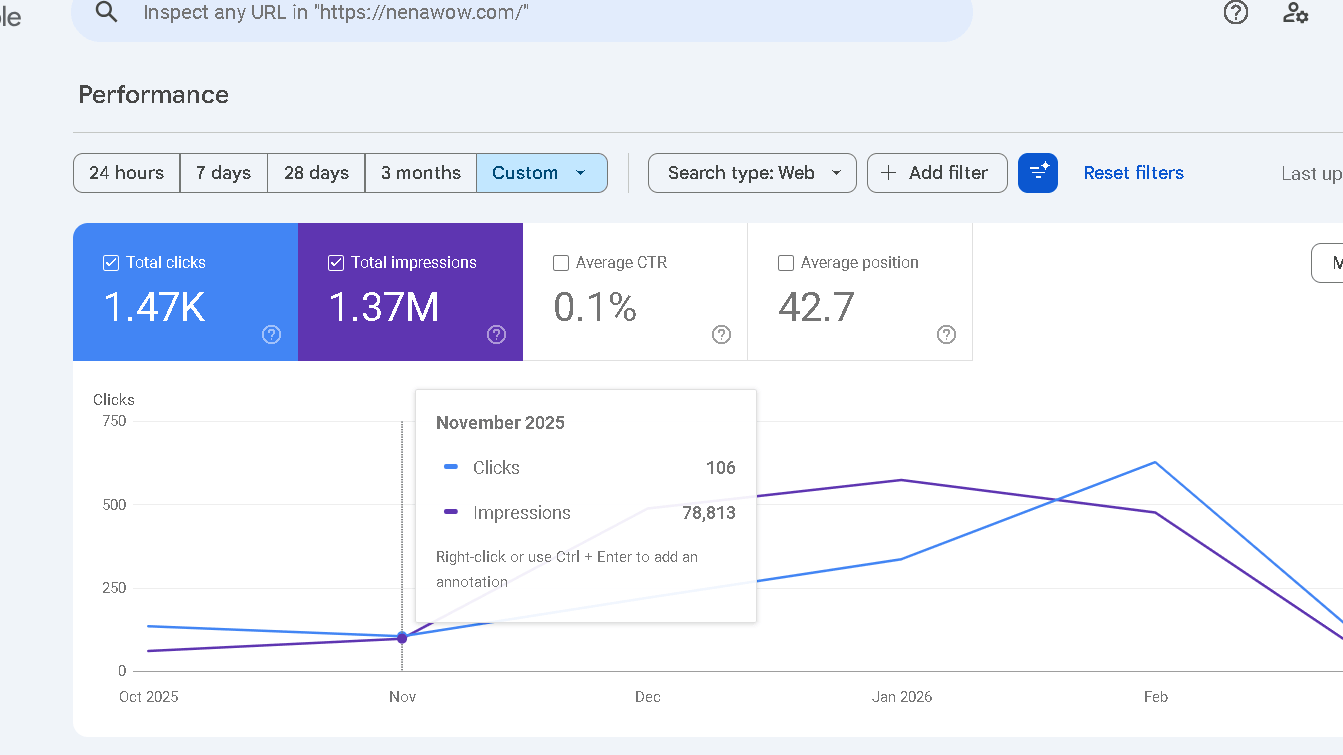
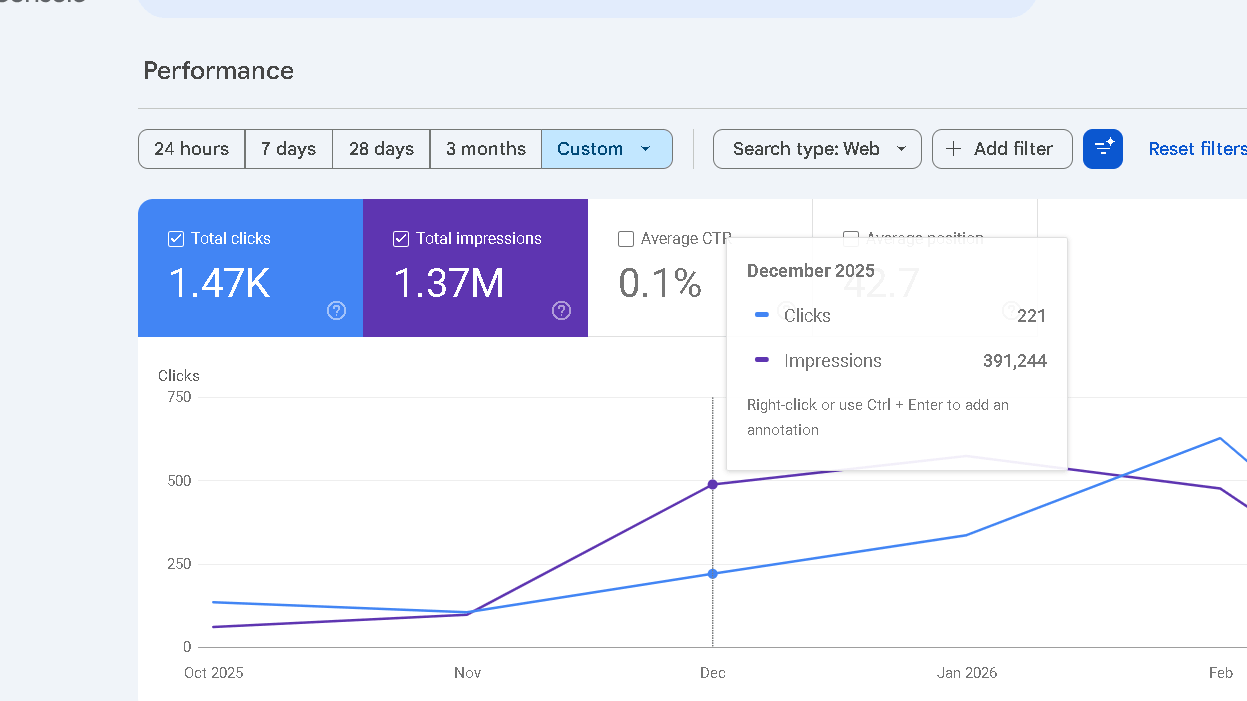
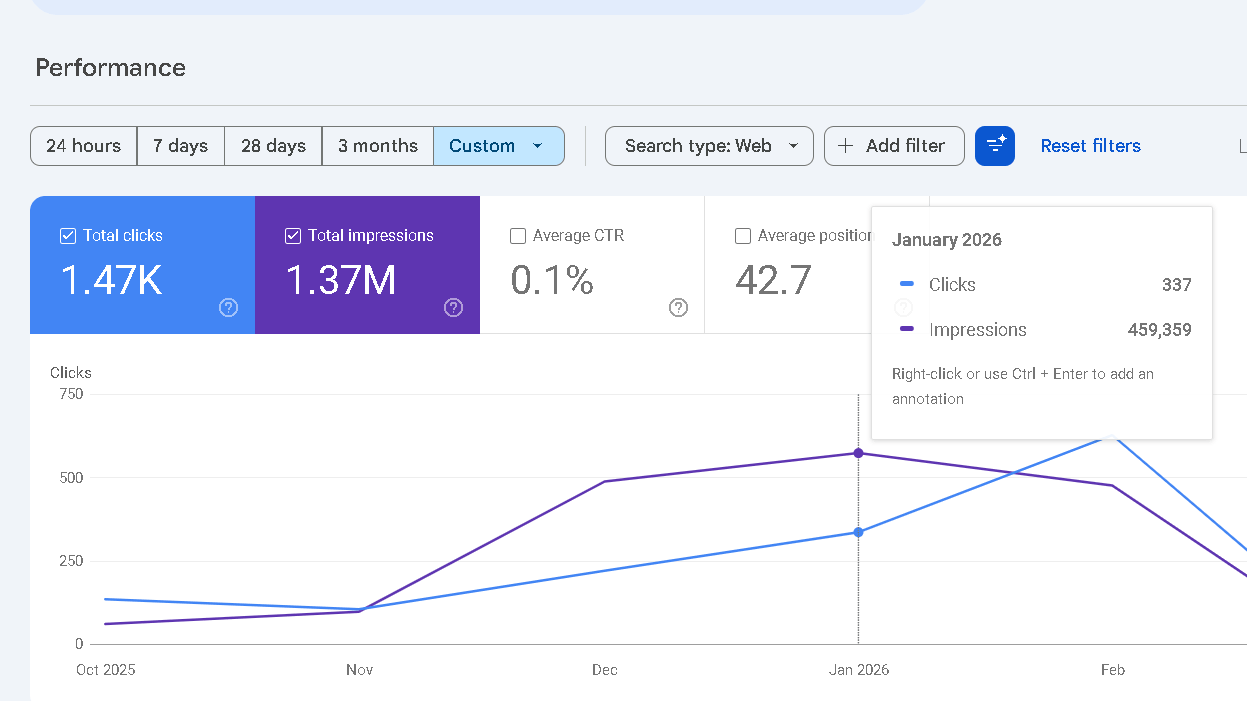
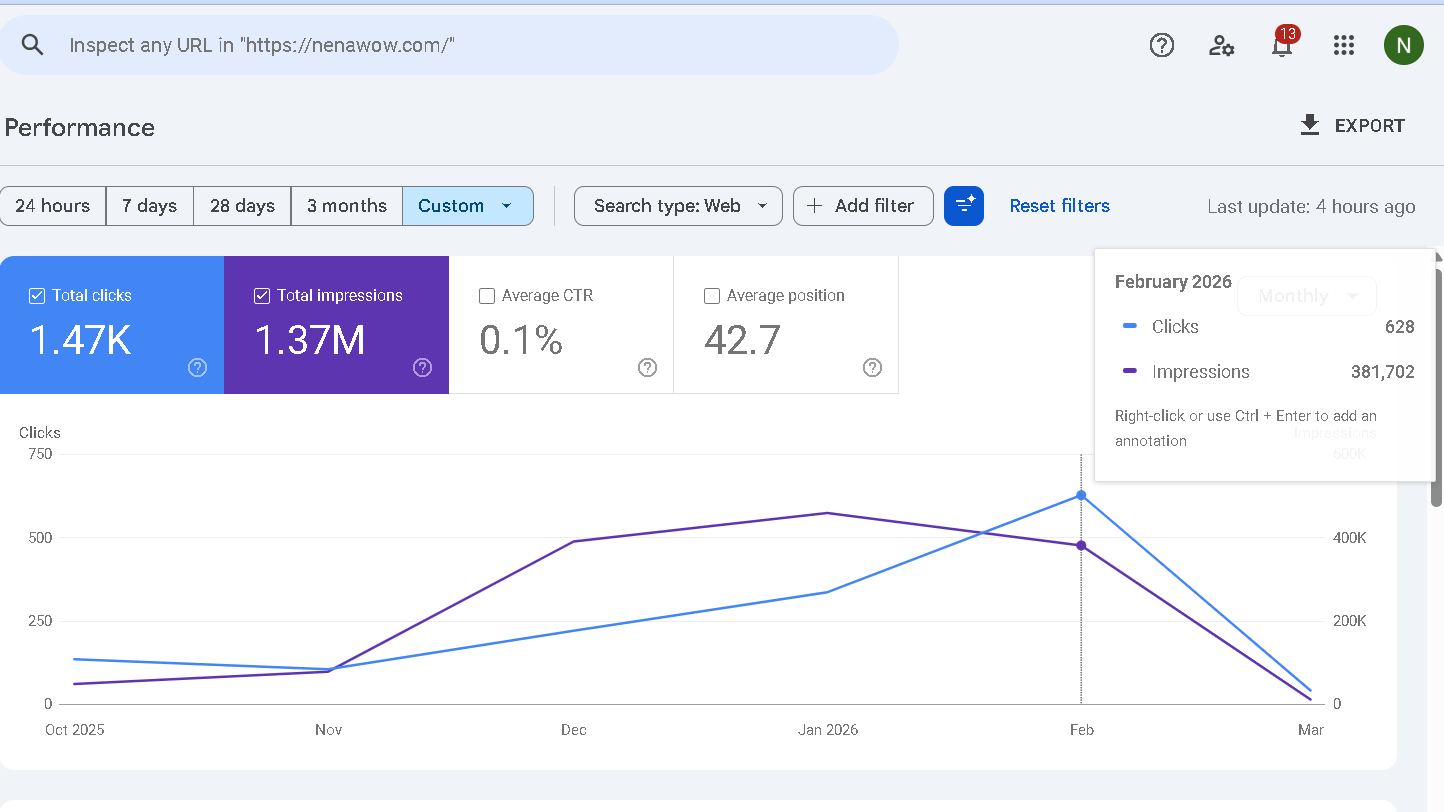
No artificial traffic spikes or paid boosts. Just organic indexing and keywords.
What Worked Well
SEO-wise, Koala AI did best at:
- Structuring headings to match what’s already ranking
- Covering related subtopics
- Producing drafts that didn’t need much structural editing
- Speeding up publishing consistency
The main value here isn’t creativity. It’s efficiency.
Where It Fell Short
But there were some clear downsides:
- High-competition keywords didn’t rank without backlinks
- Some facts needed double-checking
- Brand tone needed more tweaking
- Authority growth still depended on domain strength
Koala AI helped with execution, but it didn’t replace a real strategy.
Real Keywords That Reached Page 1
Here are examples of keywords that reached page one within 4–8 weeks:
| Keyword Type | KD | Position | Time to Rank |
|---|---|---|---|
| Linktree vs AllMyLinks | 6 | #4 | 6 weeks |
| Candy AI free alternative | 12 | #5 | 4 weeks |
| Looksmax ai free alternative | 5 | #5 | 8 weeks |
| Esasaydone ai | 11 | #8 | 5 weeks |
The testing framework used here mirrors the same workflow I typically apply to manual SEO content campaigns
What is Koala AI?
Koala Writer is a specialized SEO content generation platform. This tool helps with content marketing by automating the most tedious parts of drafting. It acts as a specialized AI SEO writer, using real-time search data and SERP analysis to shape content.
This focus on SEO means every draft is tuned to current market trends. It blends large language models with live SERP analysis .
That’s especially useful for long-form content and product descriptions. Efficient content optimization ensures that every piece has a chance to rank.
How does Koala AI work?
Koala AI takes your target keyword and runs it through its algorithm. It checks live SERP data to find subtopics and entities that matter. This provides a structured path for assisted content creation that balances speed with relevance.
Then it uses advanced GPT models to turn that info into a structured blog post. Real-time web research helps keep things accurate and competitive.
Koala AI Features (2026 Breakdown)
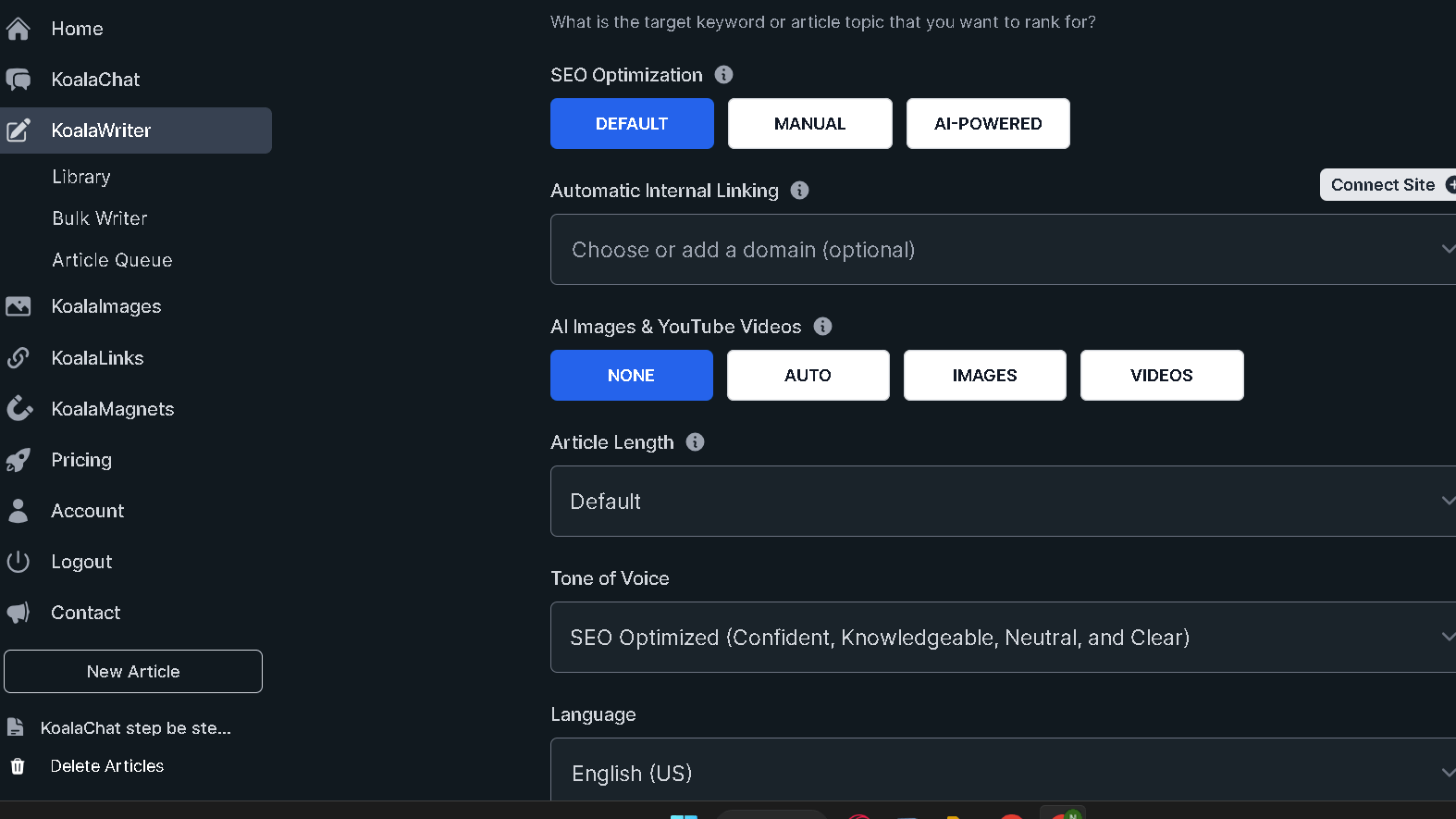
Koala AI comes with tools for SEO content teams and publishers. The main features focus on fast article generation, real-time SERP signals, internal linking, visual assets, and flexible model choices for different workflows.
One-Click SEO Blog Post Generator
KoalaWriter allows you to write a full blog post using only a few keywords or a concise. The user interface was designed to speed up your writing, which means you can move from research to draft with too much effort. It simplifies your process of creating content for those who want to publish regularly.
This generator draws the headings, meta tags and creates an outline for you automatically. It has an outline editor built-in that lets you alter sections prior to when you start your full draft.
This allows you to tweak the flow to improve its efficiency. You can also adjust your tone of voice to be in line with different writing styles.
KoalaWriter creates a well-structured post with suggestions for headings and paragraphs. It’s an excellent AI writing tool that can be used to write long-form writing at a scale.
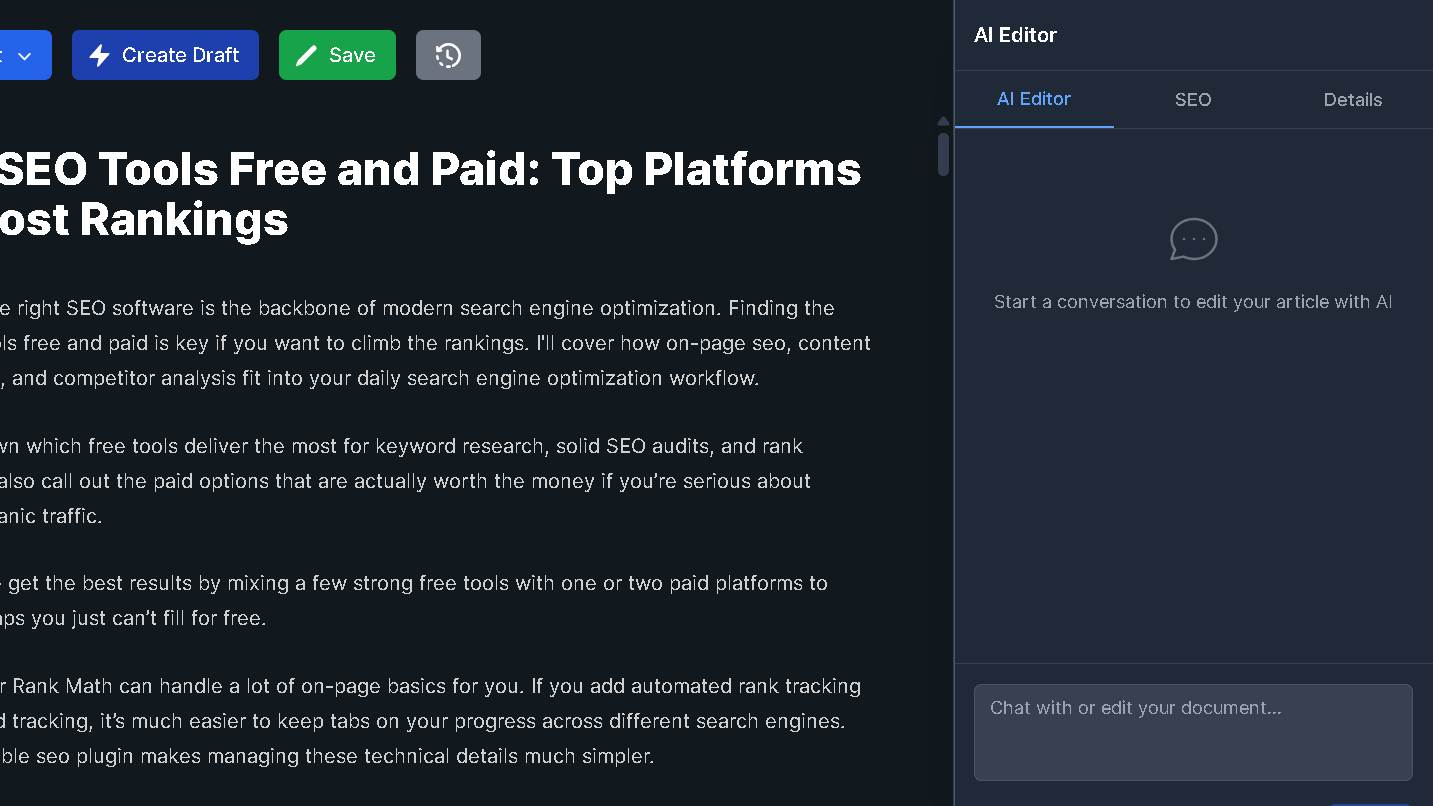
The generator has a range of content templates for listsicles, tutorials, how-tos, and product reviews. It will conduct research and format to make lengthy blog posts much simpler.
You can design a unique custom tone that matches your brand. This level of SEO optimization ensures the content aligns with your target search intent. Drafts generally require an individual touch to ensure precision and nuance, however they can save you a lot of time and effort in the planning process.
Outputs include schema markup as well as internal link suggestions. This makes publishing faster. If you’re using WordPress it is possible to push drafts onto your site in just one click.
You can also export your data to Webflow and make use of Webflow’s Google Sheets integration or create a custom webhook integration advanced automation. This makes the integration with WordPress even more effective for large-volume sites.
Built-In SEO Analyzer
Koala’s SEO analyzer compares drafts and outline against the most popular pages. It determines relevance and keyword coverage to assist in deep optimization of content.
The tool examines title and meta tags, and recommends modifications to headings. It identifies broken schemas and weak CTAs and thin sections that may hurt rankings.
There is a list of practical solutions with priority levels, for example the addition of LSI terminology or opening up an area. The analyzer will also estimate the level of readability and suggests changing from active or passive voice in order to suit your preferences.
Reports can be exported as checklists so editors can keep track of the changes.
Competitor Entity & SERP Analysis
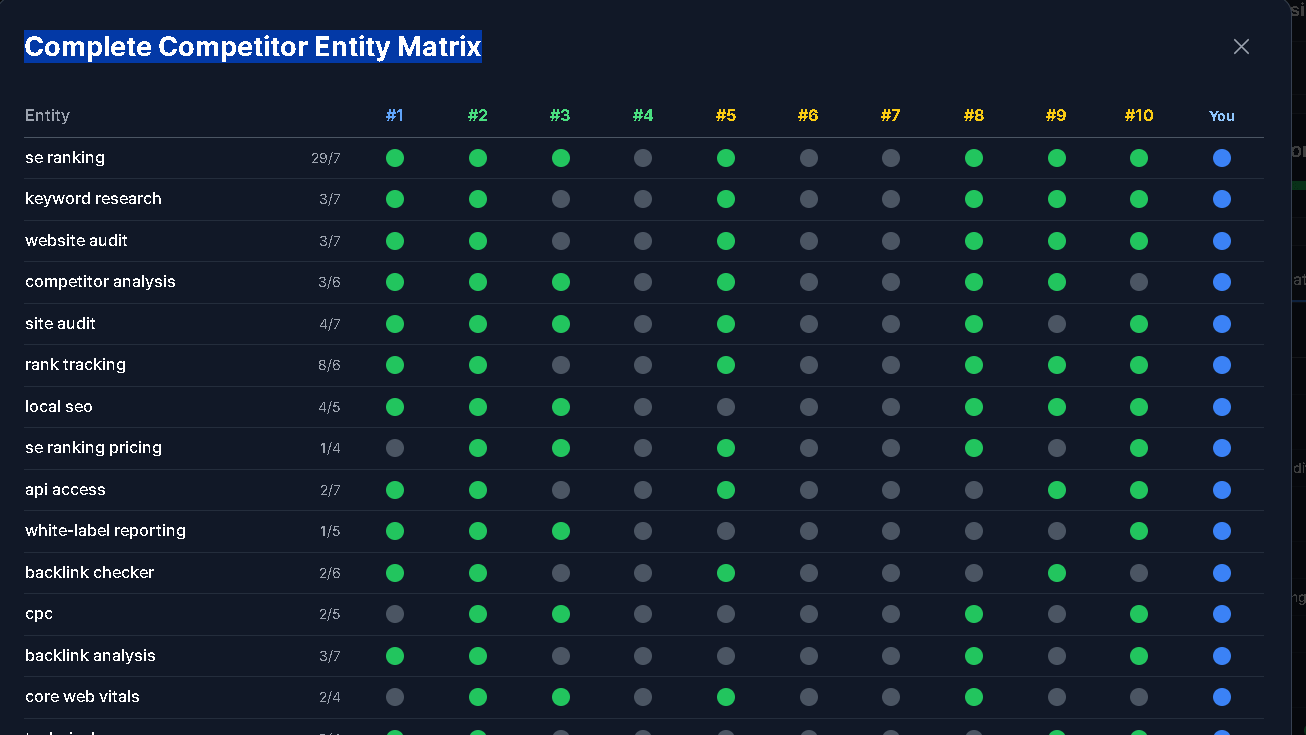
Koala collects real-time SERP information for competitor analysis. It makes use of real-time serp analysis to identify concepts and entities from the top pages in order to aid you in your competition.
It will be apparent which topics or questions and entities are most prominent on the first page. Writers may be able to connect the same semantics as well as keywords.
There’s a comparison of top URLs, popular subtopics and the frequency of phrase. It highlights areas where competitors aren’t able to find the details, and you can focus on those angles.
This analysis is incorporated into outline and briefs, allowing you to create SEO-focused content that includes entities and keywords.
Bulk Content Creation
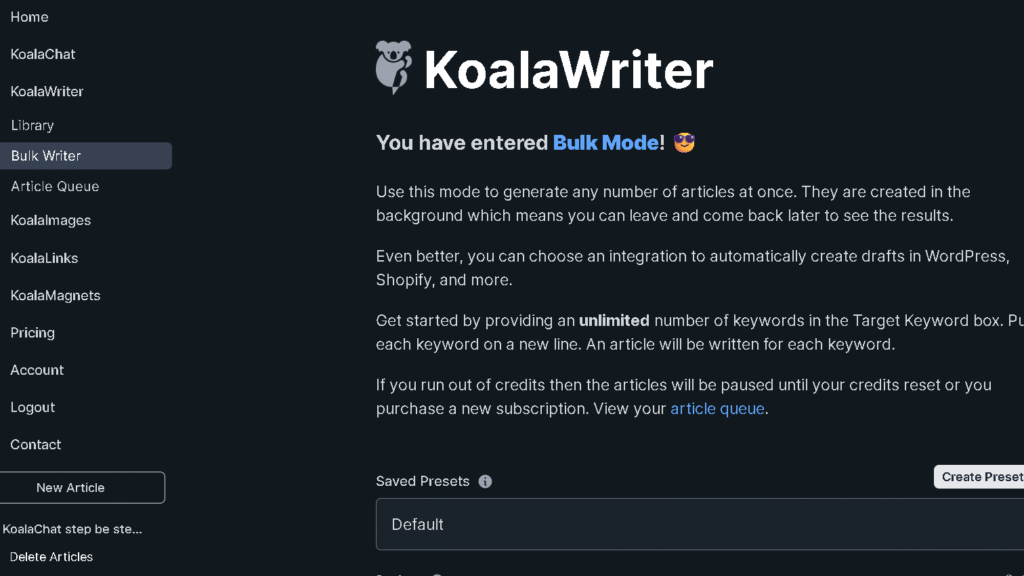
Koala AI’s bulk article creation mode lets publishers create hundreds of SEO-optimized content pieces in one go. Upload a list with keywords or an CSV file to the tool, and it will generate drafts for entire clusters of content.
This is a major time-saver for owners of niche sites who wish to establish authority quickly
Automatic Internal Linking

KoalaLinks automatically suggests internal links in accordance with your site’s contents and relevancy. It crawls your website and imports your sitemap, and recommends anchor texts and the pages that should be targeted for each article.
You can create rules that prioritize cornerstone pages, or adhere to the structure of your website. Links are displayed inline as well as in a table that can be consolidated for rapid approval.
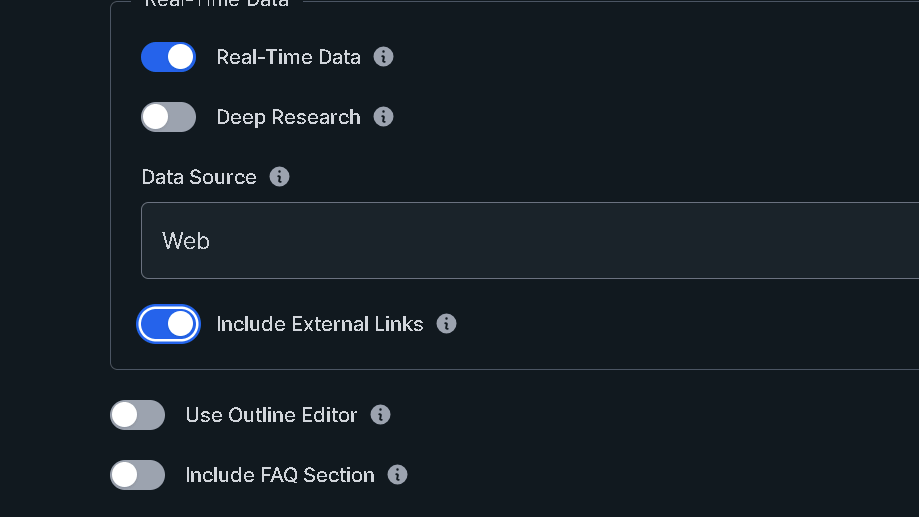
The system also constructs link clusters in order to increase the depth of topics. Owners of websites control the anchor type, nofollow and link frequency to prevent the spread of spammy patterns.
KoalaLinks allows you to scale internal SEO without the need for endless spreadsheets.
Amazon Product Roundups (ASIN Feature)
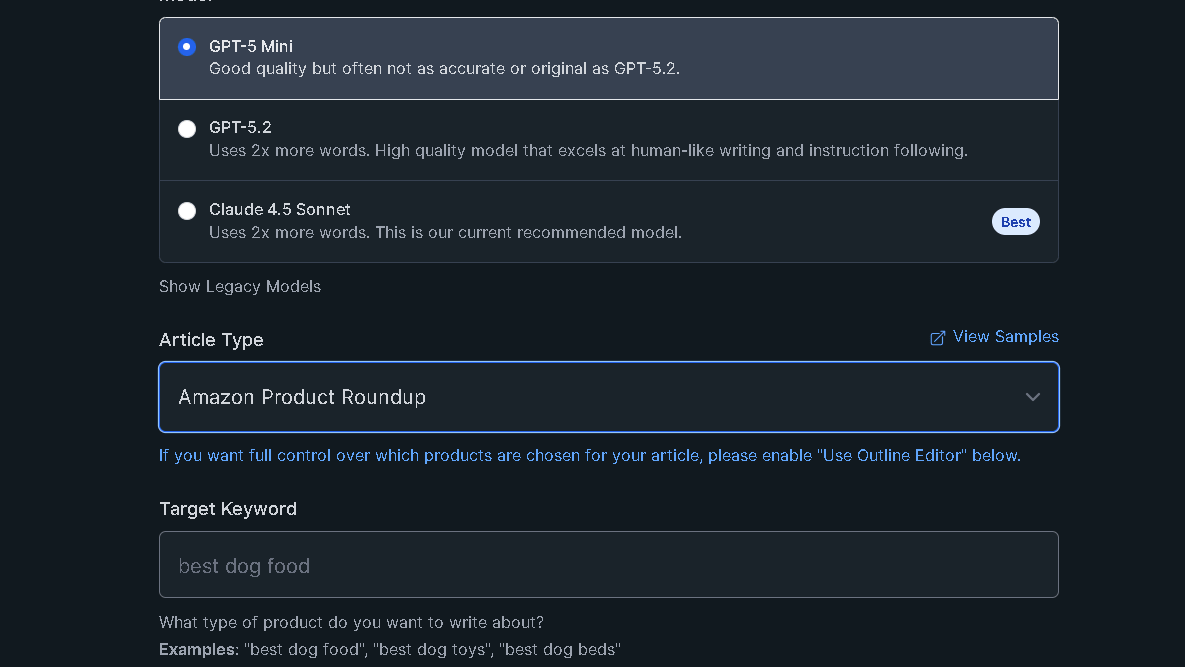
The ASIN feature utilises live Amazon data to provide an amazon product review or product roundups. This makes affiliate marketing much more efficient for niche site owners. It also handles comparisons between products effectively. For affiliate marketers it will pull up product names price, ratings as well as the most important specs.
It produces comparison tables, pros and cons, along with affiliate-ready text. You can select which fields you would like to include, and include your own commentary.
The output contains schemas for review and product excerpts, increasing the chances of obtaining high-quality results.
Real-Time Data & Web Research
Koala’s live-streamed research pulls up the most recent SERP snapshots, news, and indexes to aid in writing. Koala’s platform provides sources and adds an overview of your research to your writing.
This keeps the content up-to-date and prevents outdated examples. Research methods include trends checks, fact checking and monitoring of competitors.
You can block sources lists in order to prioritize trusted domains. The system will time stamp the results to let editors know when the data was last reviewed.
GPT AI Models Options (GPT-4 / Latest OpenAI Models)
Koala supports a variety of GPT models that include GPT-4 and GPT-4o. GPT-4 Turbo and GPT-3.5 to speed up and reduce the cost of writing. GPT-3.5 using GPT-3.5 is an effective method to manage large-volume content while keeping a tight budget.
There are models such as Claude 3 for creative needs. Models are selected by users based on the speed, cost or the quality.
The platform identifies the strengths of each model, including concise outlines and long-form expansions, as well as innovative hooks. The models can be mixed outline with a quick one, then expand using an improved one, and expand with a more expensive.
The billing process reflects the model you choose which means that costs remain steady.
If you’d like to create your own tools API access is available to incorporate Koala into your own apps.
KoalaChat and KoalaImages
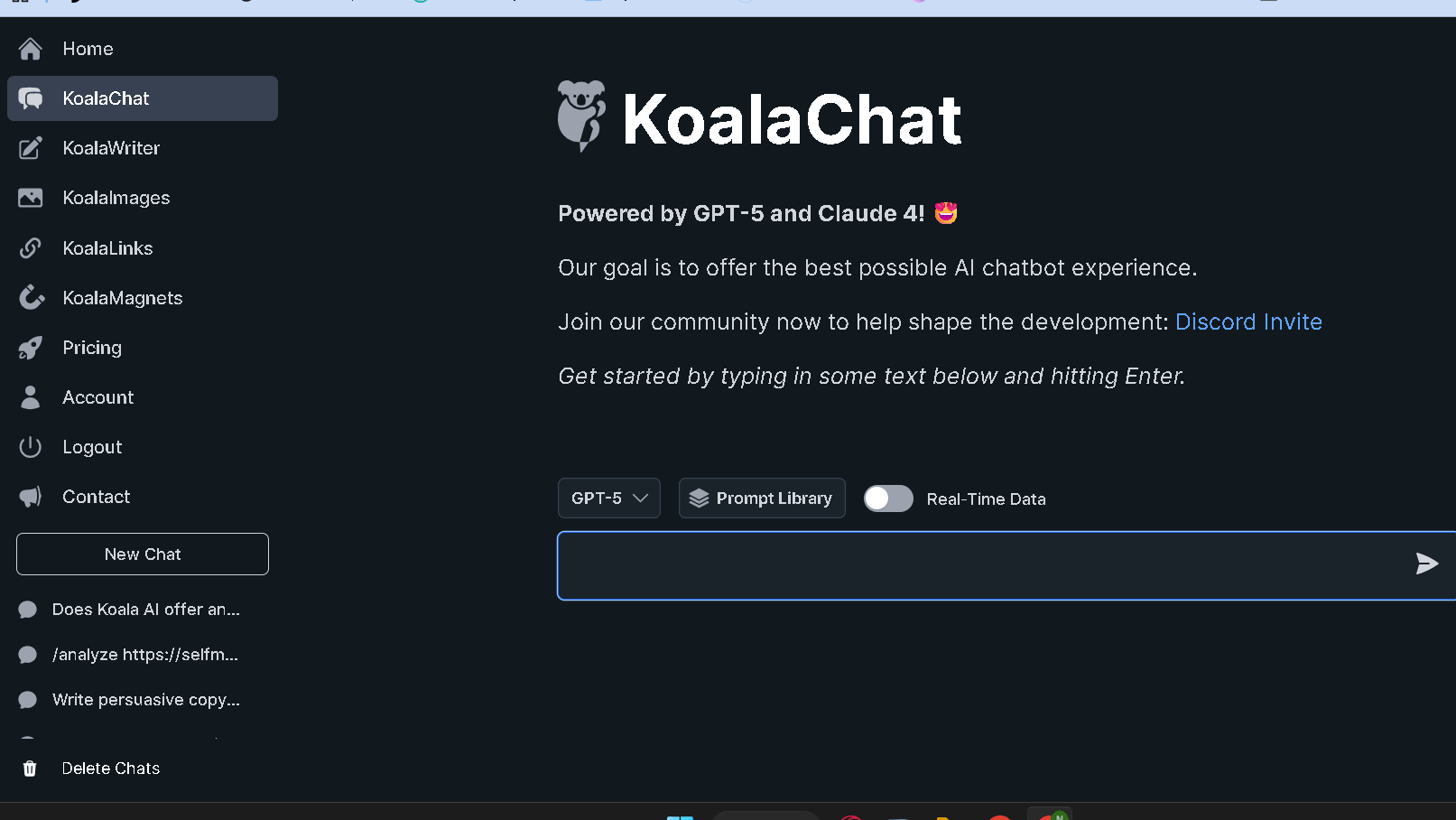
KoalaChat is a SEO-savvy editor as well as a research assistant. Teams request it to write outline, briefs or fast editing.
This chatbot is based on SEO guidelines and will create meta descriptions and social media content from your document.
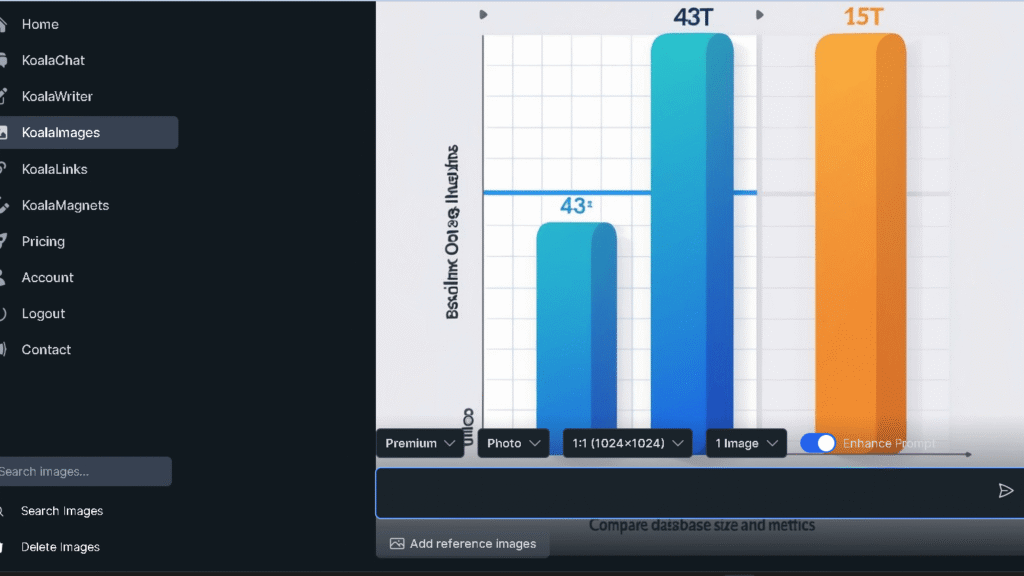
Koala Images offers image generation with brand-aligned style for blog posts. It functions as an integral AI picture generator. It can support a variety of AI image models as well as custom style presets.
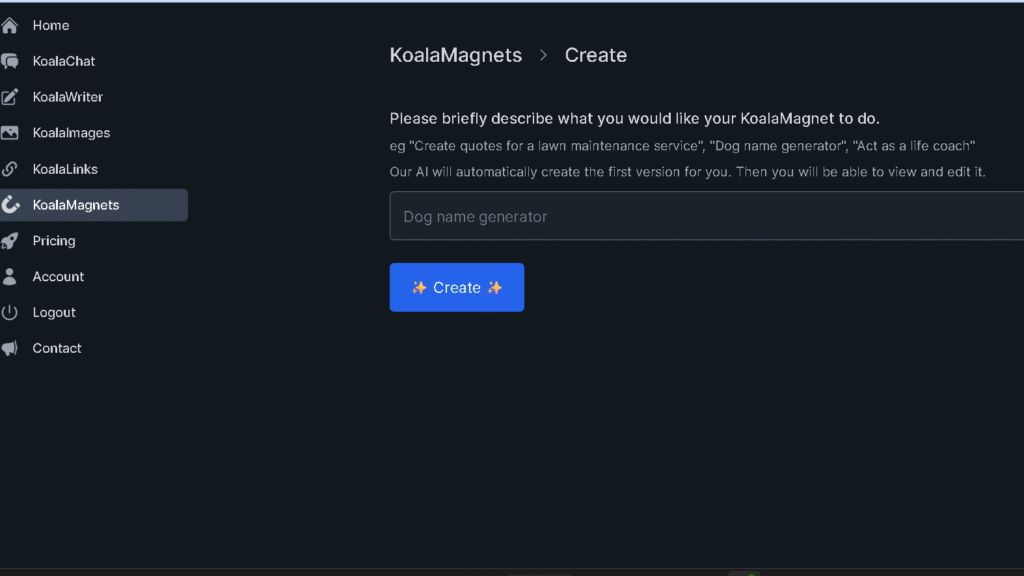
Images can be embedded during creation and export them using alt-text suggestions for improved accessibility and search engine optimization. Tools such as KoalaMagnets can convert your drafts in lead magnets.
Does Koala Writer Content Rank on Google?
Yes. Koala AI content can rank in Google, especially for low to medium competition keywords. In hands-on testing, well-optimized articles made with Koala AI got indexed fast and ranked competitively when combined with solid keyword research, internal linking, and basic on-page SEO.
Koala AI vs ChatGPT: Which Is Better for SEO?
For structured SEO blog content, Koala AI usually gets you there faster than ChatGPT right out of the gate. Koala’s built for long-form, SERP-aligned articles, while ChatGPT needs more prompting and outlining if you want something SEO-ready.
Just a quick reality check: neither tool will magically rank your site. Keyword research, backlinks, and domain authority still make a bigger impact than whatever writing tool you use.
Koala AI Pricing Plans (Is It Worth the Cost?)
Koala AI offers a few pricing tiers for different needs. The entry plan starts at $9/mo for beginners. There is also a professional plan for heavier users who need more volume.
| Plan | Price | Words/Month | Chats/Month |
| Essentials | $9 | 10,000 | 250 |
| Professional | $49 | 100,000 | 1,000 |
| Boost | $99 | 250,000 | 2,500 |
| Growth | $179 | 500,000 | 5,000 |
| Elite | $350 | 1,000,000 | 10,000 |
If you’re producing tons of content, you can go for a Scale III or higher plan. Run out of monthly credits? You can just buy more with credit packs instead of upgrading.
There’s a free trial. The Free trial offers 5,000 words to test things. Positive user reviews often highlight this as a great way to check this platform before dropping any cash.
The plans work on a credit or word-count system. If you use GPT-4 or newer models, you’ll get fewer words per credit since the fancier models eat up credits faster.
Honestly, it helps to think in terms of cost per article. The $9 plan works for a few short blog posts, but if you’re doing long-form or using GPT-4, you’ll probably burn through credits and need a mid-tier plan.
Koala Writer Review of Pros and Cons
✅ What I Like
- Cranks out long-form, SEO-focused drafts fast.
- Pulls real-time SERP data to suggest topics and headings that match what people are searching for.
- Makes it easier to hit target keywords without digging through research yourself.
- The editor and outline tools are actually helpful for scaling up content.
- Templates for blogs, product pages, and video scripts make workflows quicker.
- Customer support gets back to you fast if you hit a snag.
❌ Where It Falls Short
- AI output still needs a human editor for accuracy and voice.
- Can not replace human writer.
- Can miss niche expertise and get facts wrong on specialized topics.
- Even with real-time SERP features, there’s no guarantee you’ll rank.
- Your results depend on site authority, backlinks, and overall SEO strategy. Koala can’t fix those for you.
Who Should Use KoalaWriter (And Who Shouldn’t)
Koala AI works best for teams that need SEO-focused drafts in a hurry. Content creators and niche site builders will appreciate the keyword-driven workflow and quick article generation.
If you’re running a data-driven content strategy or juggling multiple sites, Koala fits right in. Small SEO agencies, content marketers, and solo consultants can use it for high-volume work.
The WordPress integration makes big content projects less painful. It’s handy for audits, briefs, and getting drafts out the door. Still, you’ll want a human editor to check for accuracy and keep your brand voice on point.
Brands that rely on storytelling, strong tone, or legal accuracy should be cautious. Koala can outline and provide facts, but it won’t nail your brand’s nuance and sometimes the phrasing just feels off.
If your site covers medical, legal, or financial topics, don’t publish Koala drafts without expert review. The tool pulls in SEO signals, but it can’t replace real subject-matter expertise or legal checks.
Writers who want total creative control might find Koala restrictive. It leans hard into SEO structure and sometimes feels formulaic. But if your main goal is ranking and traffic, it’s a solid option—just pair it with editing and strategy.
Koala AI Alternatives
Let us take a look at some alternatives of Koala AI Writer.
| Feature | Koala AI | ChatGPT | Jasper | Copy.ai | NeuronWriter |
|---|---|---|---|---|---|
| Primary Focus | SEO-first long-form | Flexible writing | Marketing copy | Sales/Content | Optimization |
| SEO Data | Real-time signals | None (built-in) | Limited | Limited | Deep SERP analysis |
| Drafting Speed | High (structured) | Fastest (raw text) | Fastest (raw text) | High (templates) | Manual/Assisted |
| Key Strength | Publishing workflow | Brainstorming | Brand voice control | Workflow automations | Semantic guidance |
Lots of teams pair KoalaWriter with an optimizer like Surfer SEO or NeuronWriter. That combo gets you solid writing plus precise SEO signals.
Common Mistakes When Using Koala AI
- Publishing Raw Drafts: People sometimes skip editing, so repetitive phrases and factual gaps slip through and hurt reader trust.
- Ignoring Search Intent: Writing just for keywords, not real user questions, keeps you out of AI overviews and hurts visibility.
- Scattered Content: Thin, unrelated posts instead of focused topic clusters slow down your ranking and authority growth.
- Unmonitored Internal Linking: Leaning only on AI for links sometimes creates forced or weird site structures.
- Poor Model Management: Using defaults or picking the cheapest model can mean inconsistent quality and surprise credit costs.
- Skipping Quality Control: Not fact-checking or tuning your brand voice makes content less useful and riskier for SEO.
Final Verdict: Is Koala Writer Worth It Long-Term?
I’ve used Koala AI pretty regularly , and honestly, it’s not some “magic ranking button.” What it does, and does well, is cut out the slowest part of SEO: drafting structured, SERP-aligned content.
It’s got a solid set of features for long-form content, plus professional API access if you’re more technical. For most affiliate site builders, the real question isn’t whether it’s perfect. It’s whether it saves time and keeps you competitive. In my experience, it does.
Disclaimer : Transparency is something I firmly believe in. I might receive a tiny commission if you use the links on this website to make a purchase without charging you anything extra. This enables me to continue writing frank reviews.
Still have questions about Koala AI? Here are the most common ones bloggers ask before trying it
Frequently Asked Questions About Koala Writer
Is Koala AI good for SEO?
Yes. Koala AI was built with SEO-focused blog content in mind. It generates structured, SERP-aligned articles that work well for ranking low to medium competition keywords.
Of course, rankings still depend on keyword research, backlinks, and your domain authority.
Can Koala Writer content rank on Google?
Yes, Koala AI content can rank if you pair it with solid keyword research and a bit of editing. In practice, articles made with Koala AI showed up in Google pretty quickly and did well for less competitive search terms.
High-competition niches still need strong authority and backlinks, though. No shortcuts there.
Is KoalaWriter detectable by AI detection tools?
Yes — sometimes Koala AI content gets flagged by tools like Originality.ai, especially if you publish it as-is. Detection results jump around depending on the tool.
Usually, a few human edits help smooth out the obvious patterns.
Is Koala AI worth it in 2026?
In 2026, Koala AI still works well for content scaling and affiliate SEO. It can’t really take over your strategy or build backlinks for you.
But if you’re looking to save time on drafting, it’s honestly a big help. The tool keeps your content lined up with search intent, which is pretty important these days.