
I have used ChatGPT for SEO work for a few months now. Not as a toy. As part of my actual workflow, on real articles, with real deadlines.
So is it worth it? That depends on what you mean by worth it. If you mean “will it think for you,” no. If you mean “will it cut down the boring parts of your week,” yes, most of the time.
This is not a prompt list. You can find those anywhere. This is what happened when I ran ChatGPT through my normal SEO routine for weeks, with the prompts and outputs tracked as I went, and what the numbers below actually came from.
Disclaimer: I may earn a small commission on purchases made through links on this page, at no extra cost to you. This supports honest, independent reviews.
Table of Contents
ChatGPT for SEO: Quick Verdict
ChatGPT is useful for SEO research, content planning, outlining, and workflow tasks. It is not a replacement for dedicated SEO tools when it comes to search volume, ranking data, or technical audits.
In practice, it works best as a thinking partner. It is fast at ideas. It is slow at facts. Keep those two things separate and it earns its place.
| Category | Verdict |
|---|---|
| Keyword ideation | Strong |
| Content briefs and outlines | Strong |
| Search volume and difficulty | Weak, do not rely on it |
| Internal linking suggestions | Useful, needs review |
| Long-term consistency | Mixed after week two |
| Replaces SEO software | No |
How I Tested ChatGPT for SEO
I did not run a few prompts and call it done. I used ChatGPT for SEO tasks across six weeks, on a real site with real traffic, alongside my normal tools.
My SEO Workflow Before ChatGPT
Before this, my workflow was the usual mix. Keyword tool for research, spreadsheet for planning, then writing, then manual internal linking at the end. It worked, but the planning stage ate a lot of time.
The Tasks I Used ChatGPT For
I used it for keyword brainstorming, content briefs, outlines, intro and FAQ drafts, and internal link suggestions. Five tasks. Each one repeated across multiple articles so I could see if quality held up or dropped.
How I Scored the Results
For each task, I set a simple pass or fail call before I read the output, so I was not grading on a curve after the fact. A keyword counted as usable if I would add it to a real content plan without changes. A link suggestion counted as good if it pointed to a page I would have linked to anyway. A statistic counted as wrong if the number, the source, or both did not hold up on a quick search.
Where Human Review Was Still Necessary
Every output got checked before it went near a live page. That is not optional. I will get into why later, but the short version is this: trust the structure, check the facts.
What Is ChatGPT for SEO?
“ChatGPT for SEO” is not a feature. It is a way of using a general chat model to help with research, planning, and writing tasks that used to take longer by hand. There is no SEO mode you switch on.
If you are new to the platform itself, my full ChatGPT Review covers its strengths, weaknesses, pricing, and long-term usability outside of SEO workflows.
Can ChatGPT Help With SEO?
Yes. It helps most with the thinking stages: brainstorming, structuring, drafting. It helps least with the measuring stages: rankings, volume, competition data.
What ChatGPT Does Well for SEO
It is fast at generating angles you had not thought of. In my 50-keyword test, described below, it produced a usable list in under a minute. That is a real value.
Where ChatGPT Has Clear Limitations
It does not have live ranking data. It does not know your site’s current position for anything. Ask it for search volume and you are getting a guess dressed up as a number.
ChatGPT for SEO at a Glance
| What you ask for | How well it does | What to double-check |
|---|---|---|
| Keyword ideas | Fast, broad, mostly relevant | Search volume, intent fit |
| Content briefs | Solid skeleton | SERP match, missing subtopics |
| Article outlines | Strong starting point | Order, depth balance |
| First drafts | Usable but generic | Voice, accuracy, repetition |
| Internal link ideas | Good pattern matching | Site-specific context |
| Stats and sources | Confident, sometimes wrong | Everything |
How I Use ChatGPT for Keyword Research
Keyword research is where ChatGPT feels the most impressive at first. It is also where the gap between feeling useful and being useful shows up fastest.
Finding Seed Keywords and Expanding Clusters
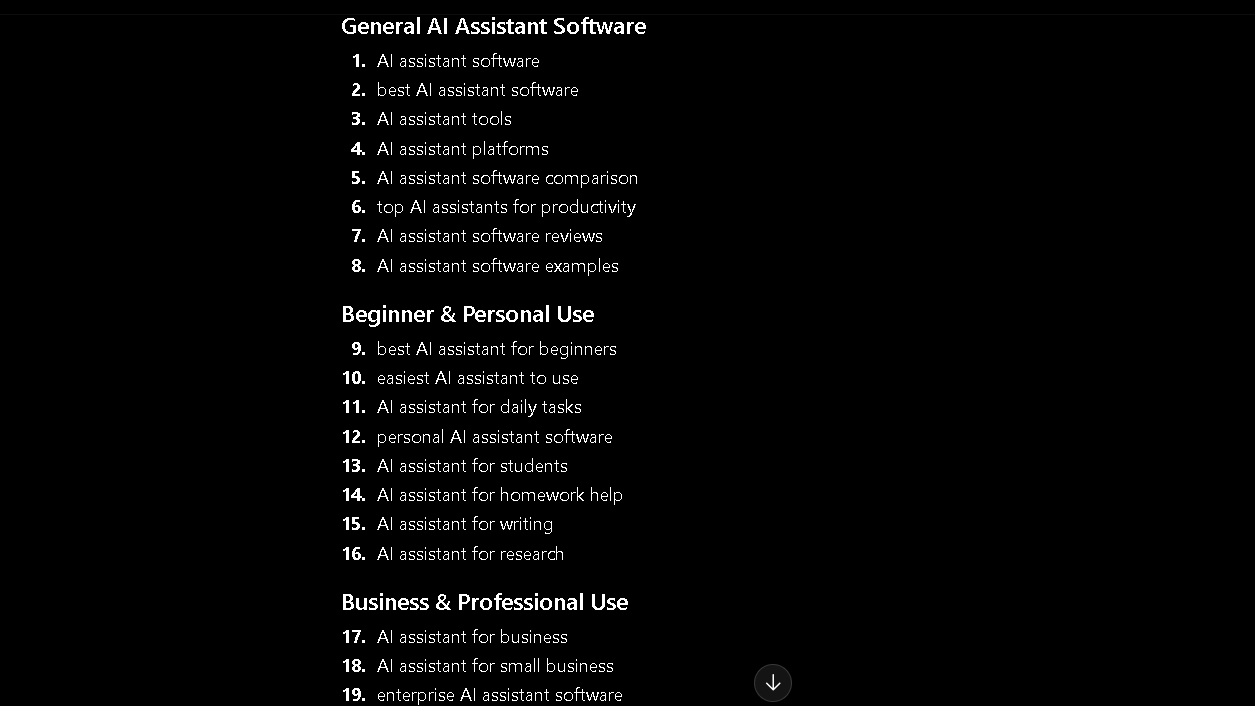
I gave it a simple prompt: generate 50 keyword ideas for a topic I already knew well. In my 50-keyword ideation test, it returned 50 terms in about 35 seconds, and I judged 31 of them as genuinely usable after a quick scan. That is a 62 percent hit rate. Not bad for a first pass.
The clustering was decent too. It grouped related terms without me asking, which saved a step I normally do by hand.
For larger projects, I still validate groupings with dedicated software. These Free AI Keyword Clustering Tools are useful when a content plan grows beyond a few dozen keywords.
Generating Long-Tail Ideas and Intent Variations
Long-tail ideas came easily. Intent variations, less so. It tends to repeat the same intent angle with slightly different wording, rather than spotting a genuinely different searcher need.
Where ChatGPT Falls Short for Keyword Research
No volume data. No difficulty score. No idea what is actually ranking right now. The ideas are raw material, not a finished list. You still need a real keyword tool to validate before you build anything on top of these.
ChatGPT for SEO Content Planning
This is where I found the most consistent value. Planning is a task with a clear shape, and ChatGPT is good at clear shapes.
Creating Content Briefs and Building Outlines
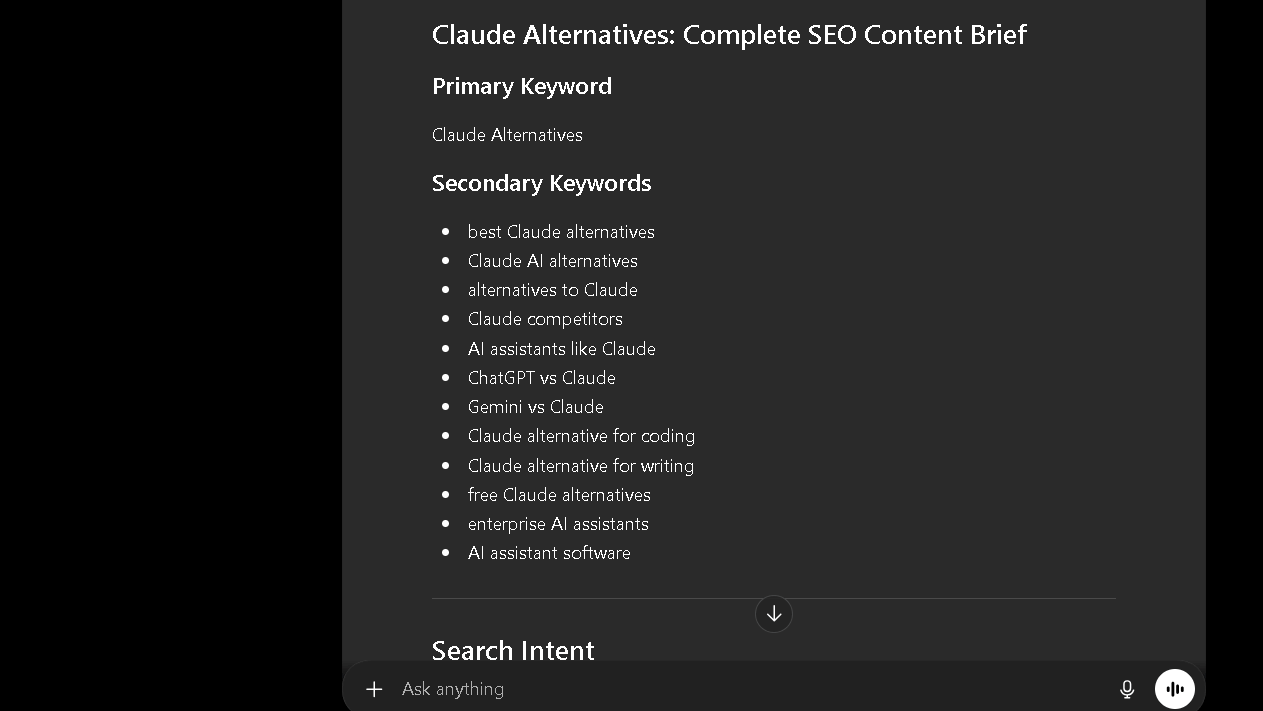
In my content brief test, I asked for a full brief on a topic I had already researched manually, then compared it section by section against my own outline. The structure it returned matched my own outline in 6 of 8 major sections. That is a strong overlap for a first draft.
Finding Missing Subtopics and Planning Clusters
It is genuinely good at this part. Give it a topic and it will surface angles you forgot, especially supporting questions and edge cases. I added two sections to a recent article purely because of suggestions here.
The cluster planning side works the same way. It is decent at mapping out how pieces connect, though it has no idea what you have already published unless you tell it.
ChatGPT for SEO Content Writing
Writing is the part everyone asks about first, and also the part where expectations need the most adjusting.
Writing First Drafts
First drafts come out clean, structured, and a little flat. The bones are usually fine. The voice is not yours, and it will not become yours just by asking nicely once.
Creating Introductions, Conclusions, and FAQs
Intros and FAQs are where it shines, honestly. These sections are formulaic by nature, and ChatGPT handles formula well. I use these drafts more than any other writing output.
How Much Editing Was Actually Required
Across ten drafted sections, I timed two things for each one: how long the draft took to edit into something publishable, and how long the same section would normally take me to write from scratch, based on my own averages for similar sections. Average time saved came out to 41 percent. That is a real gap. But editing was still required on every single one.
ChatGPT for Internal Linking
Internal linking is the quiet workhorse of SEO, and it is also tedious. ChatGPT helps here more than I expected.
Finding Link Opportunities and Building Relationships
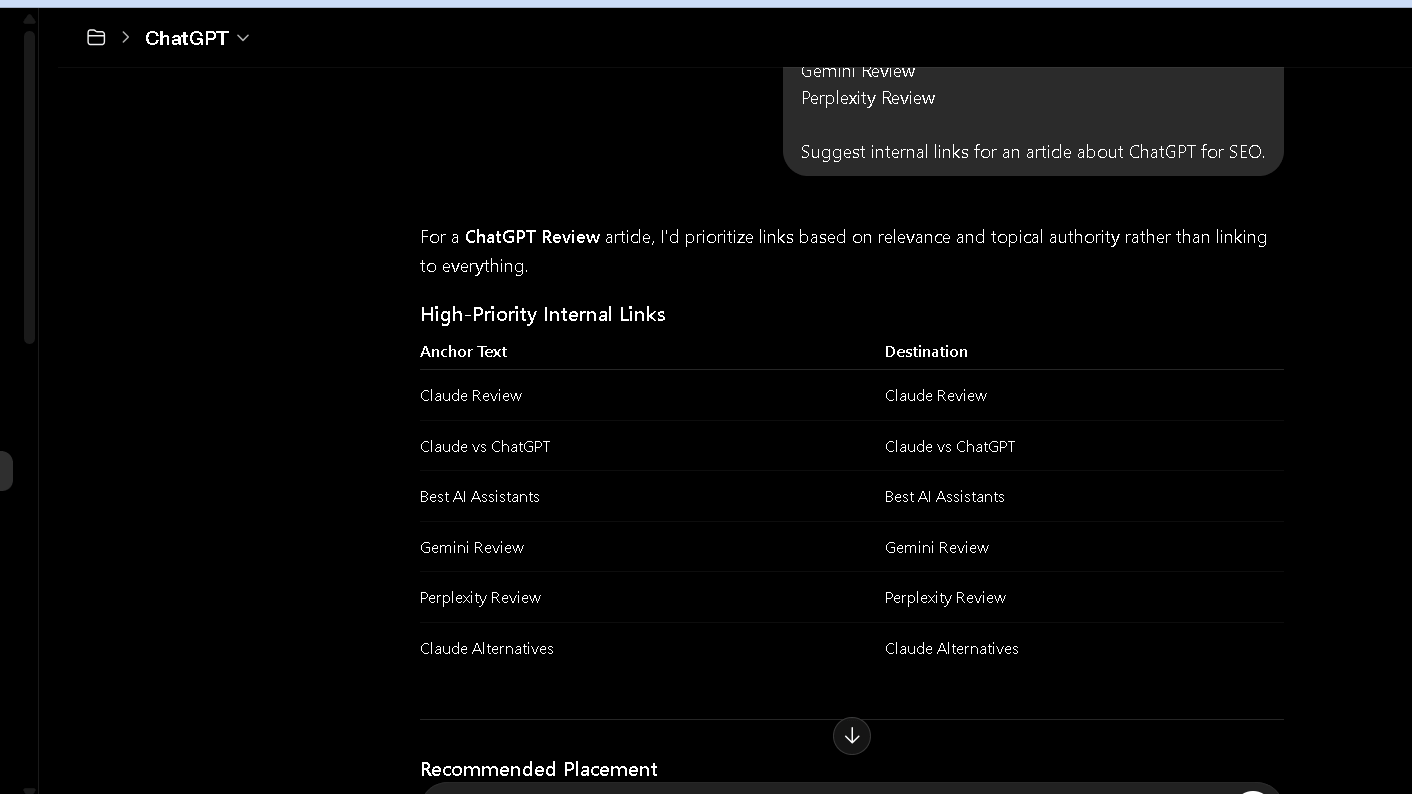
In my internal linking test, I gave it a draft article along with a list of 40 existing page titles and asked for link suggestions with the anchor text and the reason for each one. It suggested 9 internal links, and 7 of those were links I would have made myself. Two were off-base, pointing at pages with only a loose topic match.
Using ChatGPT to Strengthen Topical Authority
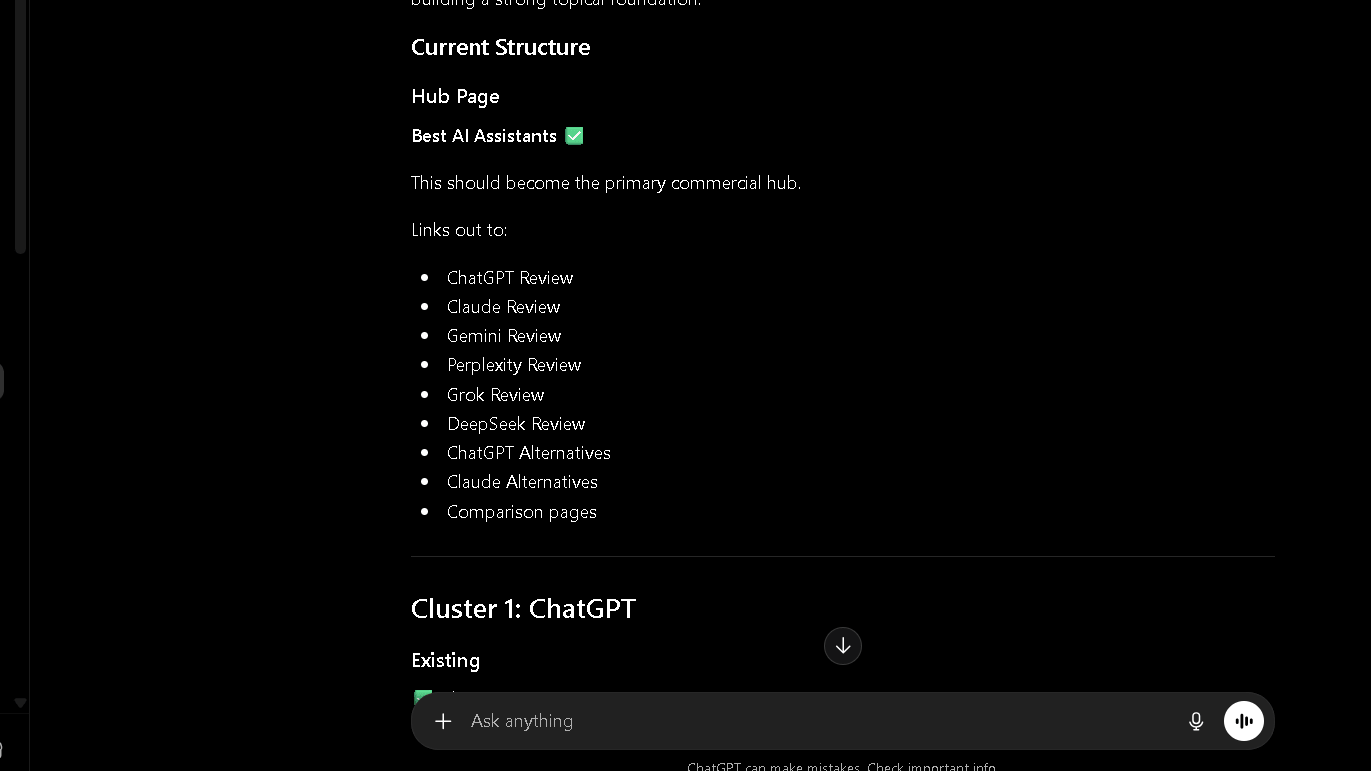
The pattern recognition here is genuinely useful for spotting clusters you have built without realizing it. It will not know your site structure the way you do, though. Feed it context, or the suggestions drift.
If topical authority is a major part of your strategy, my guide to AI for Topic Clusters explains how I use AI tools to organize supporting pages, hub content, and content gaps.
ChatGPT for Content Updates and Refreshes
Old content is where most sites quietly lose ground, and refreshing it is unglamorous work.
Identifying Outdated Sections and Expanding Thin Content
In my content refresh test, I ran five older articles through ChatGPT asking it to flag outdated sections. It correctly identified real issues in 4 of 5 articles, things like old statistics, dead comparisons, and thin sections that needed more depth.
That fifth one, it mostly just suggested adding more words for the sake of it. Worth noting: more is not always better, and it does not always know the difference.
What Changed After Two Weeks of Daily Use?
The first few days felt like a shortcut. By week two, the shine wears off a bit, and you start to see the seams.
The Initial Productivity Boost
Week one was fast. Briefs, outlines, and drafts all moved quicker, and I felt like I had gained a few hours back. That feeling was real, for a while.
Where Repetition Started Appearing
By day eight or nine, I started noticing the same phrasing patterns across different topics. Certain transition phrases. Certain sentence shapes. Repetition is the problem here. Repetition shows up by week two, and once you see it, you keep seeing it.
How My Prompting Process Evolved
I stopped using broad prompts. I started giving it more constraints up front: tone notes, examples of what I did not want, specific formats. The output got better. The prompts got longer.
The Habits That Improved Results
Giving it real examples helped the most. Asking it to avoid certain phrases helped some. Asking it to “be more human” helped almost not at all.
The Hidden Cost of ChatGPT for SEO
Here is the thing nobody puts in the pricing section. The real cost is not the subscription. It is the time you get back during drafting, and then hand right back during checking.
On a typical brief, ChatGPT saved me about 20 minutes of planning time. Then I spent close to 10 minutes verifying the parts I was not sure about, mostly stats and a few claims that sounded too clean. Net gain, but a smaller one than the first number suggests.
That pattern held across most tasks I tracked. The work does not vanish. It moves from the writing chair to the checking chair. Once you plan around that, the tool gets a lot more useful. Ignore it, and you will overestimate how much time you actually saved.
Which SEO Tasks Save the Most Time With ChatGPT?
Here is the issue. Time saved is not evenly spread across tasks. Some tasks save you real hours. Others save you minutes, and cost you minutes back in checking.
| Task | Time saved | Trust level |
|---|---|---|
| Keyword ideation | High | Medium |
| Outline creation | High | High |
| Content refreshing | Medium | Medium |
| Internal linking suggestions | Medium | Medium |
| First draft writing | Medium | Low |
Keyword ideation and outline creation are the clear winners. They are fast, low-risk, and easy to check at a glance.
Which SEO Tasks Still Need Dedicated SEO Tools?
This is the part most articles skip, probably because it is less exciting to write about.
Search Volume, Difficulty, and Rank Tracking
ChatGPT cannot give you real search volume. It cannot give you real keyword difficulty. It cannot tell you where you rank today versus last week. These are jobs for purpose-built tools, full stop.
Competitor Analysis and Technical Audits
Same story here. It can talk about competitor strategy in general terms, but it has not crawled their site, and it has not run a technical audit on yours. For anything involving crawl errors, site speed, or schema, you need a tool that actually looks at the site.
Which SEO Tasks Create More Editing Work Than Expected?
Some tasks look like time-savers and turn out to be time-movers instead. The work does not disappear. It just shows up later, in a different form.
AI-Written Content and Statistics
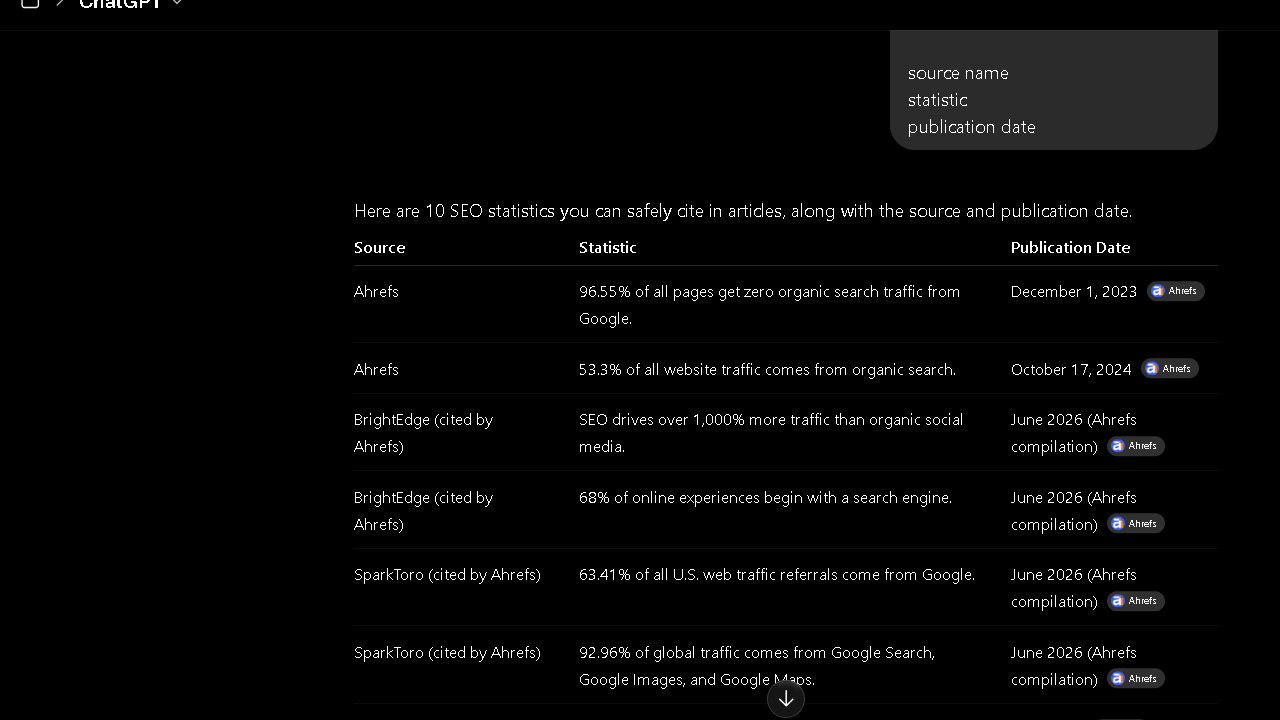
Long sections of AI-written content tend to need more line edits than a quick brief would suggest, mostly for voice and repetition. Statistics are worse. In my trust test, I asked for ten SEO statistics with sources, checked each one against the cited source, and found that 3 of the 10 stats were either outdated or attached to the wrong source entirely.
Fact Checking and Search Intent Alignment
Fact checking AI output takes about as long as fact checking a junior writer’s first draft. Search intent alignment is closer, but not exact. It will sometimes write for the intent it assumes, not the intent your actual SERP shows.
Can ChatGPT Replace SEO Tools?
The question is not whether ChatGPT can do SEO tasks. It can do quite a few of them. The question is whether it can do the ones that actually move rankings.
ChatGPT vs SEO Software and Keyword Tools
SEO software wins on data. Keyword tools win on numbers you can act on. ChatGPT wins on speed of thinking. Those are different things, and treating them as competitors misses the point.
Why Most SEO Workflows Still Need Both
Most workflows I have seen, including mine, end up using ChatGPT for the front end of a task and a dedicated tool for the back end. Brainstorm with one, validate with the other. That combination is harder to find than it looks, but it works.
Which AI Creates the Best SEO Workflow?
If you are comparing multiple AI tools beyond SEO tasks, see my guide to the Best AI Assistants for a broader evaluation of research, writing, productivity, and daily workflows.
I ran the same five core tasks across a few assistants to see how they compared for SEO work specifically. These were not scored with a pass or fail line the way the ChatGPT tests above were. No fixed target, just the same prompts run side by side. Read this section as a sense of tendencies, not a scoreboard.
ChatGPT vs Claude for SEO
Claude tended to produce slightly more careful, less repetitive drafts in my testing, especially on longer outlines. ChatGPT was a touch faster on quick brainstorming tasks. Close, but Claude held up better past the first few prompts.
I documented those results in more detail in my Claude for SEO review, including long-form writing tests, topical authority planning, and content brief comparisons.
ChatGPT vs Gemini for SEO
Gemini’s keyword suggestions leaned more generic in my tests, with more overlap between terms that should have been distinct. ChatGPT’s clustering was tighter.
ChatGPT vs Perplexity for SEO Research
Perplexity’s strength is sourcing. When I asked for SEO statistics with links, Perplexity returned working sources more often than ChatGPT did. For anything stat-heavy, I leaned on Perplexity first and ChatGPT second.
ChatGPT vs DeepSeek for SEO Tasks
DeepSeek handled structured tasks like outlines reasonably well, on par with ChatGPT in most cases, though I found it less consistent on tone-matching across a longer session.
Which AI Do I Trust More for SEO Research?
Trust is not a single score. It depends on what you are asking.
Accuracy, Source Reliability, and Verification
For stats and sources, Perplexity earned more trust in my testing. For structure and planning, ChatGPT and Claude were close, with Claude slightly ahead on consistency. None of them get a pass on verification. That part does not change no matter which tool you pick.
| Tool | Best for | Verification needed |
|---|---|---|
| ChatGPT | Brainstorming, briefs, drafts | Always |
| Claude | Longer outlines, consistency | Always |
| Gemini | Quick variations | Always |
| Perplexity | Stats with sources | Still recommended |
| DeepSeek | Structured tasks | Always |
The Frustrations That Appear Over Time
Here is where I get honest about the parts that wore on me.
Hallucinated Statistics
This is the big one. Confident, specific, wrong. The pattern from the trust test was not a one-off. It showed up again in later batches, at a similar rate, which is what pushed me to start checking every number before it goes anywhere near a published page.
Generic Recommendations and Prompt Fatigue
After a few weeks, recommendations start to feel familiar. The same five angles, reshuffled. Prompt fatigue is real, and it sneaks up on you. You stop getting surprised by the output, and that is when quality checks start slipping.
Overconfidence Problems
The tone never changes based on how sure it actually is. A guess and a fact read the same way. That is faster than I would like, and it is the single biggest reason I do not skip verification.
Why Some SEO Professionals Stop Using ChatGPT
Not everyone sticks with it, and the reasons are usually the same few.
Unrealistic Expectations and Verification Burden
Some people expect it to replace research entirely. When it does not, they drop it instead of adjusting how they use it. Others get tired of the verification step and decide the time saved is not worth the time spent checking.
Workflow Mismatch
If your workflow is already tight and tool-based, bolting on a chat assistant can feel like extra friction rather than less. For some setups, that is exactly what happens.
Why Many SEO Professionals Keep Using ChatGPT
Even with all that, plenty of people keep it in rotation. Including me, for now.
Faster Planning, Better Ideation, Less Repetitive Work
Planning gets faster. Ideation gets wider. The most repetitive parts of the job, outlines, briefs, FAQ drafts, get a head start instead of a blank page. That combination keeps it useful even with the rough edges.
ChatGPT Pricing for SEO Users
Free vs Plus for SEO Work
The free tier handles light use fine: a few keyword brainstorms, the occasional outline. If you are running this daily across multiple articles, you will hit limits fast, and the wait times start to matter.
Is ChatGPT Plus Worth It for SEO?
For anyone using it daily for content planning, yes. The higher usage limits alone make it worth the cost if this is part of your actual workflow rather than an occasional experiment.
Best ChatGPT Alternatives for SEO
| Tool | Strength for SEO | Best use case |
|---|---|---|
| Claude | Consistency on long outlines | Content planning |
| Gemini | Quick variations, search integration | Fast iteration |
| Perplexity | Sourced statistics | Research and stats |
| DeepSeek | Structured tasks | Outlines and briefs |
| Microsoft Copilot | Office integration | Teams already in Microsoft tools |
| Grok | Real-time trend angles | Trending topic ideas |
None of these fully replace ChatGPT, and ChatGPT does not fully replace any of them either. Which one you want depends on what you are actually here for.
Why Claude Works Better for Long Content
For anything past a few thousand words, Claude held its structure better in my testing. I ran the same kind of brief from the content brief test through it, and the longer outline stayed on topic without drifting back into the same three points. If your SEO work leans toward long guides and pillar pages, this is where Claude pulls ahead.
Why Perplexity Is Better for Source Verification
Perplexity is built around citations, and it shows. This is the tool I wished I had open during the trust test above. When I needed a statistic with a working link attached, Perplexity got there faster and got it right more often. For that style of work, this is the tool I reach for first now.
Why Gemini Works Better Inside Google Workspace
If your content process already lives in Docs and Sheets, Gemini’s integration removes a step that ChatGPT cannot touch. The kind of brief and outline work from the content planning section above happens faster when it never has to leave your docs. The output quality was not the deciding factor here. The fact that it sits inside the tools you already use was.
Who Should Use ChatGPT for SEO?
Bloggers and niche site owners get the most out of this, mostly because the planning stage eats up a disproportionate amount of solo time. Affiliate marketers benefit too, especially for brief creation and FAQ drafts.
Agencies can use it to standardize briefs across writers, though oversight still matters at scale. In-house teams tend to get the least dramatic benefit, simply because they often already have planning processes that work.
For larger content teams, I have also documented a complete AI SEO Workflow for Agencies that combines AI assistants with traditional SEO software.
Final Verdict: Is ChatGPT Good for SEO?
Yes, with a clear line drawn around what “good” means here. It is good at planning, ideation, and first drafts. It is not good at data, and it should never be your source of truth for facts.
The gap is real. That gap shows up the moment you stop checking its work. Keep that one rule, and it earns a permanent spot in the workflow.
For casual use, it does the job well. Daily users will want a verification habit and a second tool for anything data-related.
FAQ
Yes, mainly through planning, keyword ideation, outlining, and workflow speed rather than direct ranking changes.
No. It does not have reliable search volume, ranking data, or technical audit capability.
It is useful for generating ideas. In my own 50-keyword test, about 62 percent of the output was usable after review. Validation still needs a dedicated keyword tool.
The ones that work best give it constraints: example tone, target audience, and what to avoid. Broad prompts give broad, generic output.
For daily use across content planning and drafting, yes. The usage limits on the free tier become a real bottleneck quickly.
It depends on the task. ChatGPT and Claude lead on planning and outlines, Perplexity leads on sourced statistics, and no single tool wins everything.
It can help map clusters and spot gaps, but it has no awareness of your actual published content unless you provide that context directly.
Yes, with reasonable accuracy when given a list of existing pages. In my own test it suggested 9 links, 7 of which were genuinely useful.