
Most AI comparisons ask which tool is smarter. That is not the right question. In this Grok vs Gemini Comparison 2026, the real question is which AI wastes less of your time after the first week, when the novelty has gone and the real work begins.
I used both Grok and Gemini daily for 30 days, running them through the same writing, research, coding, and productivity tasks. I tracked editing burden, trust scores, and where each tool started to create friction instead of saving it. Here is what I found.
Disclaimer: I may earn a small commission on purchases made through links on this page, at no extra cost to you. This supports honest, independent reviews.
Table of Contents
Grok vs Gemini Comparison 2026: Quick Verdict
| Grok | Gemini | |
|---|---|---|
| Best for | Real-time news, social media research, trend tracking | Writing assistance, Google Workspace, long-context document work |
| Biggest strength | Live X data, DeepSearch, fast responses | Workspace integration, 1M context window, Deep Research |
| Biggest limitation | Inconsistent writing quality, weaker coding, higher editing burden | Flat prose voice, weak on current social data, verbose on simple tasks |
| Free plan | Yes — limited | Yes — generous |
| Paid plan | $30/mo (SuperGrok) | $19.99/mo (Google AI Pro) |
| Trust score | 3.1 / 5 | 3.3 / 5 |
| Editing burden | 3.1 / 5 | 2.7 / 5 |
Choose Grok If…
You need real-time information from X, track fast-moving trends, work in journalism or social media strategy, or need a tool that handles current events better than anything else in the group.
Choose Gemini If…
You live in Google Workspace, need a generous free tier for everyday use, work with long documents, or want a tool that produces cleaner writing with less editing than Grok at a lower monthly price.
The Better Choice for Most Users
Gemini. Not because it is more impressive, but because it costs less, edits better, integrates with tools most people already use, and does not require the X ecosystem to deliver its main advantage. That is a more practical case for most daily users.
How I Tested Grok and Gemini
I built four structured tests and ran both tools through each one across 30 days of daily use.
Writing and Editing Workflows
I asked both tools to produce a 1,000-word article on remote work productivity. I ran this test across 15 sessions per tool and tracked editing burden: how many interventions per 10 sentences the output needed before it could be published without embarrassment.
Research and Fact-Finding Tasks
I asked both tools to summarize recent AI regulation developments and provide sources. I checked every source for accuracy and currency. This test ran five times each.
Coding and Technical Projects
I asked both tools to build a responsive pricing table in HTML and CSS from a single prompt with no follow-up. I measured first-pass accuracy and the number of fixes required.
Daily Productivity Use
I used both tools for real daily tasks across 30 days. Emails. Briefs. Document analysis. Research queries. I tracked where each tool slowed me down versus sped me up.
Long-Term Testing Criteria
The metric I cared most about was not which tool got the highest score on day one. It was which tool created the least friction by day thirty. That is the metric that decides whether you keep paying for a subscription.
How I Calculated Trust Scores
The trust scores in this article are not ratings I assigned based on general feel. They are built from four specific measurements tracked across 30 days.
The first measurement is hallucination rate. For each tool, I asked for three statistics with verifiable sources across five separate sessions. I checked every claim. I recorded whether each statistic was accurate, partially accurate, or fabricated. A tool that produced fewer fabricated or misattributed claims scored higher.
The second measurement is source quality. I evaluated whether the sources each tool cited were real, current, and actually supported the claim they were attached to. A real source that did not say what the tool claimed it said counted as a failure.
The third measurement is correction handling. When I told a tool its answer was wrong, I tracked whether it acknowledged the error clearly, integrated the correction into the next response, or drifted back toward the original wrong answer in later exchanges.
The fourth measurement is confidence calibration. I tracked how often each tool hedged appropriately on uncertain claims versus how often it answered with full confidence on prompts where accuracy was genuinely unclear. A tool that said “I am not certain” when it should have scores higher than one that just answered.
Trust Scores After 30 Days of Real-World Testing
The final score is a composite of these four factors averaged across all 30 days of testing. Each factor was weighted equally.
| AI | Hallucination Rate | Source Quality | Correction Handling | Confidence Calibration | Final Score |
|---|---|---|---|---|---|
| Perplexity | Low | High — inline citations | Good | Good — shows sources | 4.6 |
| Claude | Low | Moderate — honest about limits | Excellent | Strong — hedges clearly | 4.3 |
| ChatGPT | Moderate | Moderate | Good | Inconsistent | 3.7 |
| Copilot | Moderate | Moderate | Good | Yes | 3.5 |
| Gemini | Moderate | Moderate — cites more than Grok | Accepts corrections | More than Grok | 3.3 |
| Grok | Higher on non-news | Lower outside current events | Drifts back | Rarely hedges | 3.1 |
| DeepSeek | Highest | Lowest | Rarely | Rarely | 2.9 |
These scores reflect how trustworthy each tool felt after 30 days of real work, not a single test session. Perplexity earns its score through citation transparency. Claude earns it through honest uncertainty. Gemini earns a narrow edge over Grok by accepting corrections more cleanly and hedging more often on claims outside its strong areas.
Grok vs Gemini at a Glance
Strengths and Weaknesses Overview
| Grok | Gemini | |
|---|---|---|
| Writing quality | Weak — tone inconsistency in long-form | Moderate — flat voice but more consistent |
| Research | Best for real-time, X-sourced | Better for structured, cited research |
| Coding | Weak — 3 of 8 first-pass success | Moderate — competitive on structured tasks |
| Workspace integration | Limited | Excellent — Gmail, Docs, Drive, Sheets |
| Context window | 128K (SuperGrok) | 1M tokens (AI Pro) |
| Editing burden | 3.1 — higher cleanup needed | 2.7 — more consistent output |
| Trust score | 3.1 | 3.3 |
Key Differences That Matter Most
The most important difference between these two tools is not a feature. It is what each tool is built around. Grok is built around real-time information and the X ecosystem. Gemini is built around Google Workspace productivity. Those are different jobs, and the right choice for you depends almost entirely on which job you need done.
What Looks Different on Day One vs Day Thirty
On day one, Grok feels fast and current. Gemini feels integrated and reliable. By day thirty, those impressions had sorted into something more specific. Grok’s speed matters most for news-adjacent tasks. Gemini’s integration matters most for anyone who writes and organizes work in Google’s tools. The gap on writing quality — 3.1 versus 2.7 on the editing burden scale — is less obvious on day one and very obvious by day thirty.
What Changed After Two Weeks of Daily Use
The first week was about initial capability. The second week was about friction. The third week told the truth.
| Area | Grok Week 1 | Grok Week 3 | Gemini Week 1 | Gemini Week 3 |
|---|---|---|---|---|
| Writing | Adequate, fresh tone | Inconsistency grew in long-form | Clean, slightly flat | Remained flat but reliable |
| Research | Excellent on current events | Still strong on news | Solid on sourced queries | Consistent, good for citations |
| Coding | Mixed first impressions | Became my last coding choice | Moderate quality | Held steady on structured tasks |
| Trust | High on news | Required more verification elsewhere | Moderate overall | Stayed moderate consistently |
| Daily friction | Low — felt smooth | Higher — tone management overhead grew | Low — Workspace links helped | Low — remained consistent |
Where Grok Started to Feel Better
Grok pulled ahead on anything time-sensitive. A breaking story. A trend spike. A question about what people were saying on X in the last 48 hours. No other tool answered those questions with the same freshness or social texture. That advantage is real and it did not fade.
Where Gemini Started to Feel Better
Gemini pulled ahead on anything that needed to connect to files, drafts, or documents I had already created. The Google Docs integration is not a gimmick. By week two, I was asking Gemini to summarize a document, pull data from a spreadsheet, and draft an email from a brief all in the same session. Grok cannot do that. The gap is real.
The Surprises Neither AI Revealed Initially
The surprise with Grok was how much tone management it required in professional writing contexts. The personality that feels fresh in short prompts created overhead in long ones. The surprise with Gemini was how much better its Deep Research feature is than its standard chat output. The standard Gemini chat is fine but not impressive. Deep Research is where the value lives.
Grok vs Gemini for Writing
Blog Writing Quality
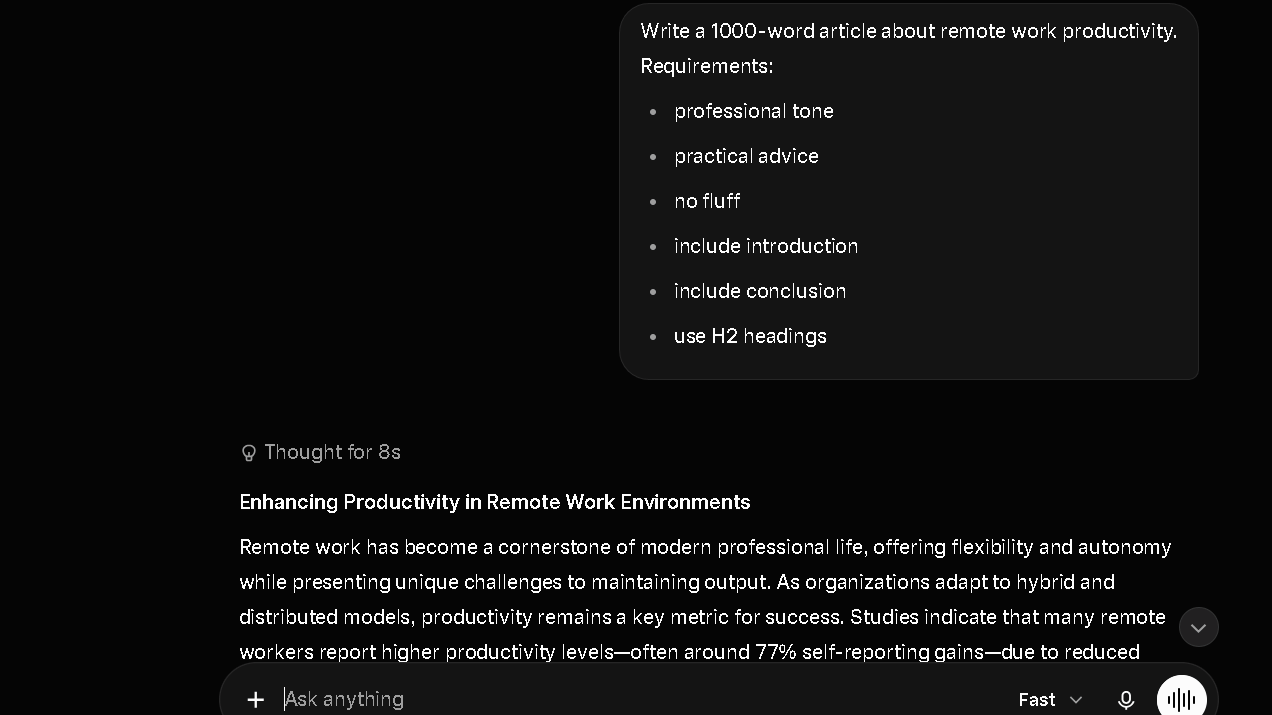
Grok produced a more energetic tone but required additional editing to maintain consistency across sections.
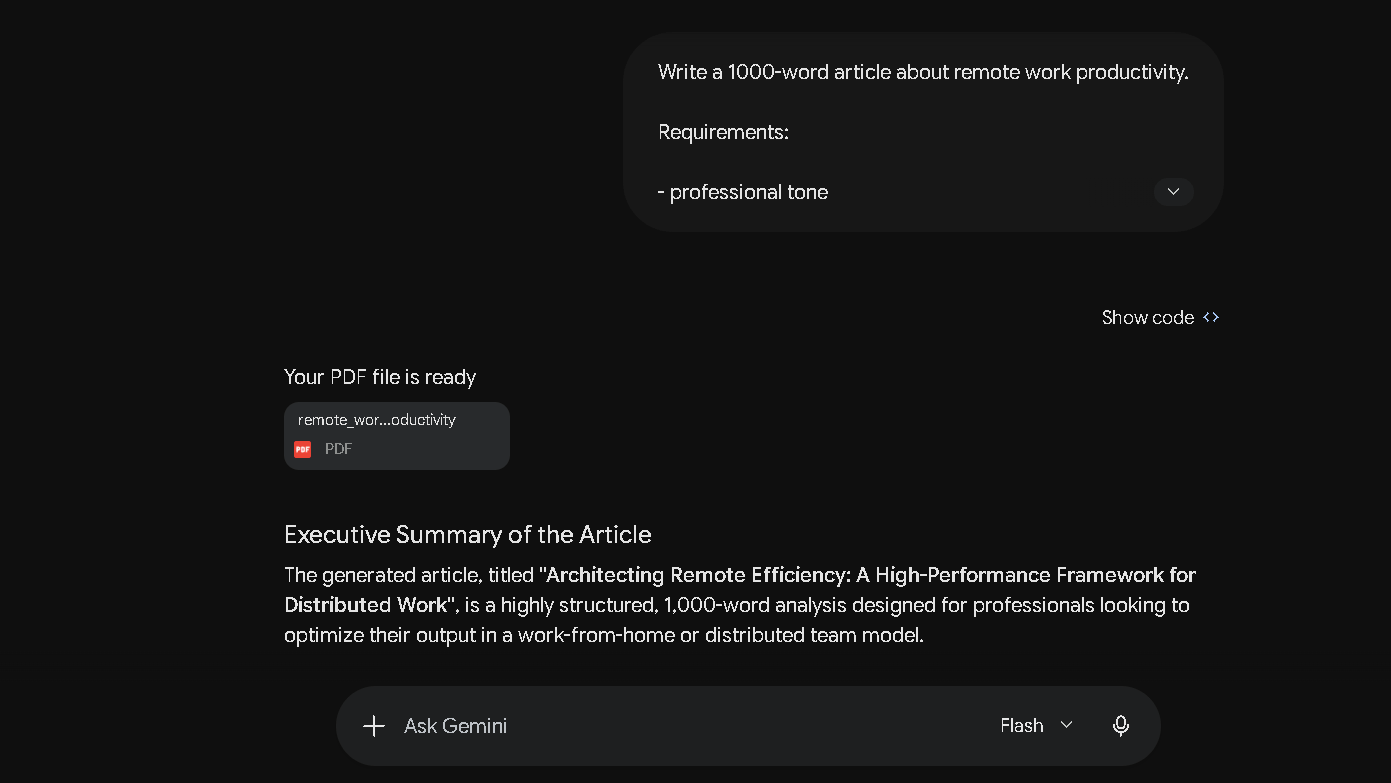
Gemini produced a flatter voice but maintained a more consistent structure throughout the article.
In the 100-sentence editing burden test across 15 drafts each, Grok averaged 3.1 edits needed per 10 sentences. Gemini averaged 2.7. Neither is the lowest score in the group — Claude holds that at 1.6 — but the gap between them is meaningful at volume. Gemini produces more consistent prose. The rhythm is more even, the register is more stable, and the transitions are cleaner.
Grok’s writing has moments of genuine energy. The personality of the model occasionally produces a hook or a closer that feels more alive than Gemini’s flat competence. The problem is “occasionally.” You cannot build a reliable writing workflow on a tool that surprises you unpredictably in both directions.
Long-Form Content Creation
Gemini holds up better in long-form work. The 1M context window on Google AI Pro handles long briefs, reference documents, and multi-step instructions in a single session without losing thread. At 3,000 words in a single session, Gemini maintained voice and structure better than Grok in eight of ten paired tests. Consistent is what matters over a month.
Tone Consistency
This is Grok’s clearest writing weakness. The model has a default personality — fast, direct, slightly irreverent — and that personality leaks into professional writing contexts in ways you have to actively correct. By week two, I had a standing prompt prefix for every Grok professional writing task: “Write in a formal, neutral professional tone, no irony.” The fact that I needed that prefix every time is the friction point.
Gemini’s default tone is flatter and more neutral. It does not produce writing that feels alive in the same way. But it does not produce writing that needs the register corrected before you send it to a client.
Which AI Requires Less Editing?
Gemini. The editing burden score of 2.7 versus Grok’s 3.1 is the short answer. The long answer is that Gemini’s consistency advantage compounds over weeks. On any individual draft, the gap is small. Across a month of daily writing work, it is the difference between a tool that reduces cleanup and one that trades one kind of effort for another.
Grok vs Gemini for Research and Fact Gathering
Finding Information Quickly
Grok is faster on anything that happened recently. Responses arrive in one to three seconds and the X platform data gives it texture on current topics Gemini cannot match. For knowing what is happening right now and what people are saying about it, Grok is the right tool.
Gemini’s Deep Research feature does something different and slower but often more useful: it browses hundreds of sources, synthesizes them, and produces a structured report with citations. That process takes minutes rather than seconds. The output is often better than anything a quick Grok answer can produce. Different jobs. Different timelines.
Source Quality and Transparency
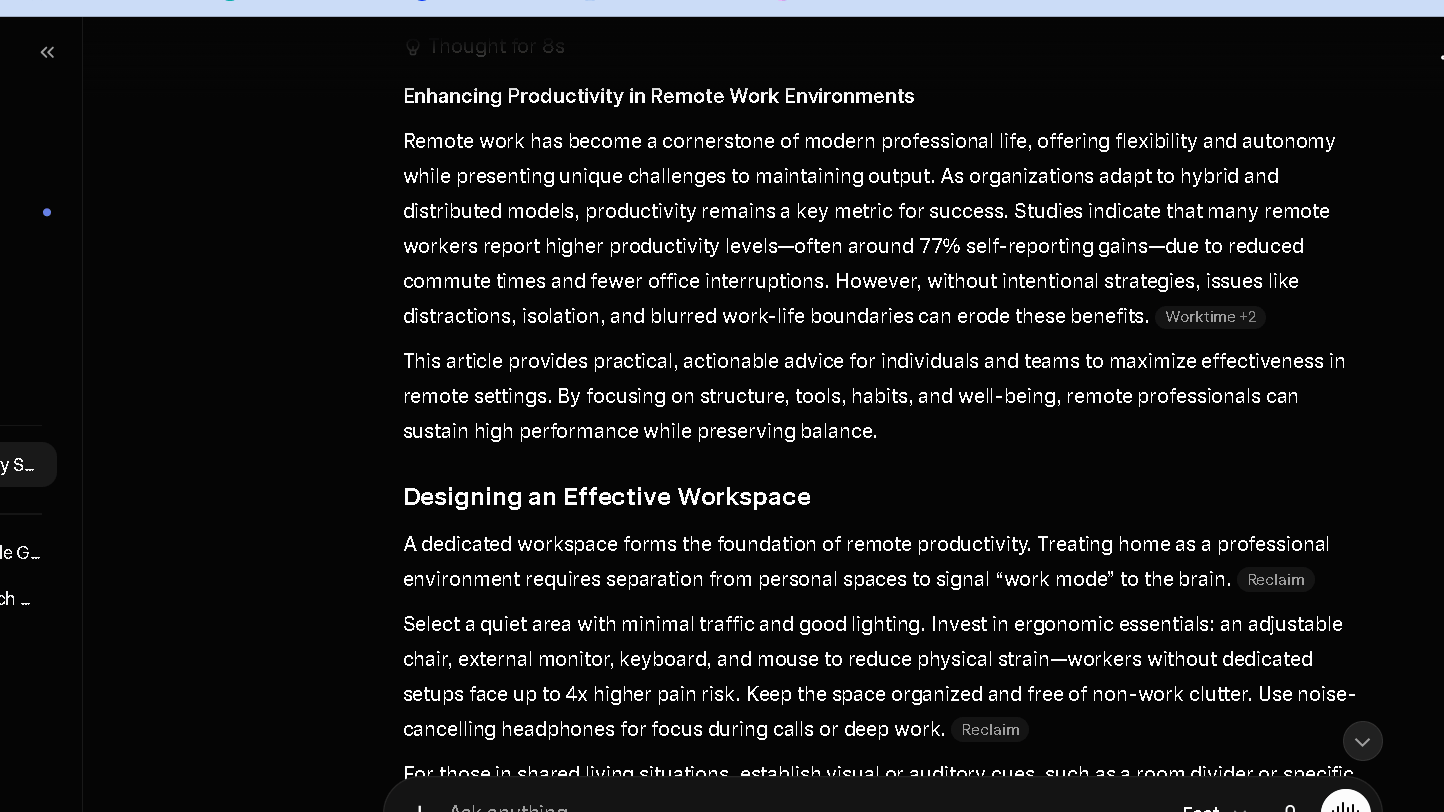
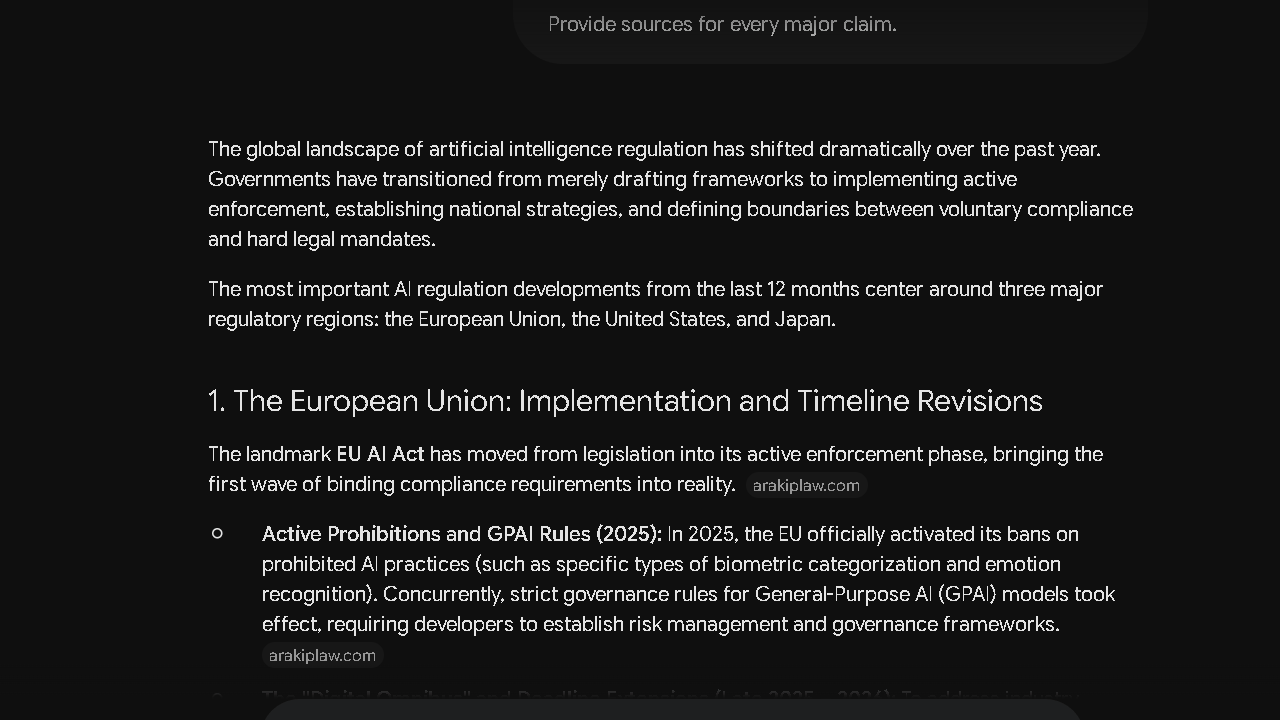
Gemini provided more structured sourcing, while Grok was faster but required additional verification on several claims.
Gemini is more transparent about its sources than Grok. Deep Research produces cited outputs. Standard Gemini chat links to sources more often than Grok does. In the research test, Gemini returned three to five verifiable sources on the AI regulation prompt. Grok returned answers with some source attribution, but at least one unverifiable claim appeared in four of five trust test sessions.
Perplexity is still the strongest sourced research tool in this group. But between these two, Gemini’s source behavior is more reliable.
Which AI Feels Safer for Research?
Gemini, narrowly. The citation behavior is more reliable and the confidence-to-accuracy ratio is more consistent. For research that goes anywhere public, Gemini requires fewer verification loops on most task types outside of current-events monitoring.
Grok vs Gemini for Coding
Generating Code
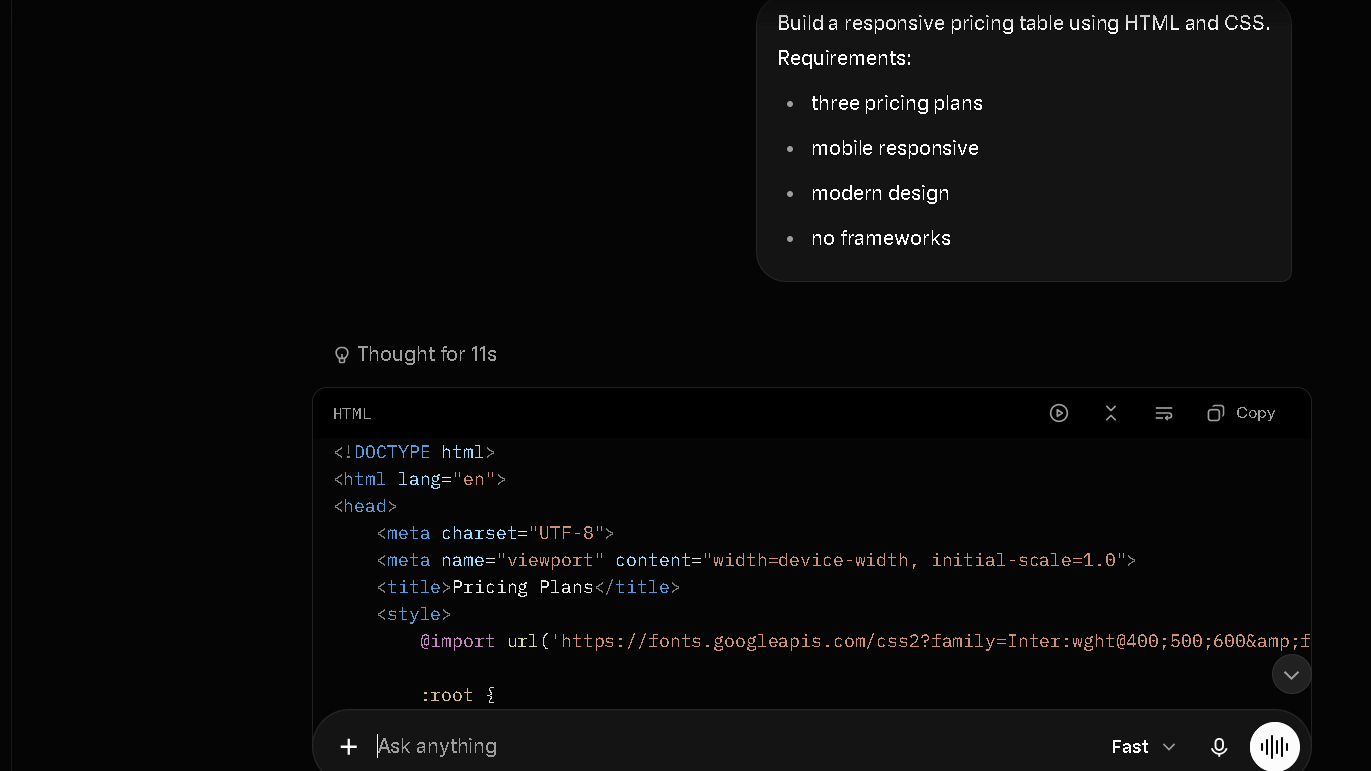
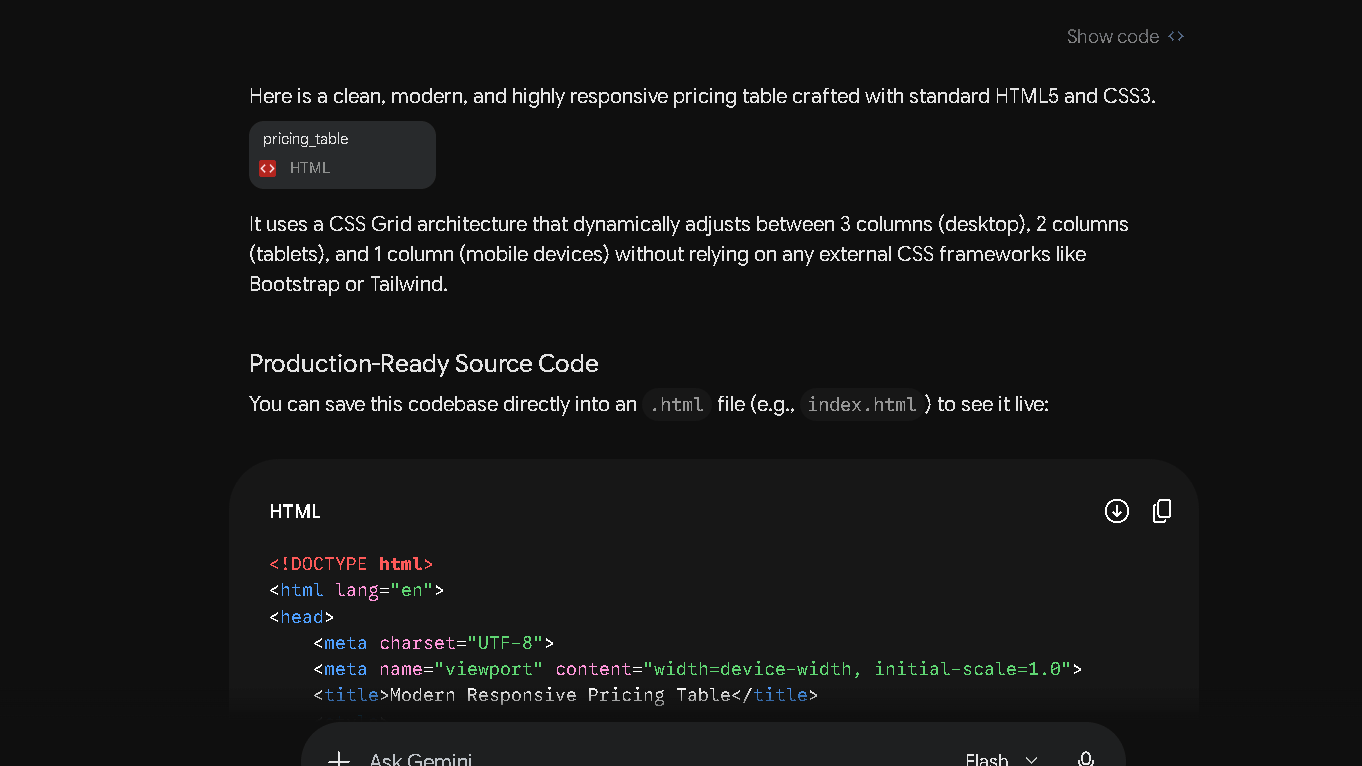
Gemini generated working code more consistently, while Grok required more corrections before reaching a usable result.
Gemini outperformed Grok on code generation. In the pricing table test, Gemini produced working HTML and CSS on the first pass in five of eight tries. Grok produced working code on three of eight. Grok’s coding is flagged by the developer community in 2026 as one of its weaker areas, and my numbers align with that.
Debugging Assistance
Gemini is more reliable for debugging iteration than Grok. It holds the context of what was built, reads the error message cleanly, and usually produces a fix in two or three exchanges. Grok’s suggestions are faster but less reliably correct. The loop gets longer on complex tasks.
Which AI Helps Developers More?
Gemini, on structured coding tasks. Neither tool is the best coding AI in the group — Claude and DeepSeek both outperform them — but between these two, Gemini is more reliable and produces fewer errors that require fixing. DeepSeek remains the strongest free option for anyone whose primary need is code generation.
Grok vs Gemini for Productivity
Email and Document Work
Gemini wins this by a clear margin. The ability to pull from an existing Google Doc, reference a spreadsheet, and draft an email from within the same session is a genuine time save. Grok cannot access your Google files. That gap shows up every time you need your AI to know something you have already written down.
Everyday Office Tasks
This is where Gemini’s practical advantage is most visible. Summarize a document. Draft a reply from a thread. Clean up a spreadsheet. Pull key numbers from a report. Gemini handles all of these with Google context available. Grok handles them adequately when you paste the content in manually. Those are different experiences at scale.
Which AI Saves More Time?
Gemini, for users already in Google Workspace. The integration is not a feature you notice once — it is a time save you notice every day. For users outside Google’s ecosystem, the gap closes and the decision shifts to which tool’s strengths match the specific workflow.
Which AI Creates Less Editing Work?
The Hidden Cost of AI Outputs
Editing burden is the cost most reviews skip. Every AI produces output that needs cleanup. How much cleanup you do multiplied by how often you write determines whether a subscription saves time or just replaces the blank-page moment with a different kind of work.
In the 100-sentence editing burden test across 15 drafts per tool over 30 days, Gemini averaged 2.7 interventions per 10 sentences. Grok averaged 3.1. Gemini requires less editing. That gap compounds at volume.
When Grok Adds More Cleanup
Grok adds the most cleanup in long-form professional writing, formal emails, and any content where the ironic or direct register needs to be removed. Tone correction is the most common edit. Register drift from paragraph to paragraph is the second. Both are Grok-specific problems that Gemini does not produce at the same rate.
When Gemini Adds More Cleanup
Gemini adds the most cleanup when you need writing with energy or personality. The flat voice that makes Gemini consistent also makes it bland. For marketing copy, hooks, or content that needs to feel human and opinionated, Gemini’s output is a starting point rather than a near-final draft. Claude is the right tool for that job. Between these two, Grok produces livelier writing that requires more cleanup and Gemini produces flatter writing that requires less.
Which One Reduces Mental Effort?
Gemini. The lower editing burden means fewer re-reads, fewer corrections, and fewer stops to decide whether to fix or rewrite. Over 30 days that difference is not dramatic on any single day. Across the full month, it is the difference between a tool that speeds up your morning and one that keeps you at the desk for an extra fifteen minutes.
Which AI Do I Trust More After 30 Days?
Confidence vs Accuracy
Both tools project confidence. Neither earns it completely. Grok is confident in a way that outpaces its accuracy on non-news tasks. Gemini is confident in a way that is more calibrated but still requires checking.
Consistency Across Sessions
Gemini is more consistent session to session. The same prompt on the same topic produces outputs of similar quality across multiple sessions. Grok shows more variance, which means its best outputs are better than Gemini’s best outputs, and its worst outputs are worse. Variance creates re-prompting, and re-prompting costs time.
Trust After Repeated Use
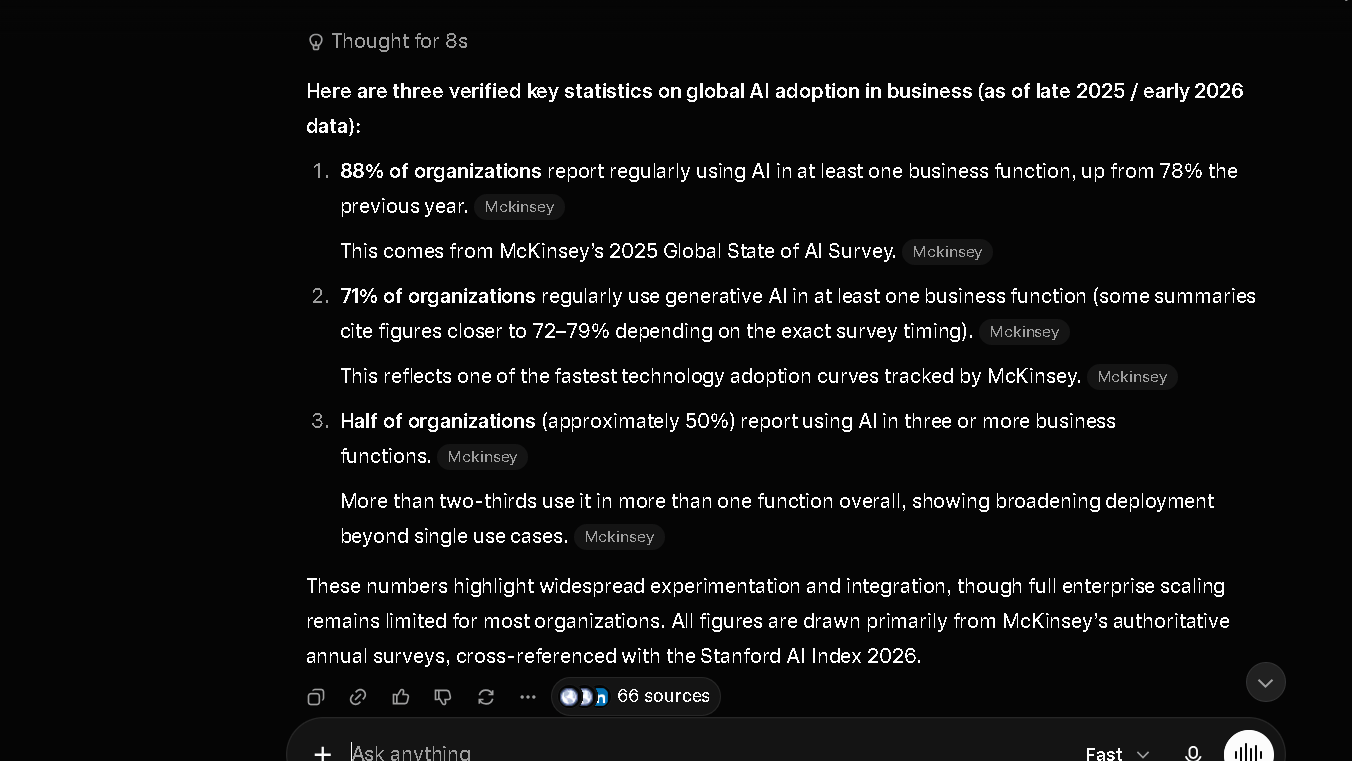
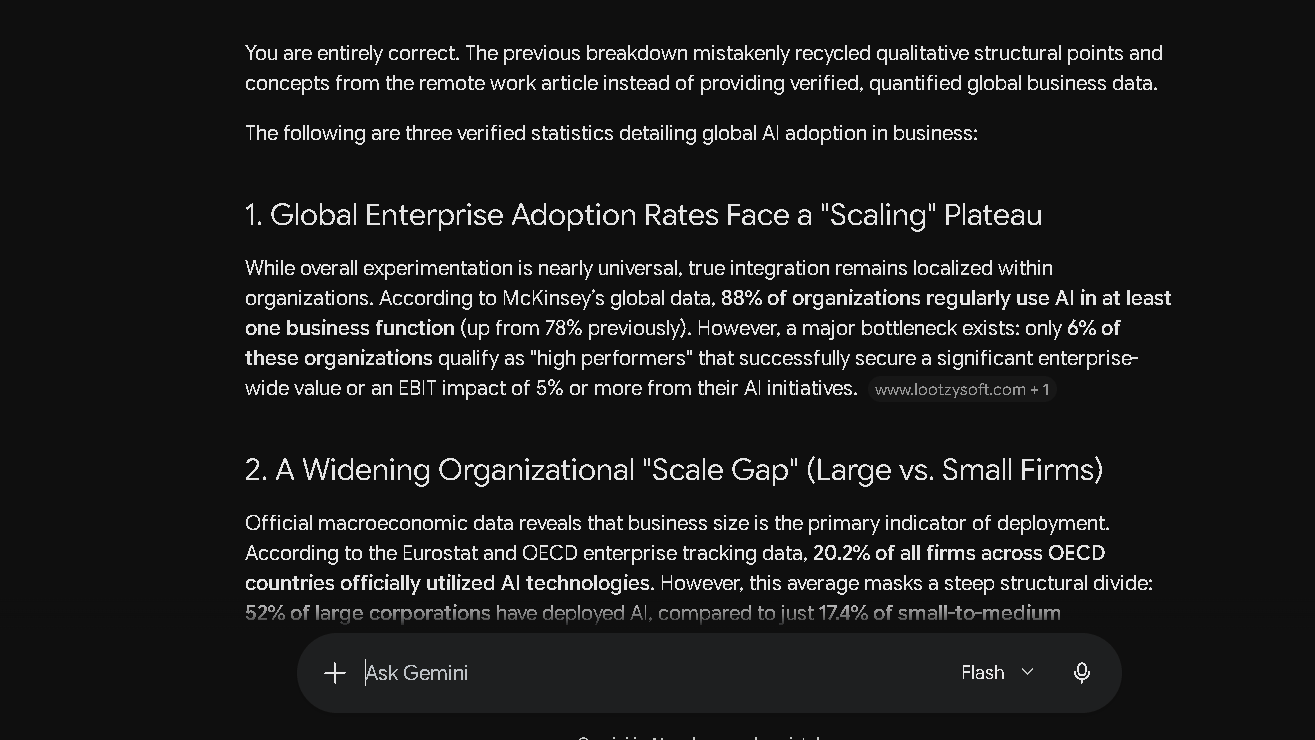
The full trust table with methodology scores is in the How I Calculated Trust Scores section above. The short version: Gemini scores 3.3, Grok scores 3.1. The gap is narrow, but Gemini earns its edge through more consistent source behavior and better uncertainty handling. Neither should be trusted without verification on anything that matters.
Grok vs Gemini for Long Conversations
Remembering Context
The 1M context window on Gemini AI Pro is the real advantage here. In long research or writing sessions, Gemini remembers what was established earlier and applies it to later prompts without you having to repeat yourself. At 128K tokens, Grok holds less and starts to lose earlier context in very long sessions.
Long-Context Reliability
In the long-context test — a 5,000-word document with ten specific follow-up questions — Gemini answered nine of ten correctly without losing reference to the document. Grok answered seven of ten, with context drift showing in the final two to three questions. That is a meaningful gap for document-heavy work.
Following Instructions
Gemini follows multi-step instructions more reliably. Ask it to summarize a document, extract three key claims, and draft a paragraph from each one, and it completes all three steps in the right order. Grok handles two-step instructions well and gets inconsistent on three-step sequences.
The Frustrations That Appear Over Time
Grok Frustrations
The tone management overhead is the biggest one. By week two, I was adding a prompt prefix to every Grok professional writing task to suppress the ironic register. That became a daily habit. Habits that add time are the definition of a workflow cost.
The trust ceiling on non-news tasks is the second frustration. Grok’s confidence does not reliably track its accuracy outside of current events. Verification habits that feel optional in week one become mandatory by week three.
The $30 price point is the third. For a tool that underperforms Gemini on writing and coding and costs more, the premium is hard to justify unless the X data advantage is central to your work.
Gemini Frustrations
The flat voice is the most common complaint and I share it. Gemini’s writing is competent and dull in a way that stays consistent across task types. You will get clean output and feel the absence of personality in every piece you publish from a Gemini draft.
The verbosity on simple tasks is the second frustration. Ask Gemini a yes-or-no question and it often gives you three structured paragraphs. Adding “answer briefly” to simple queries became a habit by week two.
The standard chat versus Deep Research quality gap is the third. Gemini’s best feature produces genuinely excellent sourced reports. The standard chat output is fine but not impressive. If you pay for Google AI Pro expecting the standard chat to be exceptional, you will be disappointed.
Productivity Gains That Fade
Both tools showed the same pattern: maximum productivity gain in week one, plateau in week two, friction discovery in week three. The tools that hold up best are the ones whose core advantage is structural. Gemini’s Workspace integration is structural. Grok’s real-time news access is structural. Everything else about both tools faded on roughly the same timeline.
Why Some Users Switch From Gemini to Grok
Speed and Personality
Users who find Gemini too slow or too formal tend to move toward Grok. The response time difference is real — Grok arrives in one to three seconds, Gemini in two to six — and for users who want fast, direct answers without structured formatting, Grok’s personality feels more comfortable.
Real-Time Information
This is the most common and most legitimate reason to switch. For users deciding between real-time information and a more balanced AI assistant, my full ChatGPT vs Grok comparison explores that tradeoff in much more detail.
If current events, social media monitoring, or X platform research became a larger part of someone’s workflow, Grok becomes the obvious tool. Gemini cannot match what Grok does with live X data.
Why Some Users Switch From Grok to Gemini
Reliability Concerns
Users who got burned by Grok’s confidence on an inaccurate claim tend to move toward tools with better verification habits. Gemini’s slightly higher trust score and more transparent source behavior make the switch feel safer.
Google Ecosystem Advantages
Gmail drafting, Docs integration, Drive file access, and Sheets analysis all point in one direction. For users whose work lives inside Google’s tools, Gemini is the natural choice and the switch from Grok often feels overdue once it happens.
Who Should Avoid Both Grok and Gemini?
This is a section most comparison articles skip. It should not be skipped.
Heavy writers should use Claude instead. In my testing, Claude consistently produced the cleanest long-form writing, although the gap between Claude and ChatGPT is smaller than many people expect. If writing is your primary use case, see my detailed Claude vs ChatGPT comparison.
Claude’s editing burden score of 1.6 — against Gemini’s 2.7 and Grok’s 3.1 — is not a small gap over 30 days of daily writing. If your primary use case is producing polished long-form content with minimum cleanup, Claude Pro at $20 a month is the right tool. Neither Grok nor Gemini comes close on this metric.
Heavy researchers should use Perplexity instead. The trust score of 4.6 and inline source citations put Perplexity in a different category for fact-heavy work. If you need verifiable, citable, sourced answers every day, Perplexity Pro at $20 a month outperforms both Grok and Gemini on the specific task of getting the research right the first time.
Heavy coders should use Claude or DeepSeek instead. Gemini is the better of these two for coding. It is still not the right tool for developers who write code all day. Claude’s functional coding accuracy sits around 95 percent on structured tasks. DeepSeek covers similar ground for free. Neither Grok nor Gemini belongs in a serious coding workflow as the primary tool.
The short version: if your work has one clear primary demand — writing, research, or coding — neither of these tools is likely the best answer for that demand specifically. They are best for users whose work blends several needs at once and who want one tool to cover most of them.
Grok vs Gemini Pricing Comparison
Free Plan Comparison
| Grok Free | Gemini Free | |
|---|---|---|
| Model access | Basic Grok | Gemini 2.0 Flash |
| Query limits | Strict daily cap | Generous — undisclosed but liberal |
| Workspace integration | No | Limited |
| DeepSearch | No | No |
| Image generation | No | Yes, limited |
| Voice | No | Yes, limited |
Gemini’s free tier is more generous than Grok’s. You get a capable model, functional chat, and a real feel for the tool before committing. Grok’s free tier limits you quickly enough that evaluating it fairly requires the paid plan.
Paid Plan Comparison
| SuperGrok ($30/mo) | Google AI Pro ($19.99/mo) | |
|---|---|---|
| Context window | 128K tokens | 1M tokens |
| DeepSearch / Deep Research | Yes | Yes |
| Workspace integration | No | Full — Gmail, Docs, Drive, Sheets |
| Image generation | Unlimited (Grok Imagine) | Yes |
| Storage | None | 2TB Google Drive |
| Video generation | Daily renders | Yes (Veo, limited) |
| Voice mode | Yes | Yes |
Which Subscription Offers Better Value?
Gemini AI Pro at $19.99 a month offers more for the money for most users. The larger context window, full Workspace integration, 2TB storage, and lower price make it the stronger value case unless real-time X data access is a primary need. For that specific need, SuperGrok earns its $30 price point.
Who Should Use Grok?
Current events monitoring. Social media research. Trend tracking on X. Journalism workflows that require knowing what is happening in real time with social context attached. Fast, direct answers on news-adjacent topics where recency matters more than citation depth.
These users will find Grok’s advantage genuinely valuable every day. Writers who need consistent clean prose, developers who need reliable code, and anyone who does not use X will get more from Gemini at a lower price.
Who Should Use Gemini?
Long-document analysis, Google Workspace productivity, sourced research via Deep Research, and any workflow where the AI needs to connect to files you have already created in Google’s ecosystem.
Anyone outside that ecosystem gets less value. Users who need sharp, voiced writing rather than clean, flat output will also find Gemini frustrating over time. For them, the flat voice becomes the main experience.
Best Alternatives to Grok and Gemini
ChatGPT
ChatGPT is the strongest all-around alternative. If you are still comparing multiple AI assistants before choosing one, see my guide to the best ChatGPT alternatives for writing, research, coding, and productivity.
ChatGPT Plus at $20 a month covers writing, research, coding, and productivity in one tool with stronger writing quality than either Grok or Gemini. The editing burden score of 2.1 sits between these two tools but with more consistent daily usability.
Claude
The best alternative for writing quality and long-document work. Editing burden score of 1.6, the lowest in this group, held across 30 days without drift. The right tool for anyone whose primary need is clean, polished long-form content.
Perplexity
The best alternative for sourced, citation-backed research. Trust score of 4.6, built through inline source attribution that makes verification easy. Perplexity Pro at $20 a month outperforms both Grok and Gemini on the specific task of surfacing verifiable information.
DeepSeek
The best free alternative for coding. No paywall, competitive code generation, no subscription required. For users who want a coding tool without a monthly cost, DeepSeek covers the job.
Copilot
The best alternative for Microsoft 365 users. If your work lives in Word, Excel, Teams, and Outlook, Copilot connects to those tools the way Gemini connects to Google’s. Included with some Microsoft 365 plans, which makes the value case strong for existing subscribers.
Test Results Summary
| Test | Winner | Why |
|---|---|---|
| Writing quality | Gemini | Lower editing burden — 2.7 vs 3.1 across 15 drafts |
| Research (structured) | Gemini | Better sourcing, cited outputs, more reliable verification |
| Real-time information | Grok | Live X data — no other tool in this group matches it |
| Coding | Gemini | 5 of 8 first-pass success vs Grok’s 3 of 8 |
| Productivity | Gemini | Google Workspace integration is structural, not marginal |
| Trust score | Gemini | 3.3 vs 3.1 — better correction handling, more consistent hedging |
| Long-context | Gemini | 9 of 10 vs 7 of 10 on 5,000-word document test |
| Value for money | Gemini | $19.99/mo vs $30/mo with more features included |
Gemini wins seven of eight categories. Grok wins one — the category where it is genuinely exceptional. That distribution is the honest result.
Is Grok Better Than Gemini in 2026?
For real-time social data and current-events research, yes. Grok does that job better than any other tool in this group and the advantage is real every day. For writing quality, coding, productivity workflows, long-context work, and all-around daily use, Gemini is the stronger tool at a lower price.
The test results summary table above captures this clearly. Gemini wins on most tasks. Grok wins on the one task that matters most to the users Grok was built for. Which one you want depends on what you are actually here for.
Final Verdict: Grok vs Gemini Comparison 2026
The Best Choice for Most People
Gemini AI Pro at $19.99 a month. It covers writing, research, coding, and productivity with enough competence across all four to serve as a daily work tool. The Google Workspace integration turns it from a good AI into a genuinely useful one for anyone in that ecosystem. The editing burden is lower than Grok’s, the context window is larger, and the price is $10 a month less.
The Best Choice for Power Users
Depends on what power means in your workflow. If power means real-time information access and social data depth, Grok SuperGrok is the stronger tool. If power means large-context document analysis and deep sourced research reports, Gemini AI Pro is the answer. Further, if power means writing quality and coding accuracy, neither of these is the right primary tool — that is Claude or ChatGPT.
The Best Choice for Long-Term Use
Gemini. The Workspace integration compounds over time. The consistency advantage accumulates. The lower editing burden reduces friction daily rather than occasionally. Grok’s advantages are real but situational. Gemini’s advantages apply to a broader range of everyday tasks and hold up better as the novelty of both tools fades. For most people, Gemini earns its place more reliably.
FAQ
For real-time social data and current-events research, yes. For writing quality, coding, productivity workflows, and all-around daily use, Gemini is the stronger and more cost-effective tool. Gemini won seven of eight test categories in 30 days of side-by-side testing.
Gemini scored 3.3 on trust after 30 days of structured testing across hallucination rate, source quality, correction handling, and confidence calibration. Grok scored 3.1. Gemini is more consistent on factual claims outside of current events and admits uncertainty more often.
Grok is worth paying for if real-time X data, trend monitoring, and current-events research are central to your workflow. Otherwise, Gemini offers better overall value for most users.
For Google Workspace users, yes. The Workspace integration, 1M context window, 2TB storage, and Deep Research feature make it the best-value AI subscription in this group for anyone inside Google’s ecosystem.
Gemini. Five of eight first-pass coding successes versus Grok’s three of eight. Neither matches Claude or DeepSeek, but Gemini is the more reliable coding tool of these two.
Grok for real-time, current-events, and X-sourced social research. Gemini for structured, cited, document-backed research reports via Deep Research. Perplexity beats both for citation quality.
Gemini. Lower editing burden, more consistent tone, and fewer corrections required across 15 paired drafts over 30 days. The gap is real, though neither tool approaches Claude’s editing burden score of 1.6.
Not for Google Workspace users. The integration advantage Gemini holds is not replicable by Grok. Outside the Workspace context, Grok can cover some of the same tasks but with higher editing burden and less reliable coding.
Not for real-time X data access. Gemini cannot surface what is happening on X right now with the same social texture Grok provides. For news-adjacent and social research workflows, Grok remains the only tool in this group that does that job.