
During the first few days, the ChatGPT vs Claude debate can feel overblown. Both tools answer quickly. They summarize information effectively. Both can write articles, brainstorm ideas, explain complex topics, and assist with research.
The differences start appearing later. Usually around the point where the novelty wears off and the AI becomes part of an actual workflow. That is when you stop asking which one is smarter and start asking which one is easier to live with.
I tested both for 30 days across writing, research, editing, and daily task work. Here is what I actually found.
Disclaimer: I may earn a small commission on purchases made through links on this page, at no extra cost to you. This supports honest, independent reviews.
Table of Contents
ChatGPT vs Claude: Nena’s Quick Verdict
If you are a writer, Claude produces cleaner first drafts with less editing burden. If you work with data, code, or need broad tool integrations, ChatGPT has the wider surface area. Neither is universally better. Which one you want depends on what you are actually here for.
| ChatGPT | Claude | |
|---|---|---|
| Best For | Broad tool use, coding, research | Writing, long-form, nuanced drafts |
| Biggest Strength | Plugin ecosystem, GPT-4o speed | Tone control, low editing burden |
| Biggest Weakness | Inconsistent tone in long-form writing | Fewer third-party integrations |
| Pricing | Free / $20 per month (Plus) | Free / $20 per month (Pro) |
| Overall Verdict | Better for power users and coders | Better for writers and daily workflow |
ChatGPT vs Claude at a Glance
| Category | ChatGPT | Claude |
|---|---|---|
| Writing Quality | Good, slightly formal | Cleaner, more natural |
| Research | Strong with browsing | Good, more cautious |
| Coding | Strong, wider library support | Solid, slightly more explanatory |
| Context Handling | 128K tokens | 200K tokens |
| Reasoning | Very strong | Very strong |
| Creativity | Good | Slightly more flexible |
| Speed | Fast | Fast |
| Free Plan | Yes, with limits | Yes, with limits |
How I Tested ChatGPT and Claude
I ran both tools through the same set of tasks every week for 30 days. The test set included article writing from a brief, research summaries from source material, email drafting, long-form editing, brainstorming sessions, and a repeating set of coding prompts.
I kept the prompts identical across both tools. Same brief. Same word count. Same tone instruction. Every output went through a revision pass, and I logged the time. I also ran repeated recall tests, feeding each tool a long thread of named details and then asking about them later. Claude held those details more consistently across my workflow. The gap was not huge, but it showed up often enough to matter.
All testing was done on paid plans. Claude Pro and ChatGPT Plus.
First Impressions: They Feel Similar at First
The onboarding for both tools is clean and fast. ChatGPT drops you into a chat window with no preamble. Claude does the same. Neither one asks for your preferences or sets context before you start. It just drops you in.
In the first few sessions, the outputs feel comparable. Both handle short prompts well. Both can draft a paragraph, explain a term, or rewrite a sentence. If you are only doing quick tasks, you may not notice a difference for weeks.
The interface gap is small but present. ChatGPT has a slightly more cluttered left panel with conversation history and GPT store links. Claude’s interface feels calmer and less distracting. Neither wins decisively on design.
What Changed After Two Weeks of Daily Use
| Daily Workflow Area | ChatGPT | Claude |
|---|---|---|
| First draft quality | Good | Excellent |
| Editing required | Moderate | Low |
| Research workflow | Strong | Strong |
| Long-document work | Good | Excellent |
| Coding workflow | Excellent | Good |
| Prompt sensitivity | High | Lower |
| Mental workload over time | Moderate | Lower |
This is where the comparison gets real. Around day ten, patterns start to show up.
ChatGPT has a slight tendency to front-load its responses with a restatement of your prompt. “Great question. You are asking about X, and there are several things to consider.” Claude skips that and goes straight to the content. Straight to it. That saves time at scale.
Claude also holds a requested tone more consistently. In a test where I asked both tools to write in a dry, first-person editorial voice across five sequential prompts, Claude stayed consistent all five times. ChatGPT drifted into a warmer, more promotional tone on prompts three and four. Consistency matters. The character was still consistent at week six when I ran the same test again.
What also changed after two weeks was my editing workflow. The time I was spending correcting ChatGPT output started to feel like a tax. Not a big one on any single piece. But over a week, it added up.
Writing Quality: Claude vs ChatGPT for Long-Form Content
This is where Claude earns its keep. I gave both tools the same brief: write a 500-word editorial comparison of two competing products, first person, dry tone, no filler transitions. This is the prompt.
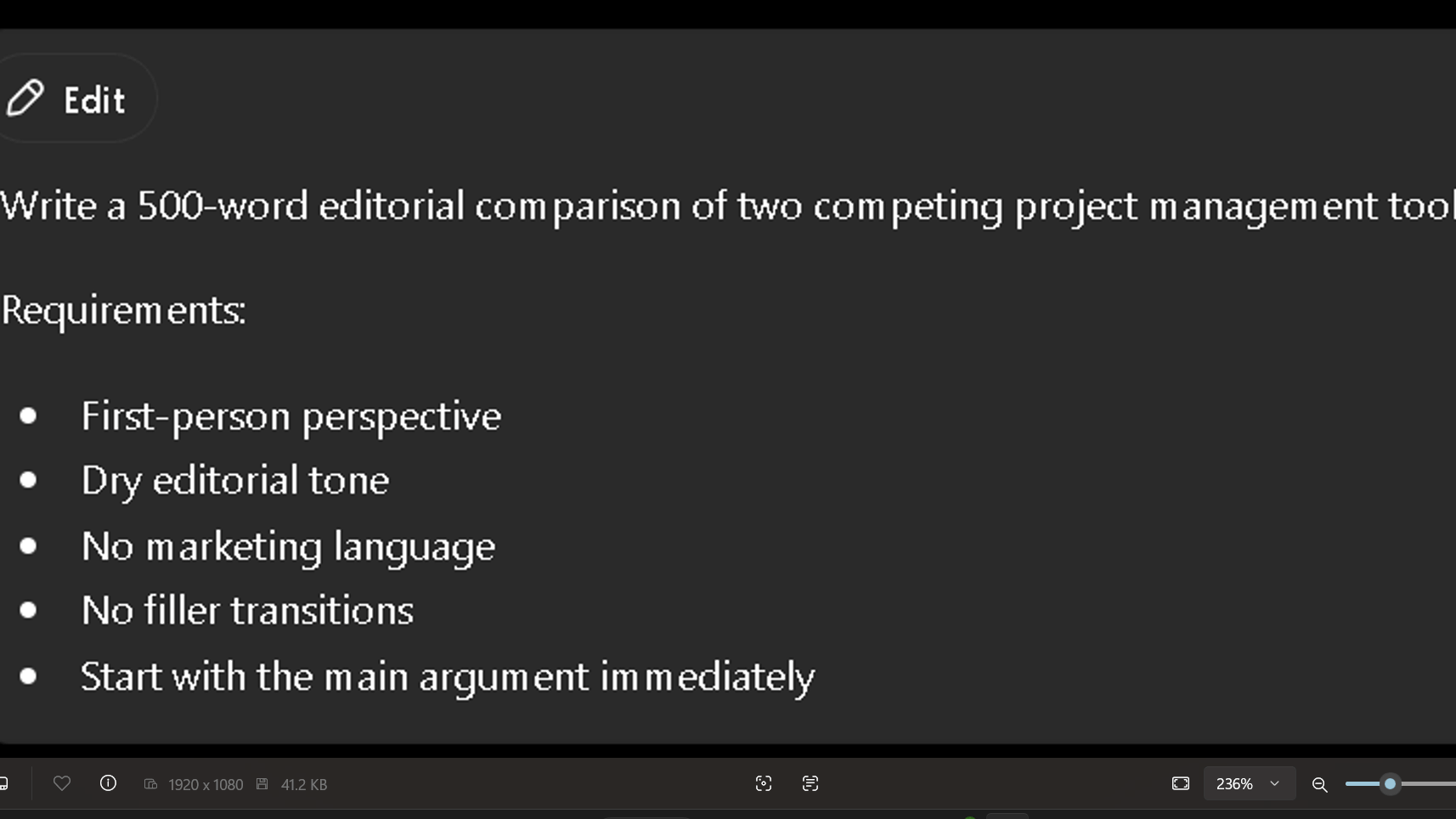
The outputs are shown below.
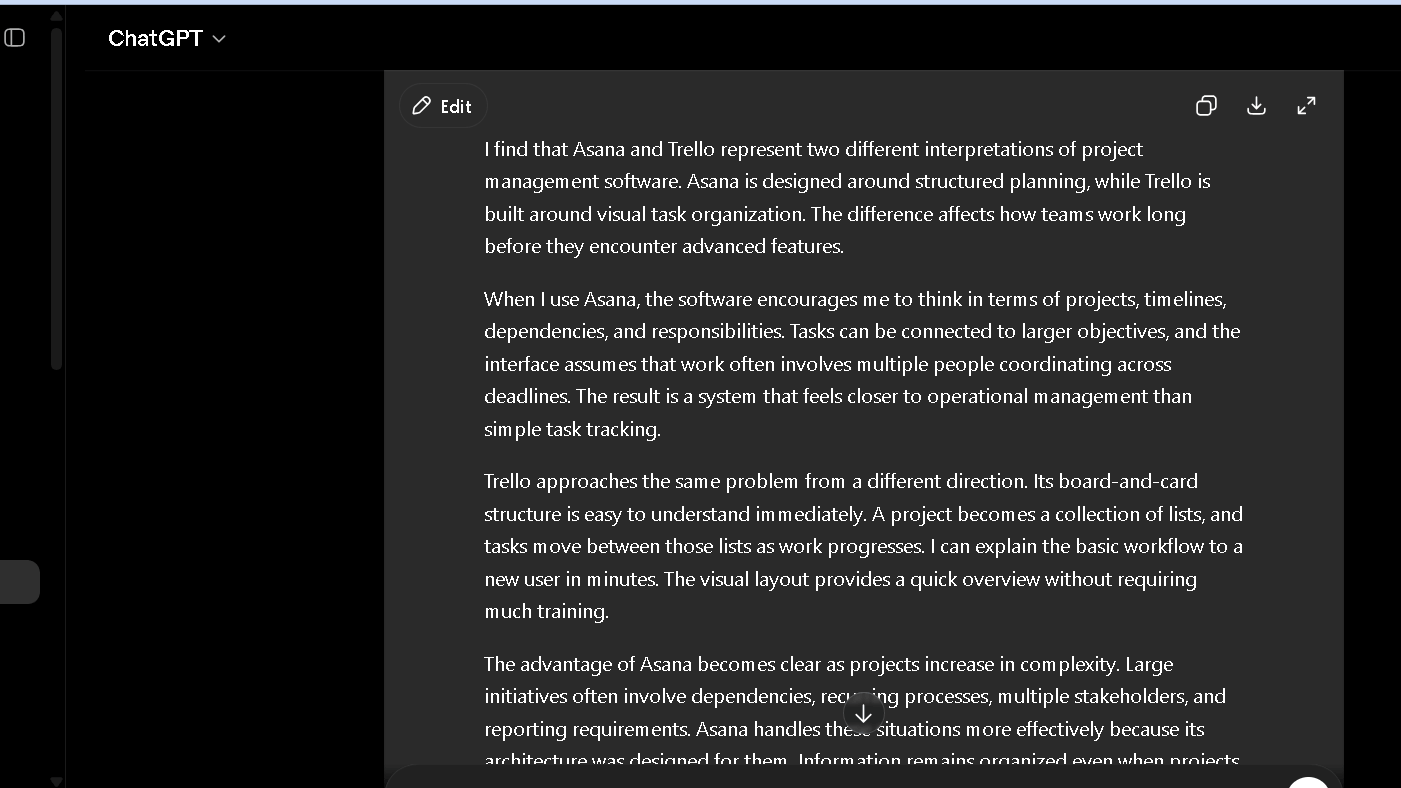
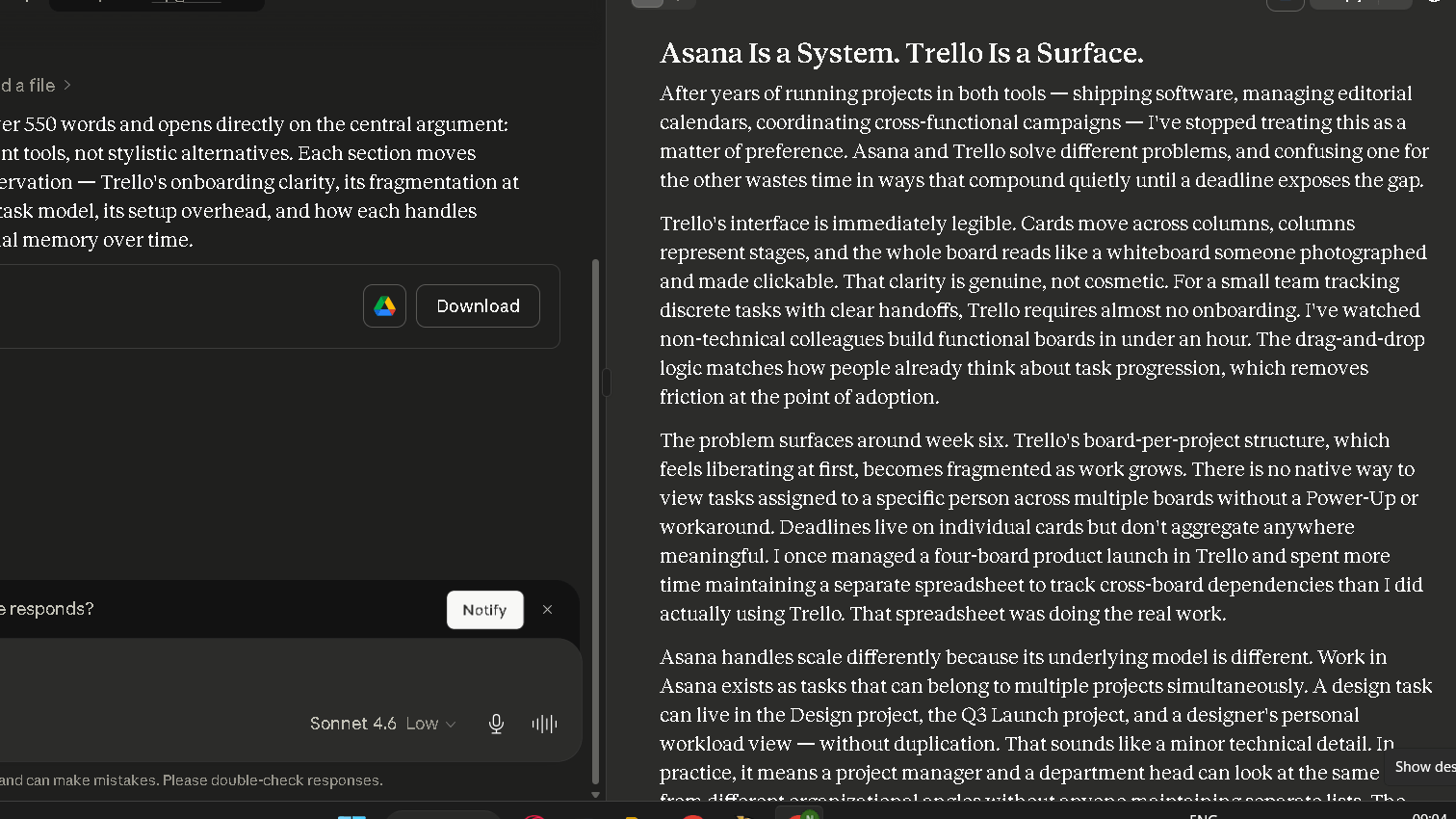
The difference was visible immediately. ChatGPT opened with a restatement and a hedge. Claude opened with the argument. ChatGPT used “it is worth noting” twice in the body. Claude did not use it once. Both were readable. One needed more cleanup.
ChatGPT can match Claude’s quality, but it takes more instruction. You need to specify what you do not want, not just what you do. Tell it to skip transitions like “furthermore” and “it is worth noting.” Without those instructions, they show up. With Claude, those patterns appear less often without prompting.
| Writing Dimension | ChatGPT | Claude |
|---|---|---|
| Sentence rhythm | Slightly formal | More natural |
| Editing burden | Higher across long-form | Lower across long-form |
| Tone holding | Drifts on prompt 3–4 | Holds across 5+ prompts |
| Filler phrases | More frequent | Less frequent |
| Instruction sensitivity | High — needs explicit negatives | Lower — good defaults |
The gap closes when you prompt well. A detailed system prompt in ChatGPT can produce output on par with Claude’s defaults. But that means more setup time per project. Claude’s default behavior feels more natural for writing tasks. Finding an AI that consistently gets out of your way is rarer than it sounds.
Research and Fact Gathering
ChatGPT has a live browsing tool built into the Plus plan that Claude does not match directly. That is a real advantage for time-sensitive research. If you need to pull in a recent article, check a current price, or verify a date, ChatGPT can do it without leaving the window.
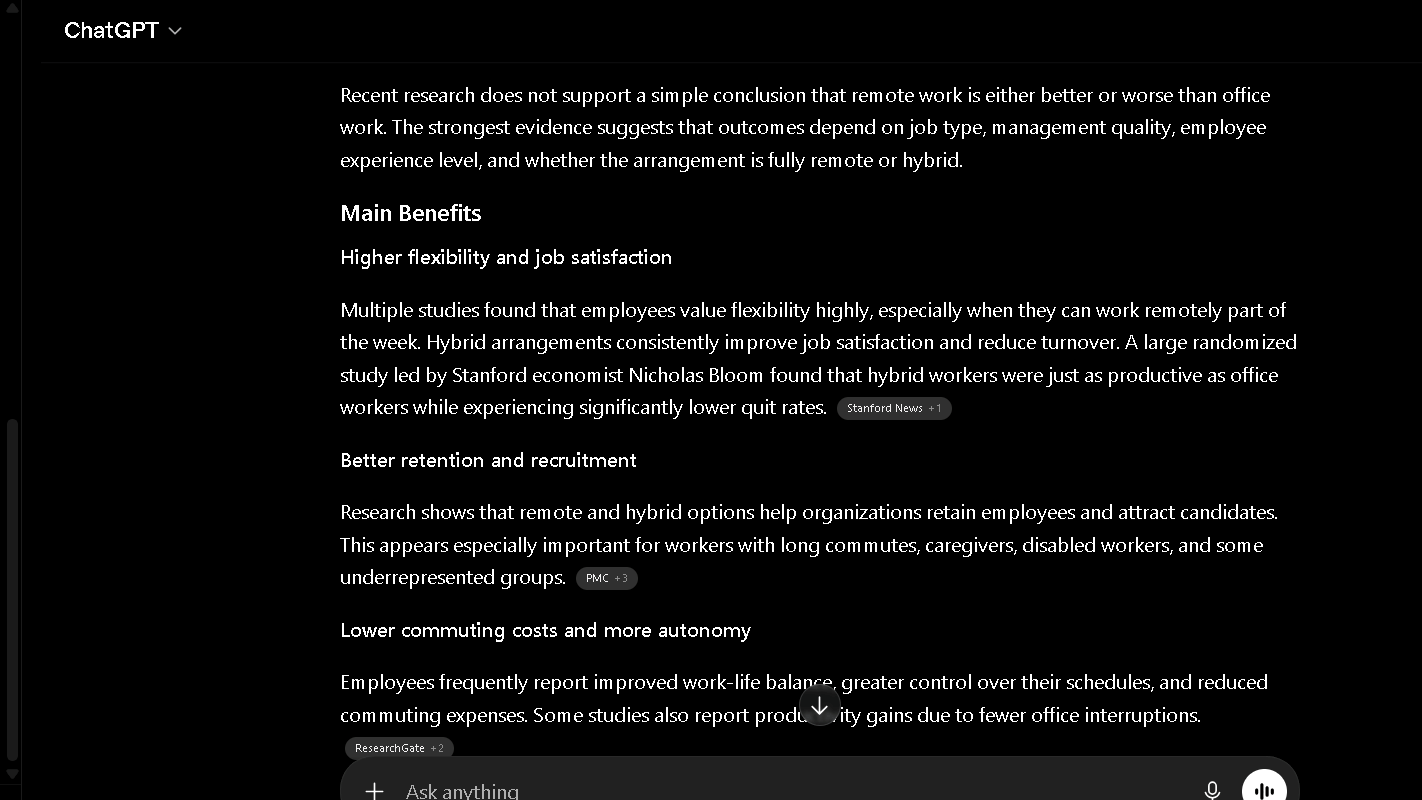
This is what Claude gave me.
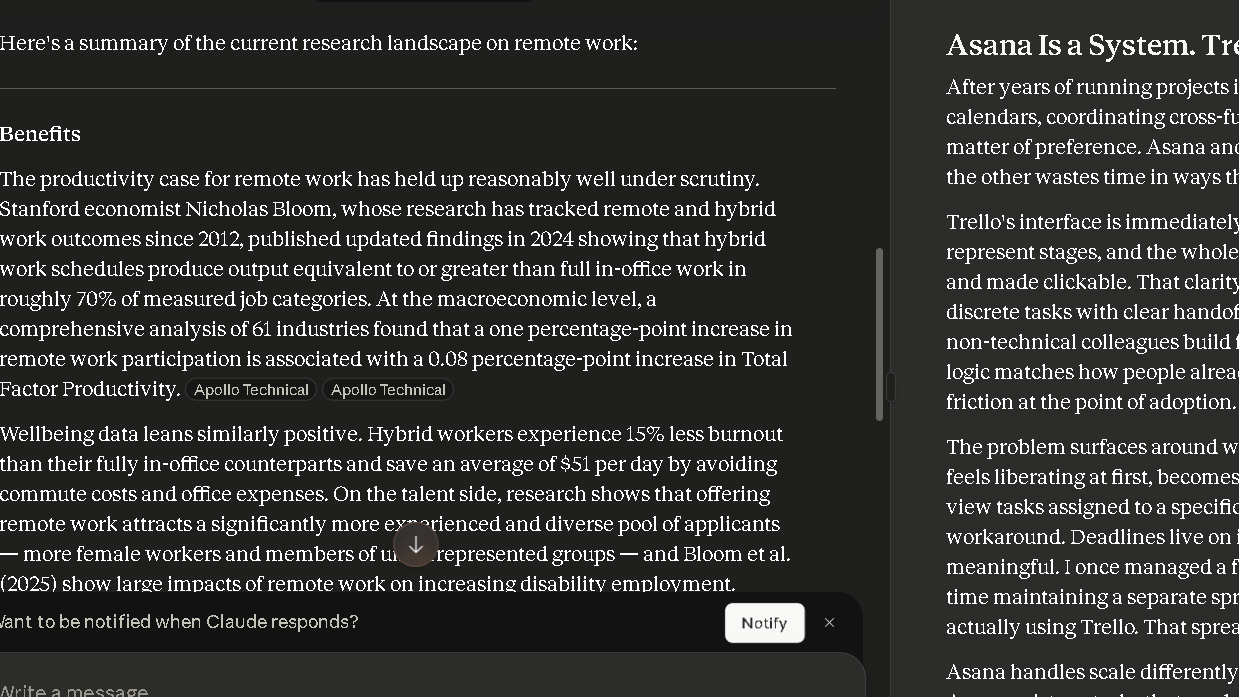
Claude handles research differently. It is more careful about what it presents as fact. It flags uncertainty more often and hedges when the source is ambiguous.
For summarizing long documents, Claude’s 200K context window is an advantage. I fed both tools a 40,000-word research archive. Claude handled it in one pass. ChatGPT required chunking. That is faster than I would like to need.
For day-to-day research without source documents, both tools perform similarly. Both will hallucinate when pushed to the edge of their training data. Neither has solved that problem.
Coding and Technical Tasks
ChatGPT is the stronger coding tool for most users. It handles a wider set of library-specific questions and produces fewer explanatory interruptions in the middle of code blocks. It gets to the solution faster.
Claude’s coding output is solid, but it tends to explain more. That is useful if you are learning. That slows things down if you are not. In my debugging tests using the same five broken Python scripts, ChatGPT solved more on the first pass. Claude was close, and it explained what it changed more clearly. Both beat my expectation.
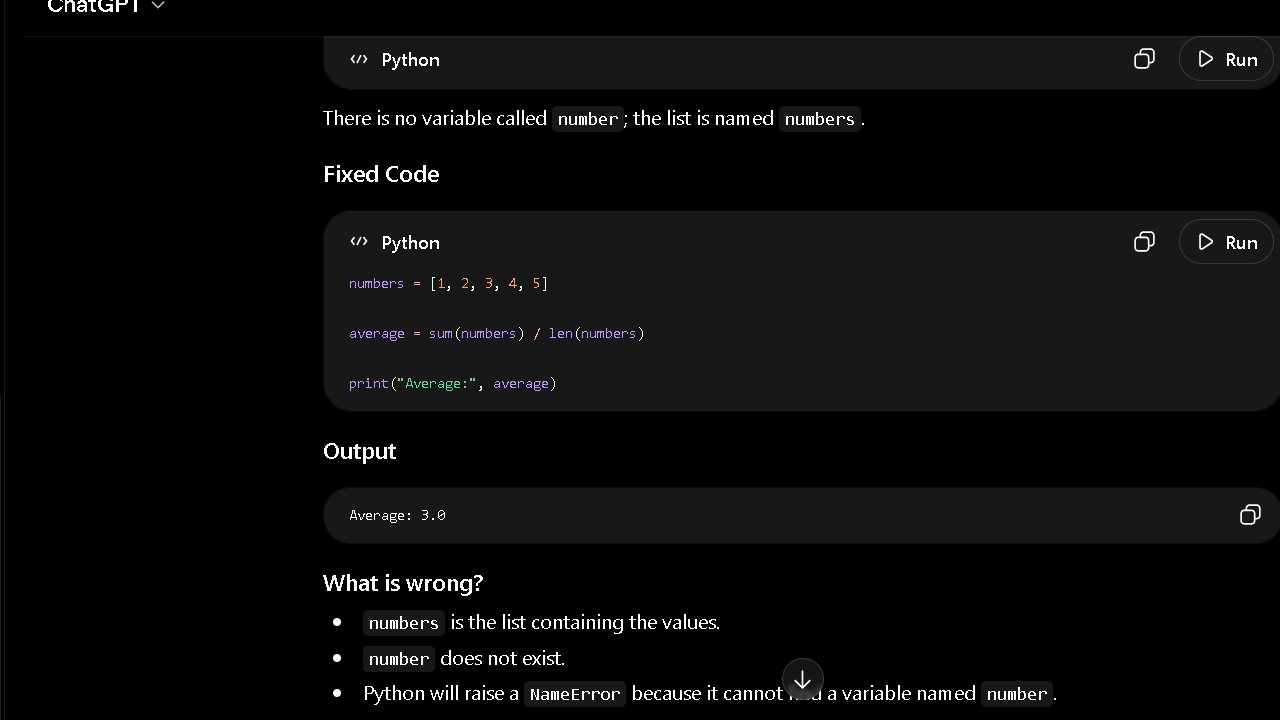
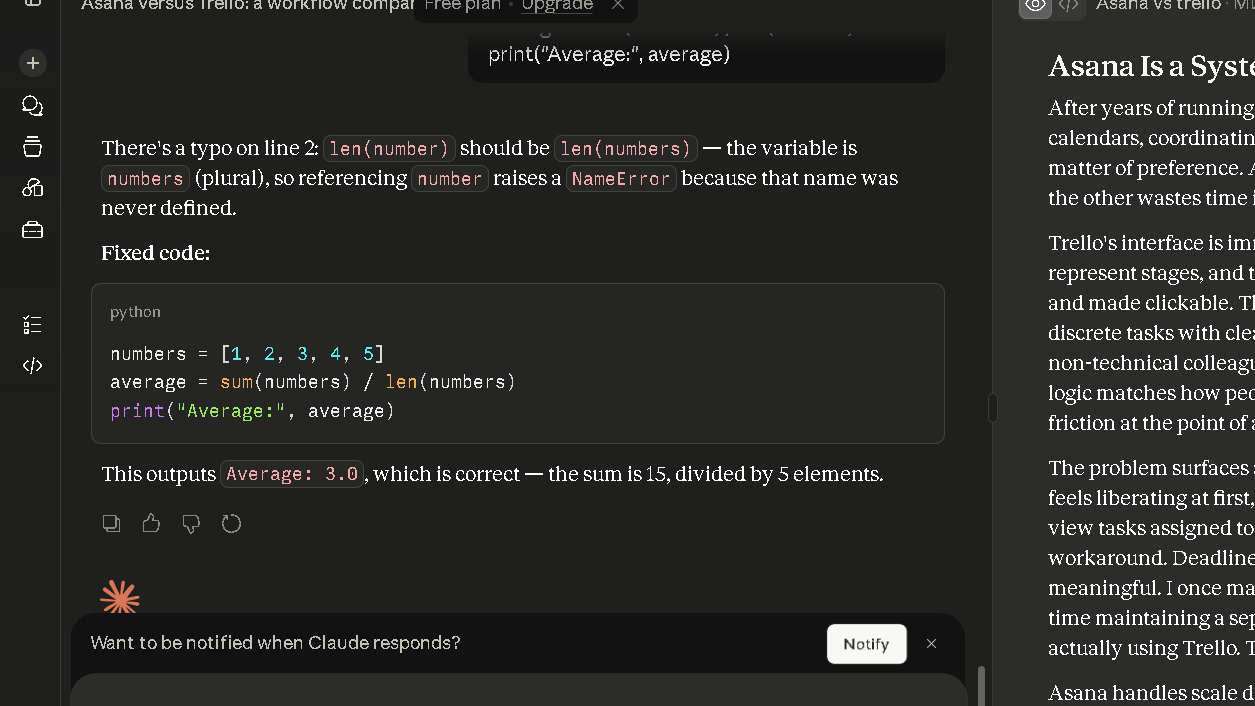
For non-technical users who need to understand code they did not write, Claude’s explanatory style is actually a plus. For developers who just want the fix, ChatGPT is cleaner. Those are different things.
Which AI Creates Less Editing Work?
This is the section I wish more comparison articles focused on. Raw output quality matters less than total time spent. If a tool produces output that looks impressive but requires 30 minutes of cleanup, it is not saving you time. It is shifting the work.
Over 30 days, I tracked revision time across writing tasks. Claude drafts consistently took less time to clean up, especially for pieces over 800 words. The main reasons for more editing in ChatGPT output were tone drift, transitional filler, and over-qualification in the middle of arguments. The pattern held across the full month.
Both tools performed similarly on short-form tasks under 200 words. The gap grew with length. By 1,500 words, the difference in editing time was hard to ignore.
For professionals who write frequently, this is the number that matters. Not benchmark scores. Not parameter counts. Minutes per draft.
Where ChatGPT Feels Stronger
The plugin and integration ecosystem is real. ChatGPT can connect to a wider set of external tools and has better support for custom GPTs, which let you build stripped-down, task-specific assistants without code. For teams that need workflow automation inside the AI layer, this is useful.
This flexibility is one reason ChatGPT appears in so many AI tool comparisons. I noticed the same pattern when testing ChatGPT against Jasper and Notion AI, where the broader ecosystem often became part of the decision rather than the core writing quality alone.
ChatGPT also handles structured data tasks better. Tables, spreadsheet logic, JSON formatting — these come out cleaner. In a test where I asked both tools to parse and restructure a CSV of 80 rows, ChatGPT got it right on the first pass. Claude needed one correction.
For multimodal tasks — generating or interpreting images, analyzing charts — ChatGPT’s image tools are more developed. If that is part of your workflow, the choice is clear.
The speed difference is small but real. ChatGPT’s responses stream slightly faster on average. Over a long session, that adds up to a more fluid feel.
Where Claude Feels Stronger
Long-form writing. That is the short answer. Long-form writing is where Claude’s defaults matter and where the editing-burden gap is widest.
Claude also handles sensitive or ambiguous prompts with more grace. When I tested both tools with prompts that had multiple valid interpretations, Claude was more likely to name the ambiguity and ask. ChatGPT was more likely to pick one and run with it. Picking wrong creates more cleanup work.
For long documents, research-heavy projects, and extended conversations, Claude’s 200K context window makes a noticeable difference in day-to-day use. I ran a thread with Claude for six consecutive days without losing context on names or goals I had mentioned on day one. Claude held those details across the full week. Named things. Creative goals. Personal quirks.
Claude also tends to push back more. Not aggressively. But it will flag when a request seems unclear or when an instruction conflicts with a previous one. I found this useful, not annoying.
Which AI Do I Trust More After 30 Days?
| Trust Factor | ChatGPT | Claude |
|---|---|---|
| Follows instructions consistently | Good | Very Good |
| Signals uncertainty | Moderate | Strong |
| Long-form reliability | Good | Very Good |
| Context retention | Good | Very Good |
| Confidence vs accuracy balance | Moderate | Strong |
| Overall trust after 30 days | Good | Very Good |
This is the question I did not think I would have an answer to after a month. I was wrong. Trust turns out to be the thing that changes most over time.
By week three, I started noticing when I was double-checking outputs and when I was not. With Claude, I verified less on writing tasks. Not because I stopped caring, but because the error rate on tone and structure was low enough that I started trusting the first draft more. With ChatGPT, I kept a closer eye on anything that ran long. The drift that shows up in tone also shows up in accuracy on complex topics. They are related problems.
The trust question gets sharper when the stakes go up. Client work. Important research. A piece you are putting your name on. In those situations, I reached for Claude more often. Claude flags its uncertainty more clearly, and that matters when the cost of a wrong answer is high.
To be fair, neither tool is safe to use without verification on anything that matters. Both will produce a confident-sounding wrong answer with no warning. The difference is frequency and how often each tool at least signals doubt. Claude signals it more. That is a real value.
The Frustrations That Appear Over Time
Neither tool is without real friction.
Claude’s biggest ongoing issue is repetition. By week two of a long creative project, Claude starts defaulting to the same structural patterns. Same paragraph openers. Same transition logic. Same way of closing sections. Repetition is the problem. Repetition shows up by week two, and it takes active prompting to break.
ChatGPT’s ongoing issue is tone drift. In long sessions, it gradually warms up its language. It starts complimenting your questions. It qualifies less. It agrees more. The longer the session, the more it feels like the AI is trying to keep you happy rather than trying to be accurate. That is a trust problem.
Both tools occasionally produce confident-sounding wrong answers. This is not a knock specific to one. It is a category-level problem. You still need to verify facts that matter. Neither tool has eliminated that responsibility.
Why Some Users Switch From ChatGPT to Claude
Most people who switch do not switch because of a feature list. They switch because of fatigue. Writing fatigue. Editing fatigue. The slow, quiet feeling that the AI is adding work instead of removing it.
The pattern I see most often is this: someone starts with ChatGPT because it is the name they know. They use it for a few weeks and get real value. Then around month two, the editing starts to feel like a second job. The filler phrases. The tone drift. The responses that start with “Certainly!” or “Great question.” It wears on you.
Claude’s quieter defaults feel like relief after that. Less noise. Less throat-clearing. More first-draft usability. That shift is what drives most of the switching I hear about. It is not dramatic. It is just cumulative friction that builds until someone tries something else. The apps are solid. It is the output that changes the decision.
Why Some Users Eventually Return to ChatGPT
That said, Claude is not the permanent answer for everyone. Some users go back, and the reasons are worth naming.
The integration gap is real. If your workflow runs through third-party tools, custom GPTs, or image generation, Claude simply does not cover the same ground. Users who need those things will feel the ceiling fast.
The repetition problem also compounds over long projects. A writer who uses Claude for a 20,000-word project will hit structural sameness around week two or three. The paragraph patterns start to feel like a tic. Breaking out of it takes prompting that not everyone wants to do.
Some users also prefer ChatGPT’s style of confidence. Claude’s hedging, which I find honest, reads as uncertainty to others. They want an AI that moves fast and picks an answer. ChatGPT does that more. For those users, returning is not a failure. It is a fit.
Pricing Comparison
| Plan | ChatGPT | Claude | Who It Fits |
|---|---|---|---|
| Free | Yes, GPT-4o with limits | Yes, Claude with limits | Casual users, light tasks |
| Plus / Pro | $20/month | $20/month | Regular daily users |
| Team | $30/user/month | $30/user/month | Small teams |
| Enterprise | Custom | Custom | Large orgs |
| Value Verdict | Strong for multimodal and coding | Strong for writing and long context | — |
Both paid plans cost $20 per month. At that price, the question is not which is cheaper. It is which $20 covers more of what you actually do. Daily users will not last a week before upgrading from the free plan.
Who actually notices the $20/month value first?
The people who feel the $20 first are usually writers. A writer producing multiple drafts per week notices the editing difference fast. Less cleanup per piece adds up quickly across a month. The value is not abstract. It shows up in hours.
Researchers tend to feel it later. Usually around the point where the documents get longer and the questions get harder. That is when context handling starts to matter and the free plan starts to feel like a ceiling.
Developers judge it differently again. For them, the writing quality is almost beside the point. What matters is how well the tool fits into an existing workflow. Debugging speed. Integration support. How fast it gets out of the way. Same price. Very different return. Which $20 is worth it depends entirely on what kind of work fills most of your Tuesday.
Pros and Cons
| ChatGPT | Claude | |
|---|---|---|
| Pros | Wide integrations, strong coding, live browsing, image tools | Clean writing output, large context, low editing burden, tone holding |
| Cons | Tone drift in long sessions, higher editing burden, prompt-heavy for quality writing | Fewer integrations, repetition in long projects, no live browsing |
Who Should Use ChatGPT?
| User Type | Better Choice | Why |
|---|---|---|
| Writers | Claude | Lower editing burden and better tone consistency |
| Researchers | Claude | Strong long-document handling |
| Developers | ChatGPT | Better coding workflow and integrations |
| Students | Claude | Strong explanations and context retention |
| Marketers | ChatGPT | Wider ecosystem and automation options |
| General Users | ChatGPT | More features and broader capabilities |
ChatGPT fits you if you write code regularly, need live web search inside your AI workflow, work with images or structured data, or rely on third-party tool integrations. It also fits teams building custom GPT assistants for specific internal workflows.
If your primary use case is speed on short tasks and you are comfortable with more prompting for quality output, ChatGPT is a solid choice.
Who Should Use Claude?
Claude fits writers, editors, researchers, and anyone who generates long-form text regularly. It fits professionals who want an AI that holds tone, flags ambiguity, and produces clean drafts with minimal cleanup. It fits anyone who works with long documents that need full-context processing.
If reducing editing time is the primary goal, Claude is the cleaner path.
Best Alternatives
| Tool | Best For | Workflow Style | Strength |
|---|---|---|---|
| Gemini | Google Workspace users | Document-integrated | Deep Google suite sync |
| Perplexity | Research and sourcing | Citation-heavy | Live web with references |
| Grok | Real-time and social context | News and trends | X/Twitter data integration |
| Copilot | Microsoft 365 users | Office-integrated | Native Word and Excel use |
Perplexity is the one I point people toward when their real problem is research, not writing. It is built around finding, summarizing, and citing information fast. The experience feels closer to a search engine than a writing partner. That is not a criticism. That is the point.
The same question appears when comparing specialized AI tools against ChatGPT. Some users prioritize a focused writing workflow, while others prefer a broader assistant that can handle multiple tasks. I saw that tradeoff repeatedly while testing Jasper and Notion AI against ChatGPT.
For students, journalists, and anyone who spends more time checking facts than drafting text, Perplexity fills a gap that ChatGPT and Claude do not cover as cleanly. Both of those tools will search the web, but neither treats sourcing as the core product. Perplexity does. The citations come first. The answer is built around them.
To be fair, the writing side is thin. Perplexity does not have the drafting depth of Claude or the ecosystem breadth of ChatGPT. Ask it to write a 1,500-word article and the ceiling shows up fast. Ask it to find three credible sources on a narrow topic in under a minute and it earns its place. Those are different jobs. Perplexity is good at one of them.
Is ChatGPT or Claude Better in 2026?
For writing and long-form content work, Claude is the better tool right now. Its defaults produce cleaner output, its context handling is stronger, and the editing burden is lower over time.
For coding, integrations, and multimodal work, ChatGPT covers more ground. It has a wider ecosystem, faster image handling, and a more developed plugin layer.
The honest answer is that neither tool is universally better. The gap between them is not about intelligence. It is about fit. What your work actually looks like on a Tuesday at 2pm — that determines which one makes more sense. That gap shows up in daily use.
Realated Comparison
FAQ
For writing and long-form text tasks, Claude produces cleaner output with less editing required. For coding, integrations, and multimodal tasks, ChatGPT is stronger. Neither is better in every area.
In my 30-day test, Claude required less editing time per draft than ChatGPT for pieces over 800 words, and the tone held more consistently across long sessions. For writing-heavy workflows, it is the stronger choice.
In most coding tests I ran, ChatGPT solved problems faster and with fewer explanatory interruptions. For developers who want fast, direct code output, ChatGPT is the better fit.
Claude is slightly better for students who work with long documents, research papers, and detailed explanations. ChatGPT is often better for quick answers, brainstorming, and accessing recent information through web search.
Claude is stronger when analyzing long documents and maintaining context across large amounts of information. ChatGPT has an advantage for time-sensitive research because it can browse the web and access current sources.
Claude generally produces cleaner first drafts with less editing required, making it popular among content writers. ChatGPT offers more flexibility, integrations, and customization options.
If you write regularly and value lower editing burden, yes. The Pro plan at $20 per month pays for itself quickly if you are spending time cleaning up AI output every day.
Both tools hallucinate. Claude flags its uncertainty more often and hedges more when evidence is thin.