
A hands-on NeuronWriter review based on real publishing results, including what worked, what didn’t, and whether it’s worth the cost.
The SEO tools market keeps growing. A new optimizer shows up every few months, each promising smarter keyword targeting, better rankings, and less time staring at a blank editor.
For affiliate content creators, the real question isn’t which tool looks best on a features page. It’s which one actually moves the needle on organic traffic.
Over the past 18 months, I used NeuronWriter to optimize and publish more than 100 articles across affiliate and niche info sites. Some ranked fast. Others needed more time. This NeuronWriter review isn’t based on a demo or a quick features walkthrough — it’s based on what actually happened in a real SEO workflow.
Disclaimer: I may earn a small commission on purchases made through links on this page, at no extra cost to you. This supports honest, independent reviews.
Table of Contents
Quick Verdict: Is NeuronWriter Worth It?
Yes — NeuronWriter is worth it in 2026 if your goal is creating well-optimized SEO content without paying premium Surfer SEO prices.
After using NeuronWriter across 100+ published articles over 18 months, I found it consistently improved content quality, topical coverage, and ranking potential. It won’t replace keyword research, backlinks, or authority, but it helps close the gap between an average article and a well-optimized one.
| Category | Rating |
|---|---|
| SEO Optimization | 9.5/10 |
| AI Writing | 7/10 |
| Ease of Use | 8/10 |
| Value for Money | 10/10 |
| SERP Analysis | 9/10 |
Best For
• Affiliate marketers and niche site builders
• Bloggers targeting low-to-medium competition keywords
• SEO consultants looking for a Surfer SEO alternative
Not Ideal For
• Users who want one-click AI articles
• Publishers relying entirely on AI-generated drafts
• Brands with strict voice and style requirements
Case Study: 100+ Articles Over 18 Months
To evaluate NeuronWriter under real conditions, I used it consistently across two niche affiliate sites. Both were established domains targeting low to medium competition keywords, with no paid traffic or major outreach campaigns running alongside.
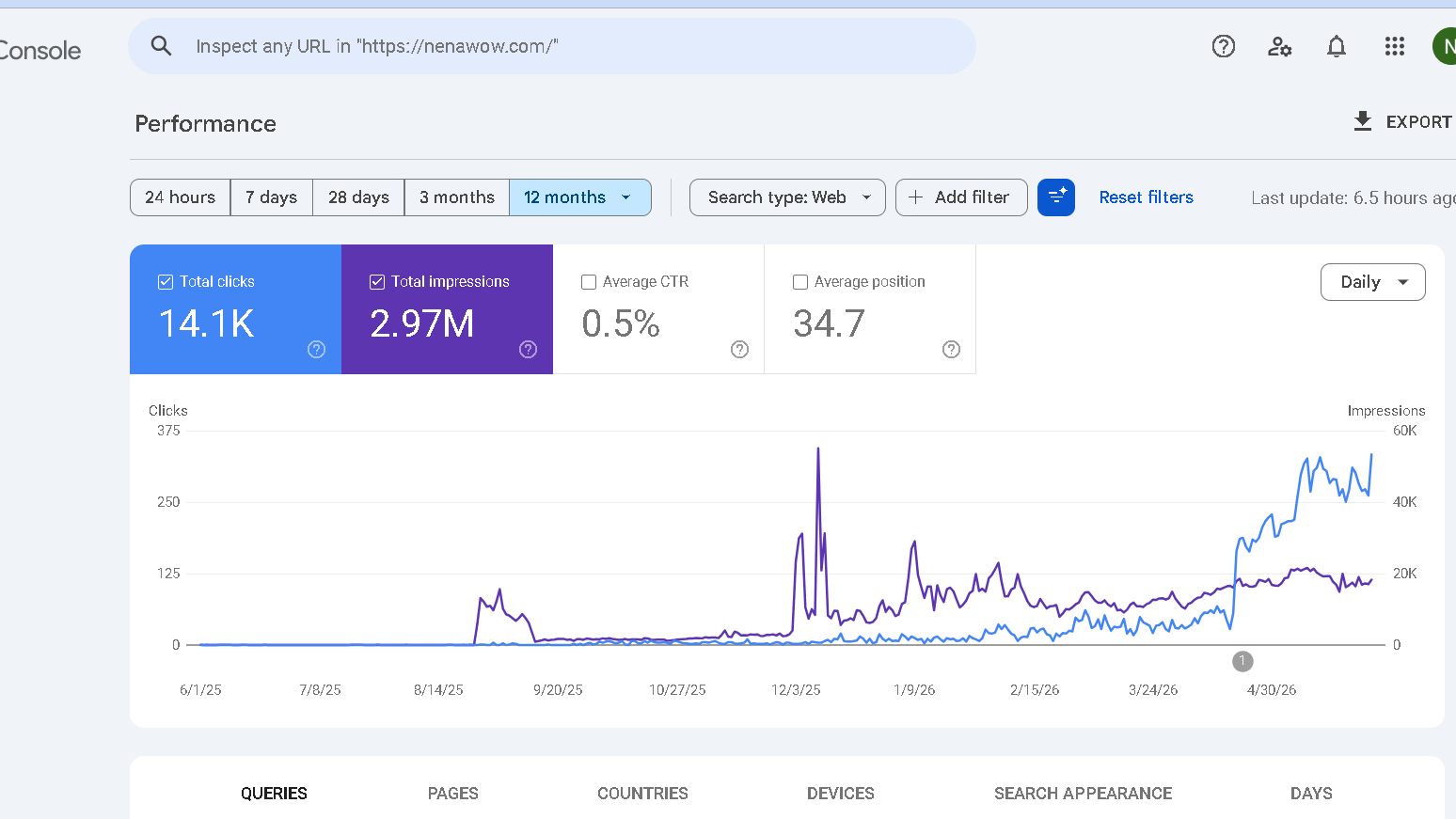
You can see the Google Search Console screenshot below for my website nenawow.com, and traffic changes last 12 months.
📊 Case Study Snapshot
| Metric | Detail |
|---|---|
| Articles Optimized | 100+ |
| Content Mix | Affiliate reviews, comparisons, informational posts |
| Timeframe | 18 Months |
| Keyword Difficulty | KD 5–25 (Ahrefs) |
| Optimization Time | 20–35 min per article |
| Backlinks Built | Minimal — no active outreach |
📈 Performance Observations
- Steady month-over-month improvement in Search Console impressions across both sites
- Multiple page 1 rankings for low-competition affiliate comparison keywords
- Optimized articles consistently outperformed non-optimized drafts from the same period
- All growth driven by organic indexing — no paid boosts
Key Takeaway: NeuronWriter’s NLP scoring gave me a concrete optimization target for each article. That consistency paid off over time, even without aggressive link building.
Real Keywords That Reached Page 1
| Keyword Type | KD | Position | Time to Rank |
|---|---|---|---|
| Nomi AI alternatives | 5 | #8 | 6 weeks |
| Candy AI vs OurDream | 8 | #7 | 4 weeks |
| Topview AI alternatives | 10 | #9 | 8 weeks |
| Semrush vs SearchAtlas | 11 | #7 | 9 weeks |
What’s New in NeuronWriter in 2026?
NeuronWriter has improved steadily over the last year. The platform is still focused on SEO content optimization, but several additions make it more useful for affiliate publishers and content teams.
Notable updates include:
• GPT-4o integration for AI-assisted writing
• Claude integration for content generation and editing
• Improved SERP analysis and NLP extraction
• Better Content Designer workflows
• Expanded internal linking capabilities
• Continued support for AppSumo lifetime users
For me, the biggest improvement is the AI model support. The AI tools are still not good enough to publish without editing, but they are much better at expanding sections and helping with outlines than they were a year ago.
That improvement is real.
What Is NeuronWriter and How Does It Work?
NeuronWriter is an AI-powered SEO content optimization platform built around one core idea: analyze what’s already ranking on Google for your target keyword, then give you a clear, data-driven guide to writing something more thorough and semantically complete.
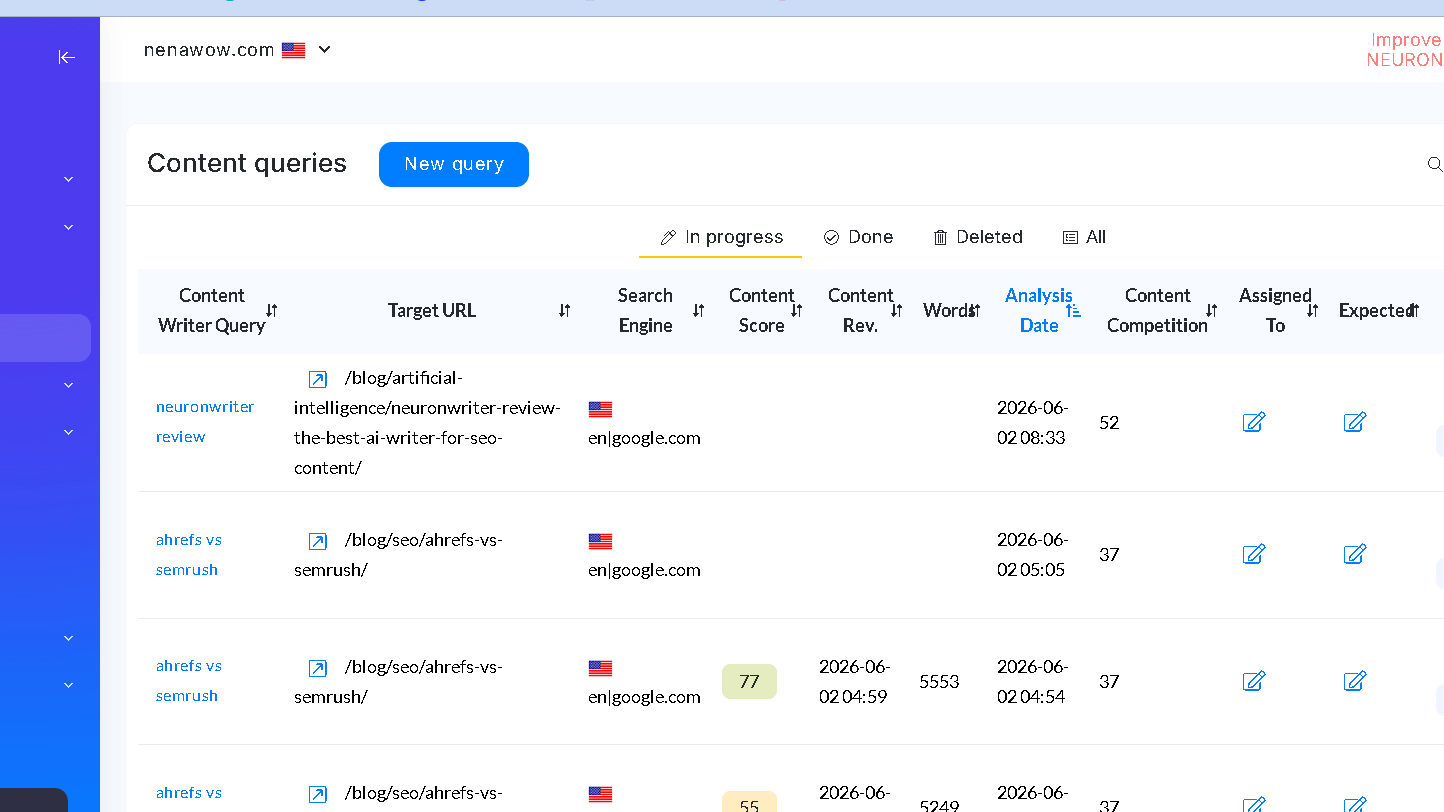
It’s not primarily a text generator — it’s an optimizer. The tool uses natural language processing (NLP), real-time SERP analysis, and competitor data to score your content and tell you exactly what to improve. Since launching in 2021, it has grown to over 300,000 users and holds AppSumo Hall of Fame status.
How NeuronWriter Works for SEO Content Optimization
NeuronWriter takes your target keyword and runs it against the current Google SERP. It analyzes the top-ranking pages, extracts the semantic terms, entities, headings, and questions that appear across them, and builds a scoring rubric for your content.
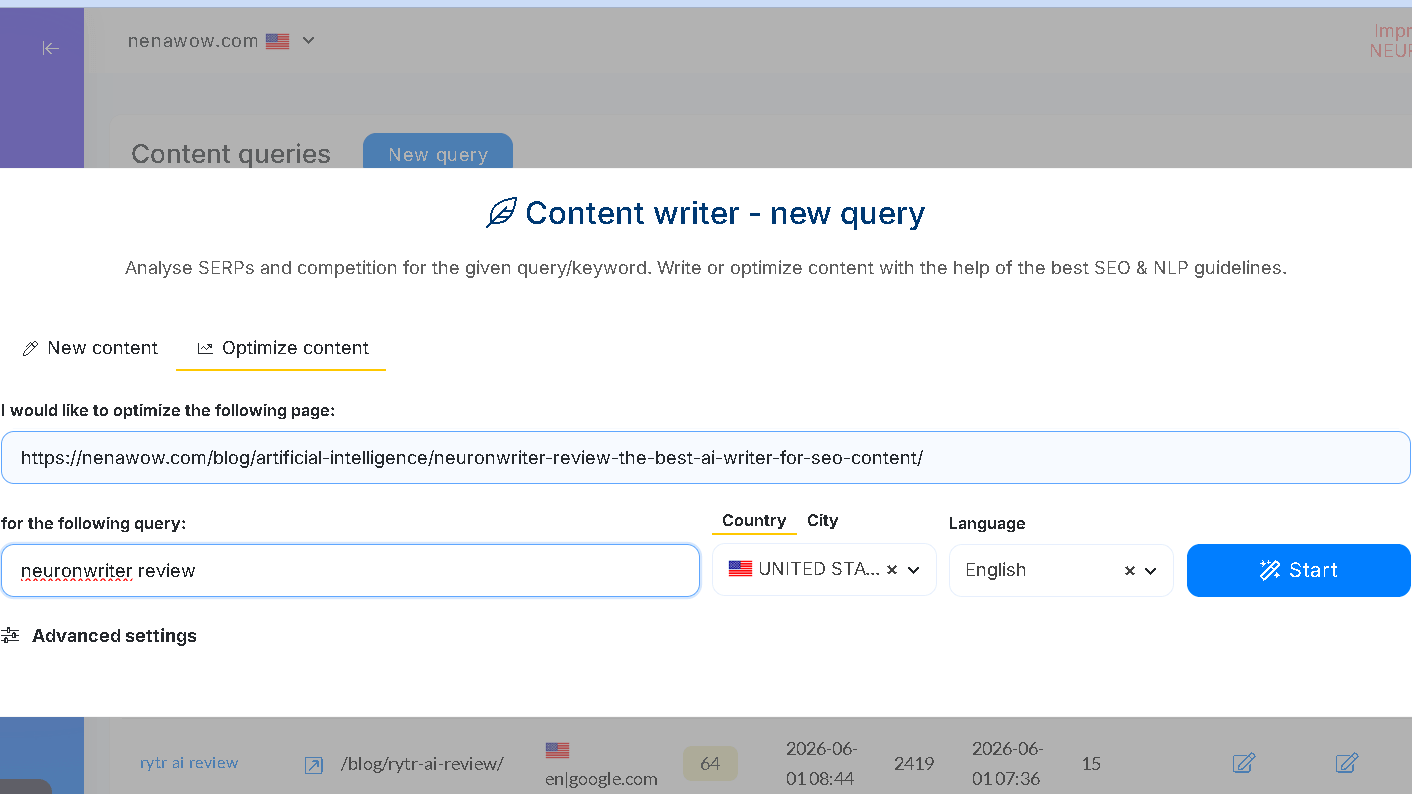
As you write, the editor updates your Content Score in real time. The goal is to exceed the average score of the competing pages — without keyword stuffing or over-optimization.
NeuronWriter Features and SEO Tools (2026)
NLP Content Scoring & Real-Time Editor
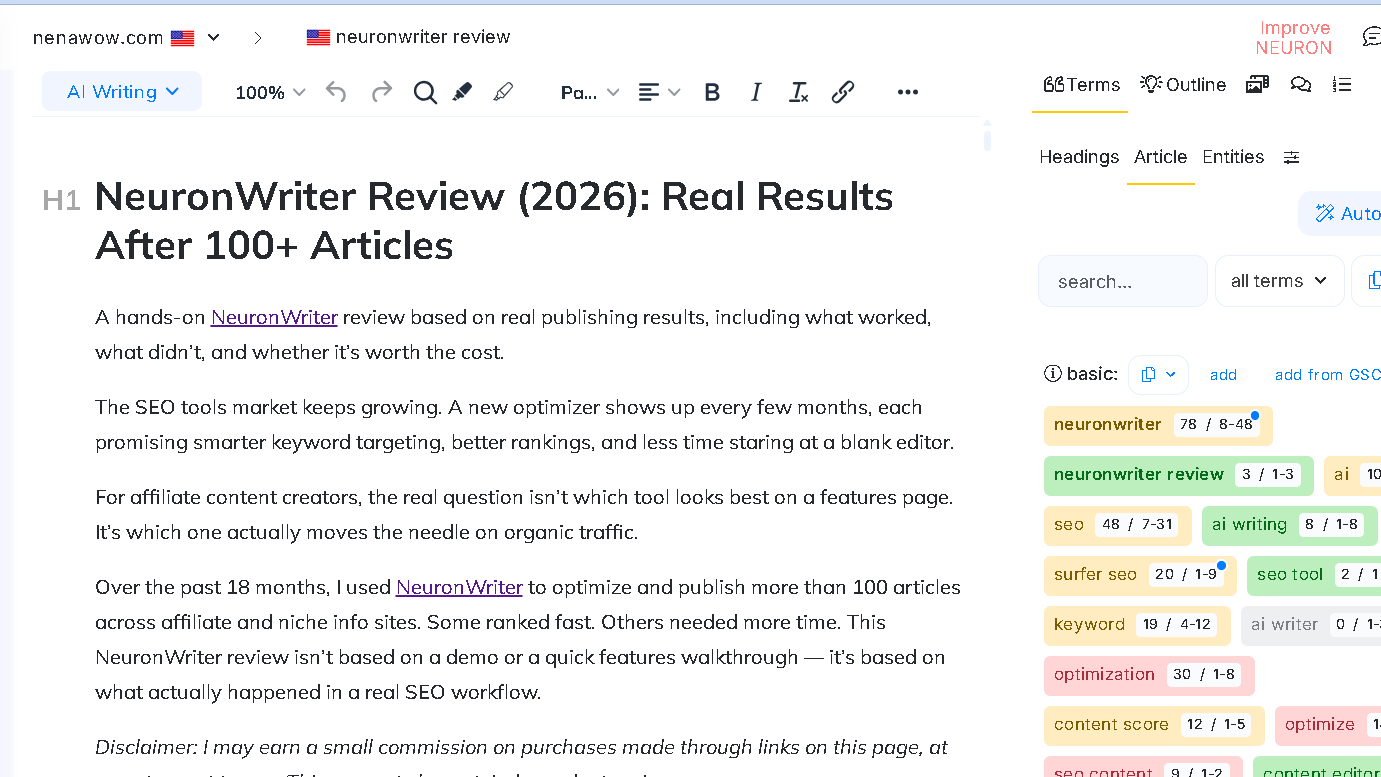
This is the engine the whole platform runs on. NeuronWriter analyzes the top 30 Google results for your keyword and extracts the NLP terms, entities, and semantic concepts those pages use. A color-coded system updates live as you write — green means covered, yellow means you could add more, red means missing.
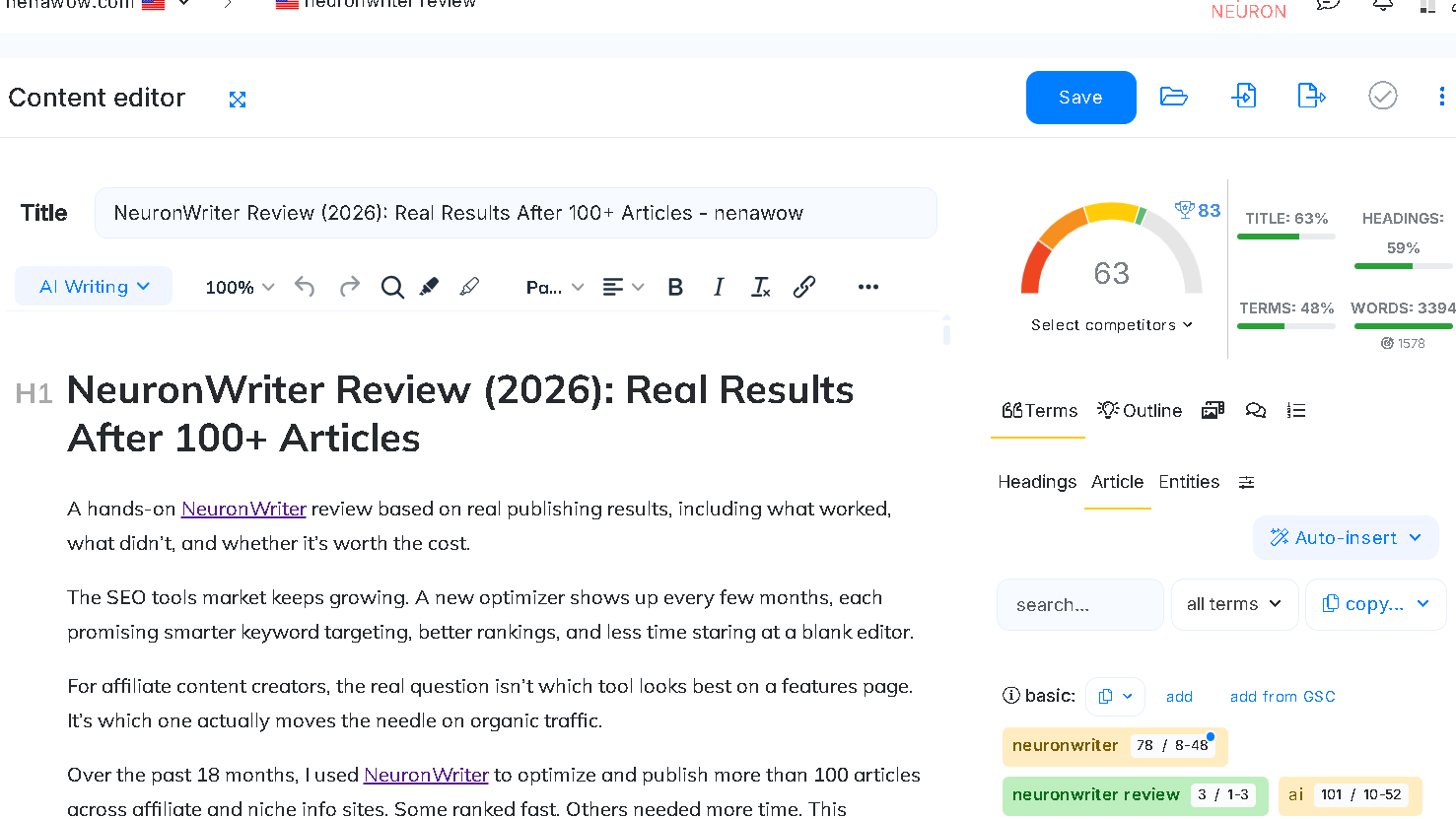
The scoring tends to run stricter than Surfer SEO’s. In practice, hitting a solid NeuronWriter score often means a more thoroughly optimized piece. The editor supports heading insertion, paragraph-level AI assistance, and paraphrasing tools built directly into the writing flow.
Competitor SERP Analysis
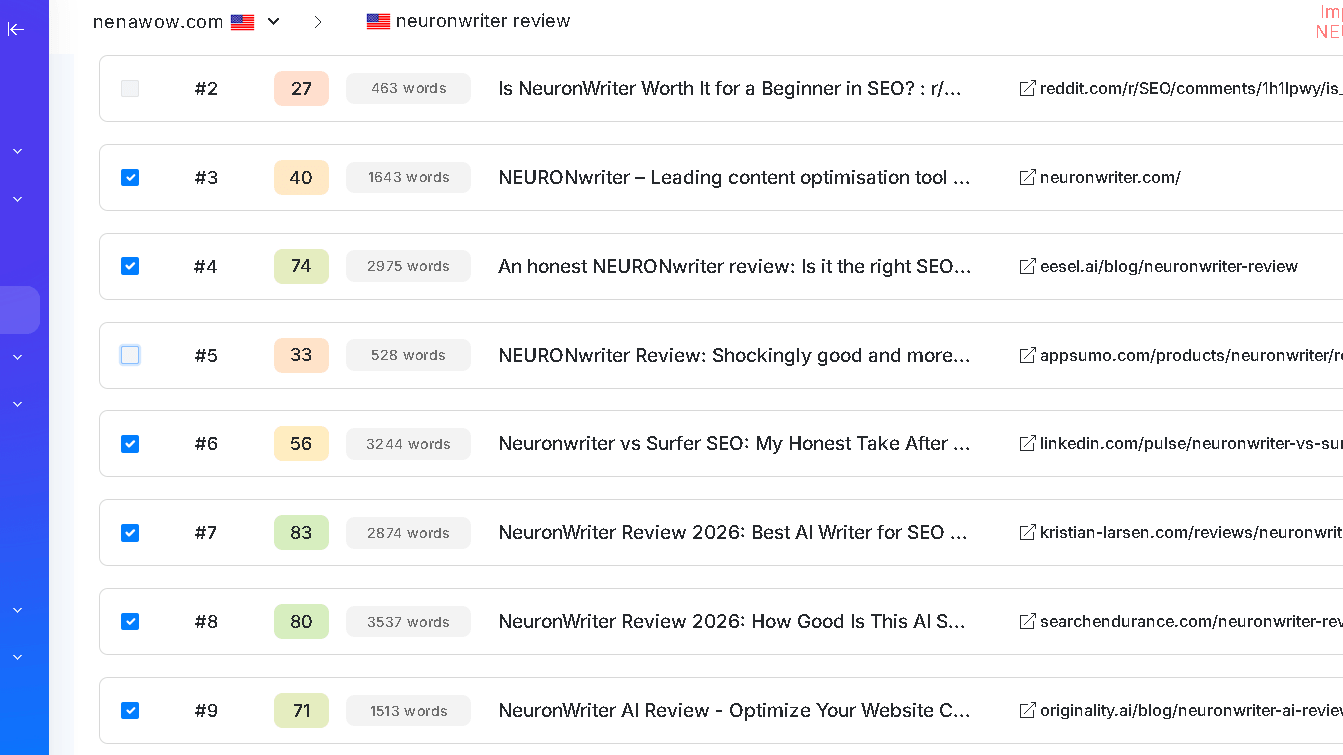
Before you write a word, NeuronWriter gives you a full breakdown of who’s ranking and why — word counts, heading structures, Domain Authority scores, and topical coverage gaps across up to 30 competing pages.
For affiliate content, it’s particularly useful for knowing whether a piece needs three comparison points or ten, and which product attributes matter most to the SERP. This pre-writing phase alone can save 30–45 minutes of manual research per article. You can see an example of the competitor report below.
AI Writing Assistance
NeuronWriter includes AI drafting via its Content Designer, supporting GPT-4o and Claude integrations. The honest take: AI writing features are useful for expanding thin sections and getting unstuck, but not good enough to publish raw. NeuronWriter is best treated as a research-and-scoring layer you write into, not a drafting tool you publish from.
If AI drafting is your main priority rather than SEO optimization, my Jasper vs ChatGPT comparison explores two of the most popular AI writing tools available today.
Internal Linking Suggestions
NeuronWriter can crawl your site or import your sitemap and suggest internal link opportunities within each article. For affiliate sites with an existing content library, this is a passive authority-building tool that surfaces linking opportunities you’d otherwise miss.
WordPress Integration & Other Tools
Direct WordPress publishing is available on the Gold plan and above — useful for high-volume workflows. The platform also includes a plagiarism checker (Gold plan+), a content calendar for managing multiple projects, and multi-language support across 19 languages for full NLP analysis.

Does NeuronWriter Content Rank on Google?
Yes — with caveats. Content optimized with NeuronWriter can rank on Google, particularly for low to medium competition keywords. In hands-on testing, well-optimized articles following NeuronWriter’s NLP scoring indexed quickly and performed competitively.
The tool doesn’t guarantee rankings — keyword selection, domain authority, and backlinks still matter more than any optimizer. What NeuronWriter does is reduce the gap between a good article and a Google-ready one, particularly for semantic completeness and topical coverage.
NeuronWriter Pricing Plans
| Plan | Monthly Price | Projects | Content Analyses |
|---|---|---|---|
| Bronze | $23/mo | 2 | 25/mo |
| Silver | $45/mo | 5 | 50/mo |
| Gold | $69/mo | 10 | 75/mo |
| Platinum | ~$93/mo | 25 | Expanded |
| Diamond | ~$117/mo | 50 | Full suite |
Annual billing saves up to 40%. The practical starting point for most affiliate publishers is the Gold plan, which unlocks WordPress integration and the plagiarism checker. For lighter use, Bronze or Silver works if you’re optimizing fewer than 25 articles per month.
NeuronWriter’s AppSumo lifetime deals are worth mentioning — a one-time purchase covers ongoing access with no recurring fees, and historically those deals cost less than a few months of a Surfer SEO subscription.
NeuronWriter vs Surfer SEO vs Jasper
| Feature | NeuronWriter | Surfer SEO | Jasper |
|---|---|---|---|
| Primary Focus | NLP content optimization | Content scoring & briefs | AI copywriting |
| SEO Data | Deep SERP + NLP analysis | Strong content scoring | Limited |
| Pricing | $23–$117/mo (or lifetime) | $79+/mo | $49+/mo |
| AI Writing | GPT-4o + Claude | Surfer AI built-in | Core feature |
| WordPress Integration | Gold plan+ | Available | Available |
| Key Strength | Value + optimization depth | Polish + team features | Brand voice control |
For pure optimization depth at a low cost, NeuronWriter wins. Surfer SEO is worth considering for polished agency workflows. Jasper serves a different use case — it’s a copywriting tool first, not an SEO optimizer.
NeuronWriter Pros and Cons
What I Like
- NLP scoring is genuinely strong — comparable to tools costing 4–9x more
- Real-time SERP analysis provides a clear pre-writing roadmap
- Competitor content gap analysis saves significant research time
- Exceptional price-to-feature ratio, especially with lifetime deal access
- Internal linking suggestions scale well for established affiliate sites
Where It Falls Short
- AI-generated drafts need significant editing before publishing
- Interface has a noticeable learning curve for new users
- Full NLP analysis limited to around 19 languages
- WordPress integration and plagiarism checker locked behind the Gold plan
Who Should Use NeuronWriter
NeuronWriter works best for affiliate marketers, niche site builders, and solo SEO consultants who want to optimize content with real data rather than guesswork. If you’re publishing 10+ articles a month and you care about ranking for specific keywords, this tool fits naturally into a standard WordPress workflow.
It’s not the right tool for complete beginners who want one-click articles, publishers in YMYL verticals who need expert review regardless of any tool’s output, or brands with highly developed tone requirements where the SEO-first structure feels too formulaic.
NeuronWriter Alternatives: Which SEO Content Tool Should You Choose in 2026?
Choosing an SEO content optimization tool isn’t just about features — it’s about workflow fit, budget, and how aggressively you’re scaling content.
Here’s how NeuronWriter compares to the biggest alternatives in 2026.
Another option worth considering is Scalenut. In my full Scalenut Review, I tested its content optimization workflow, AI writing tools, and SEO capabilities.
NeuronWriter vs Surfer SEO
This is the most common comparison — and for good reason.
Surfer SEO is one of the most established content optimization platforms. NeuronWriter is often positioned as the budget-friendly alternative.
If you’re considering Surfer as an alternative, see my full Surfer SEO Review where I break down pricing, content scores, AI features, and real-world results.
Core Differences
| Feature | NeuronWriter | Surfer SEO |
|---|---|---|
| SERP Analysis Depth | Top 30 results with detailed NLP extraction | Strong SERP + Content Editor |
| NLP Strictness | Stricter scoring | More forgiving scoring |
| AI Writing | GPT-4o + Claude integration | Surfer AI built-in |
| Workflow Tools | Internal linking + content planner | Strong team collaboration |
| Pricing | $23–$117/mo | $79+/mo |
| Lifetime Deal | Yes (historically via AppSumo) | No |
I also compared these tools directly in my Scalenut vs Surfer SEO comparison, which highlights how different content optimization platforms approach SERP analysis and AI-assisted writing.
Which Is Better?
- Choose NeuronWriter if:
You’re an affiliate marketer, niche site builder, or solo SEO who wants deep optimization at a lower monthly cost. - Choose Surfer SEO if:
You run an agency, manage a content team, or need more polished collaboration tools.
My experience:
NeuronWriter’s scoring tends to be stricter. If you can hit a high score in NeuronWriter, your content is usually very well optimized. Surfer’s UI feels more refined, but for pure optimization depth per dollar, NeuronWriter wins.
NeuronWriter vs Frase
Frase positions itself as an AI-powered content brief and research tool first, optimizer second.
Core Differences
| Feature | NeuronWriter | Frase |
|---|---|---|
| SERP NLP Extraction | Deep entity + semantic analysis | Strong question extraction |
| Content Briefs | AI outline + competitor breakdown | Excellent automated briefs |
| Optimization Focus | Heavily NLP-driven | More question-driven |
| AI Writing | Integrated | Strong AI generation tools |
| Pricing | Lower entry cost | Mid-range pricing |
Which Is Better?
- Choose NeuronWriter if:
You care most about semantic scoring and beating competitors on content depth. - Choose Frase if:
You create lots of client briefs or need fast research summaries.
NeuronWriter feels more technical and data-heavy. Frase feels more research-focused and workflow-oriented.
NeuronWriter vs MarketMuse
MarketMuse targets enterprise SEO teams and high-authority publishers.
Core Differences
| Feature | NeuronWriter | MarketMuse |
|---|---|---|
| Target User | Affiliates, niche sites, small teams | Enterprise publishers |
| Content Modeling | SERP-based NLP | AI-driven topic modeling |
| Price | $23–$117/mo | Significantly higher |
| Ease of Use | Moderate learning curve | Steeper learning curve |
| Enterprise Features | Limited | Advanced content inventory + strategy tools |
Which Is Better?
- Choose NeuronWriter if:
You want affordable SERP-based optimization that scales. - Choose MarketMuse if:
You manage large content inventories and need advanced content audits and strategic modeling.
For most affiliate publishers, MarketMuse is overkill. NeuronWriter covers 80–90% of practical SEO optimization needs at a fraction of the cost.
NeuronWriter vs Jasper
This comparison is often misunderstood.
Jasper is primarily an AI copywriting tool — not a true SEO optimization platform.
I cover this difference in more detail in my Jasper vs ChatGPT comparison, where I tested both tools for content creation, research, and long-form writing.
Core Differences
| Feature | NeuronWriter | Jasper |
|---|---|---|
| Primary Focus | SEO optimization | AI copywriting |
| SERP Analysis | Yes | No native deep SERP NLP |
| Content Score | Yes | No structured NLP scoring |
| Brand Voice | Basic | Advanced |
| Best For | Ranking-focused content | Marketing copy & branding |
Which Is Better?
- Choose NeuronWriter if:
Your goal is ranking in Google. - Choose Jasper if:
Your goal is generating marketing copy, ads, or brand-controlled messaging.
They serve different purposes. In fact, many publishers use them together — Jasper for drafting, NeuronWriter for optimization.
NeuronWriter vs Clearscope
Clearscope is another premium optimization tool often used by agencies and SaaS companies.
Core Differences
| Feature | NeuronWriter | Clearscope |
|---|---|---|
| Pricing | Budget-friendly | Premium pricing tier |
| NLP Optimization | Strong | Very strong |
| UI Polish | Functional | Extremely polished |
| Target User | Affiliates & SMBs | Enterprise & SaaS teams |
Clearscope has a reputation for clean UX and powerful optimization — but at a significantly higher cost.
For solo publishers, NeuronWriter provides similar optimization logic without the enterprise price tag.
Which SEO Content Tool Should You Choose?
Here’s the simple breakdown:
- 🟢 Best Budget Optimization Tool: NeuronWriter
- 🟢 Best for Agencies & Teams: Surfer SEO
- 🟢 Best for AI Drafting: Jasper
- 🟢 Best for Enterprise Strategy: MarketMuse
- 🟢 Best for Automated Briefs: Frase
If you’re publishing 10–30 SEO articles per month on affiliate or niche sites, NeuronWriter offers the strongest balance of:
- SERP depth
- NLP scoring
- Cost efficiency
- Practical ranking utility
And in real-world testing, that balance is what actually moves rankings.
How to Use NeuronWriter for SEO Content (Step-by-Step Workflow)
One of NeuronWriter’s biggest advantages is that it fits naturally into a structured SEO workflow. Here’s exactly how I use it when publishing affiliate and informational content.
Step 1: Create a New Content Analysis
Start by entering your primary keyword into NeuronWriter’s Content Editor.
For example:
- “best email marketing software for small business”
- “NeuronWriter alternatives”
- “[Tool] vs [Tool] comparison”
Choose your target country and language. NeuronWriter will then analyze the top 30 Google search results and generate a full SERP breakdown.
This takes about 60–90 seconds.
Step 2: Analyze the SERP Before Writing
Before drafting anything, review:
- ✅ Average word count of ranking pages
- ✅ Competitor content scores
- ✅ Heading structure (H2/H3 breakdown)
- ✅ Frequently covered subtopics
- ✅ Missing content gaps
This phase alone can save 30–45 minutes of manual competitor research.
Instead of guessing what Google wants, you see patterns immediately:
- Are comparison tables common?
- Do pages include pricing breakdowns?
- Are FAQs ranking?
- Is the average article 1,500 words or 4,000+?
This determines your scope before you write a single paragraph.
Step 3: Build Your Outline Using Content Designer
Next, use the Content Designer to generate a suggested outline.
NeuronWriter pulls:
- Common headings from ranking competitors
- Related questions
- NLP-relevant entities and terms
I don’t copy this outline directly — I refine it.
My rule:
Cover every important SERP topic — but organize it better than competitors.
This is where you create structural advantage.
Step 4: Write and Optimize in Real Time
Now you start writing inside the editor.
On the right side, you’ll see:
- Content Score
- Target score range
- NLP term usage
- Missing important phrases
The goal is not to “stuff” keywords.
The goal is to:
- Cover important semantic entities
- Match search intent
- Address topical completeness
In most cases, I aim to exceed the average competitor score by 5–10 points.
Example:
- Average score: 62
- My target: 70+
This ensures you’re not just matching the SERP — you’re improving on it.
Step 5: Fill Content Gaps Intentionally
The most powerful part of NeuronWriter isn’t the score — it’s the gap analysis.
You’ll often notice:
- Competitors mention a feature you didn’t
- Pricing details missing
- Important use cases underexplored
- Specific buyer objections not addressed
Instead of rewriting the whole article, you strategically expand weak sections.
This is how optimized content often jumps from page 2 to page 1.
Step 6: Add Internal Links
If you’ve connected your site or sitemap, NeuronWriter suggests internal linking opportunities.
I use this to:
- Strengthen topic clusters
- Support affiliate money pages
- Improve crawl depth
Internal linking is one of the most underrated ranking factors for niche sites — and this step takes less than five minutes.
Step 7: Final Review & Publish
Before publishing:
- ✅ Ensure your score is competitive
- ✅ Review readability (avoid robotic NLP stuffing)
- ✅ Add original insights or experience
- ✅ Insert screenshots or proof where possible
- ✅ Optimize title + meta description
Then publish directly to WordPress (Gold plan and above) or export the content.
How Long Does the Full Process Take?
For me:
- SERP research: 10–15 minutes
- Outline creation: 10 minutes
- Writing + optimization: 30–60 minutes
- Final polish + linking: 10 minutes
Total: ~60–90 minutes per well-optimized article.
Once you’ve used the tool for a few weeks, the workflow becomes second nature.
The Key Insight Most Users Miss
NeuronWriter is not a “write for me” button.
It’s a decision-making tool.
If you treat it as:
- A research assistant
- A SERP pattern analyzer
- A topical coverage checklist
It becomes extremely powerful.
If you treat it as:
- A one-click AI blog generator
You’ll be disappointed.
Used correctly, it helps you consistently produce content that aligns with what’s already ranking — while still allowing room for originality and experience.
A highly optimized FAQ section (to win PAA snippets)
Final Verdict: Is NeuronWriter Worth It Long-Term?
I’ve used NeuronWriter consistently for over 18 months across real affiliate sites — and it earns its place in the workflow.
It’s not a shortcut. What it does, and does very well, is give you a data-backed map of what your content needs to compete in the SERP. The NLP scoring is strict, the competitor analysis is thorough, and the price-to-feature ratio is genuinely unmatched at this price point.
For affiliate marketers who are serious about SEO but don’t want to pay Surfer SEO prices indefinitely, NeuronWriter is the obvious alternative. Pair it with solid keyword research, real human editing, and consistent publishing — and it delivers.
NeuronWriter FAQ (2026)
Yes — NeuronWriter is worth it in 2026 for affiliate marketers, bloggers, and niche site builders who want affordable SEO content optimization. It provides deep SERP analysis, NLP-driven content scoring, and competitor gap insights at a significantly lower price than tools like Surfer SEO or Clearscope.
NeuronWriter can help content rank by improving semantic coverage and topical completeness. It analyzes top-ranking pages and identifies important entities, terms, and structural patterns.
NeuronWriter is better than Surfer SEO for users who want deeper NLP scoring at a lower cost. Surfer SEO offers a more polished interface and stronger team collaboration tools.
Yes, for most individual publishers, NeuronWriter can replace Surfer SEO. It offers similar SERP analysis, content scoring, and optimization guidance. However, agencies managing large teams may prefer Surfer’s workflow features and integrations.
NeuronWriter is beginner-friendly once you understand basic SEO concepts like keyword targeting and search intent. However, it is not a one-click blog generator.
For experienced users, optimizing an article typically takes 20–40 minutes after drafting. The platform streamlines SERP research, entity coverage, and content gap analysis, reducing manual competitor research time significantly.
NeuronWriter’s content score is based on real-time analysis of top-ranking SERP results and extracted NLP entities. While no scoring system guarantees rankings, the metric is directionally accurate.