

SE Ranking vs Ranktracker? Which one to pick?
If you’re on a budget and need an all-in-one SEO suite, SE Ranking covers more features and deeper site audits. But if you just want a focused, easy rank-tracking tool, Ranktracker’s simple setup and straightforward keyword monitoring make life easier.
This SE Ranking vs Ranktracker review explains the core differences: rank tracking, keyword research, competitor and backlink analysis, technical audits, pricing, integrations, and user support.
You’ll get side-by-side details and practical tips to help you decide quickly.
Core Differences Between SE Ranking vs Ranktracker
These two SEO toolsets track ranks but fit different workflows. One’s a broader all-in-one platform with auditing and marketing features. The other is all about simplified, affordable rank tracking and keyword research.
SEO Platform Summary
SE Ranking stands as a complete SEO platform. There is the SE Ranking review with more information about this SEO tool.
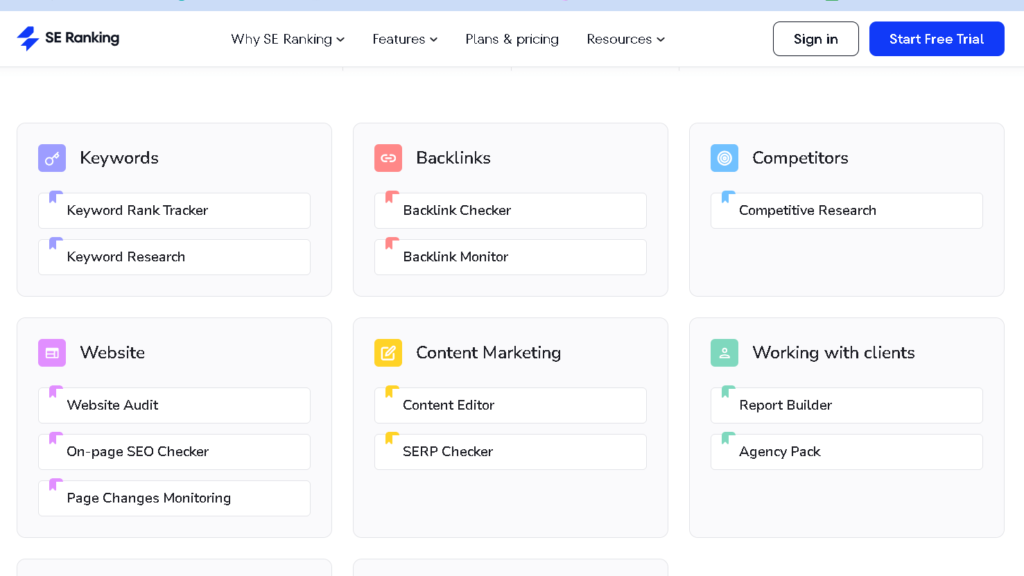
You can perform site audits, keyword monitoring across search engines and locations, backlink analysis, and a marketing plan module .
The tools are all organized within the interface in analytics, On-page, and competitor research.
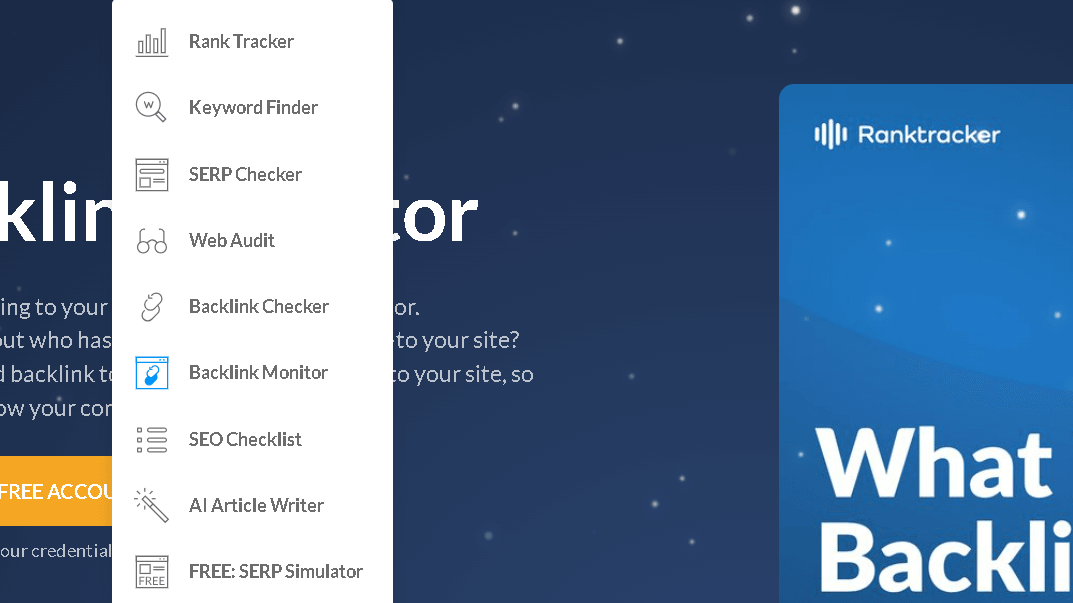
You can then perform most SEO tasks without having to juggle additional apps. It is primarily a rank tracker with some keyword capabilities.
It allows you to share your location, track events and things geographically in your area as well as globally, and do some basic geotag keyword tagging.
For rank tracking as well as the least learning curve is your main concern, you will sigh with relief at Ranktracker’s minimalist design.
Both are cloud- based and operate on web and mobile.
SE Ranking throws in more tools.
With Ranktracker the basic functionality is right there in front and easy to find.
Primary Use Cases
If you run an agency or manage several websites, SE Ranking is usually a better fit.
It supports multi-user accounts, white-label reports, deep site audits, and competitor gap analysis.
You can do technical fixes, content planning, and client reporting all in one spot.
Ranktracker works best when you want accurate, frequent rank updates and simple keyword lists.
It’s a solid choice for solo SEOs, small businesses, or anyone tracking campaigns without needing advanced audits or fancy marketing modules.
It’s also friendlier on the wallet at entry tiers.
Some teams actually use both—SE Ranking for project work, Ranktracker for quick, high-frequency checks.
Your choice comes down to whether you want a full SEO toolkit or just a fast, focused rank tracker.
Feature Focus
SE Ranking goes broad: keyword rank tracker, website audit, backlink monitor, keyword suggestion tool, and on-page checker.
Reporting and white-labeling are strong points, and you can schedule crawls and set up client dashboards.
The goal is to replace several separate SEO tools with one suite.
Ranktracker puts the spotlight on speed and simplicity in rank tracking and keyword research.
You get position history, SERP snapshots, keyword difficulty metrics, and focused keyword lists.
If you want a reliable, affordable rank tracker and keyword finder—Ranktracker’s likely enough.
Rank Tracking and Keyword Monitoring
Here’s how each tool tracks keyword positions, monitors rankings by location, and reads live SERP features.
You’ll see what data updates look like, how precise the tracking feels, and which tool handles local SEO best.
Position tracking capabilities
You need precise keyword rank tracking to know if your SEO changes actually work.
SE Ranking gives you daily updates, historical charts, and multi-engine tracking (Google desktop, mobile, Bing).
It also provides the number of position changes, % movement and visibility score so you can see the trends and not get caught up in the minutiae.
Ranktracker is all about quick, frequent checks.
They will provide you with position logs as well as .keyword difficulty scores.
It catches steep declines and will give asterisks for movement, but you won’t get the same granular trend context you will with SE Ranking.
Each allows you to organize keywords and to filter by tag or project.
Grouping enables you to keep track of how your campaigns are doing and export CSVs for reports.
Local Rank Tracking
When your customers search locally, you’ve got to monitor rankings in specific cities or postal areas.
SE Ranking supports granular geo-targeting across thousands of locations and shows local packs, map results, and city-level position differences.
That’s a big help for testing local landing pages or tracking Google Business Profile changes.
Ranktracker tracks local ranks for many cities and makes it easy to switch locations.
It reports position differences between national and local results, and flags SERP features like snippets or video results that affect visibility.
For both, set up separate projects per region and compare city-level data side by side to see if your local tweaks work.
Real-Time Data and SERP
Analysis Real-time data matters when you’re running a promo or fixing a ranking drop.
Ranktracker offers near real-time checks and instant SERP snapshots, so you can see the latest top results and featured snippets.
That speed helps you react to algorithm shifts or competitor moves within hours, not days.
SE Ranking focuses on daily automated checks, with on-demand refreshes and deeper SERP feature tracking.
It flags rich snippets, knowledge panels, and paid vs. organic changes.
The historical SERP view is handy for linking ranking changes to updates or content tweaks.
Both tools give you SERP analysis tables showing top URLs, snippet types, and position changes.
Use these to compare your page with competitors and figure out where to fix or update content.
Keyword Research and Analysis
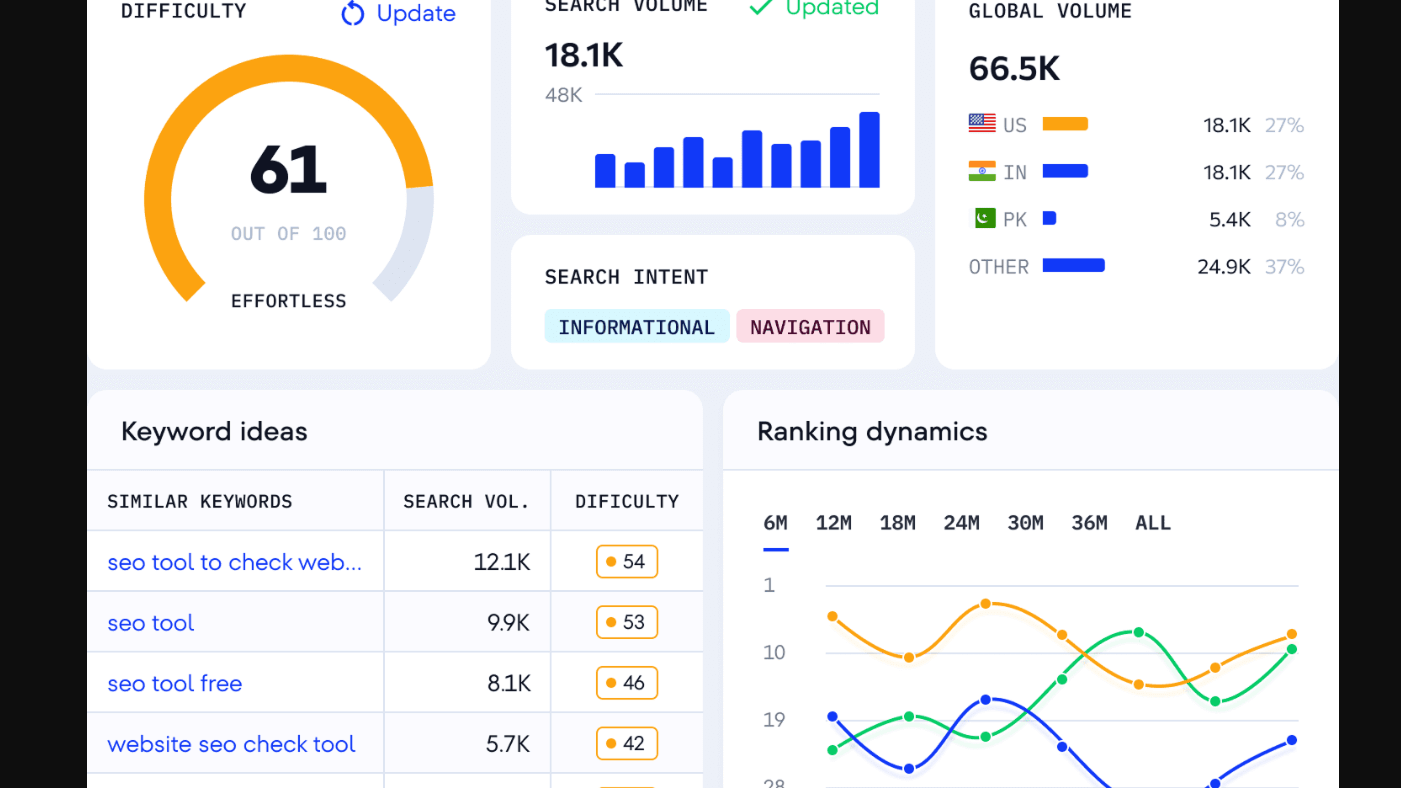
You want tools that show real search numbers, how tough it is to rank, and content ideas you can use now.
Here’s how database size, difficulty scores, and content idea tools stack up.
Keyword Databases, Search Volume
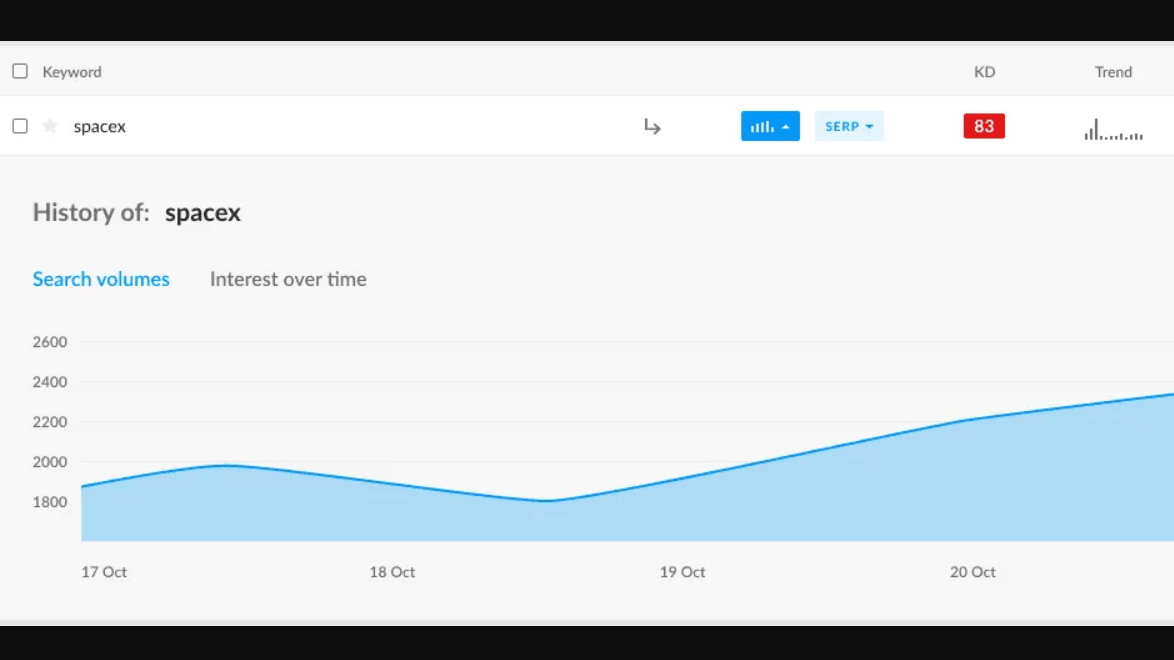
SE Ranking and Ranktracker both offer extensive keyword databases, but each is unique.
SE Ranking is drawing from a more general global index and tends to provide more seeded keyword ideas per seed term.
If you’re looking to rank in multiple countries, or need long-tail keywords, even better.
It also provides specific local coverage, allowing you search volumes by city, which ranktracker does not.
This is useful to estimate traffic in a city or with small market keywords.
Both display monthly search volume and, the trends- but, note how often they refresh- old volume numbers can throw off your planning.
Device, country, language and export option filters are all a big time saver for when you want to construct content briefs.
Keyword Difficulty Score
Keyword difficulty scores help you choose your battles.
SE Rankings are based on a combined score of backlinks, domain authority and onpage signals found in top pages.
You obtain a multi- angle view in order to prioritize keywords in larger or multiple campaigns.
The difficulty metric in Ranktracker provides a higher level, a rough estimate of how difficult or easy is to rank on a particular keyword or phrase.
It centers on on-page, and SERP competition and is updated more often for local queries. And if you are a one person or small, you can see the low-effort wins more readily. Use difficulty scores as a starting guide, rather than a hard and fast rule. NEVER take the “top 10 in title” for granted as you should double check the results yourself, page strength, backlinks, and search intent are more important than a number.
Content Idea Finder
A content idea tool provided by SE Ranking extracts keywords, questions, topics in one report.
Each concept is associated with search volume and proposed landing pages.
You have the option to produce briefs complete with headings, keyword recommendations, and, examples of competitors and other briefs to get writing going.
The tool Ranktracker includes AI-suggested keywords as well as question-based suggestions and the ability to incorporate these as well as rank tracking data.
It is fine if you plan to run a brief campaign or need topic lists quickly.
Similarly to the above, select the how-to, list, comparison etc… post types by viewing keywords.
Then pair intent to difficulty and decide which to publish first.
Competitor & Backlink Analysis
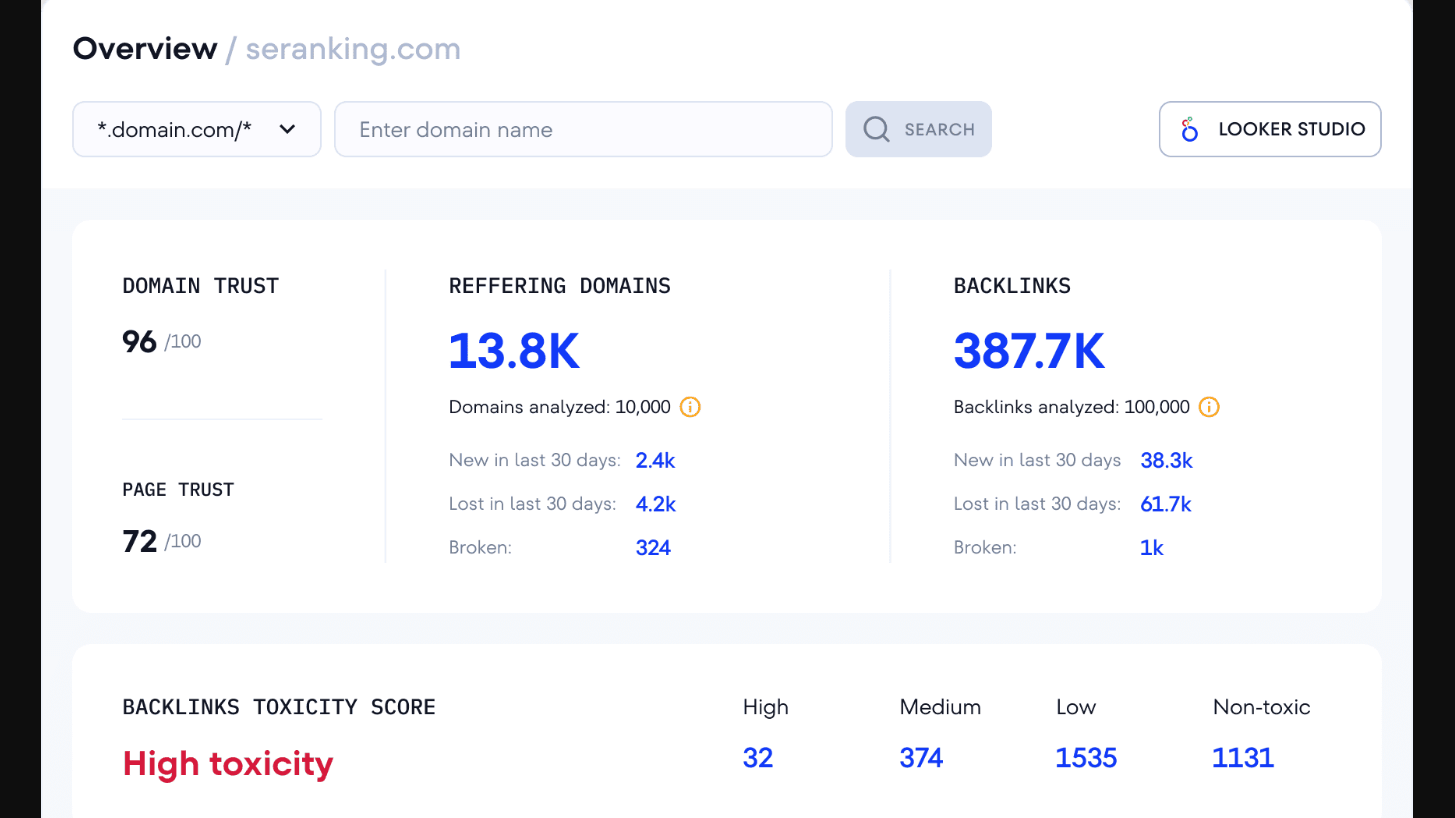
You get a clear look at rivals’ keyword gaps, their top pages, and backlinks driving their rankings.
The tools show who links to them, which pages earn the most links, and where you might win similar ones.
Competitive analysis and research
Perform competitor analysis to identify the specific pages and keywords that drive traffic to competitors.
Monitor top pages for organic sessions as well as top pages for which keywords they rank for.
This will help you to identify in which subjects you need to focus and which pages are working well and which ones could you improve or replicate.
In addition, compare your niche to at least a few of competitors to identify keyword gaps, i.e. which terms they rank for that you don’t.
Export those lists and start concentrating on high volume, low competition keywords first.
Look at your competitors in the SERPs (snippets, videos) and try to match their content format.
Examine their site structure and internal linking to get an idea of what content to cluster.
Create an action plan: which pages to build, which to update, and what keywords to go after for low lying fruit.
Backlink Monitoring and Tactics
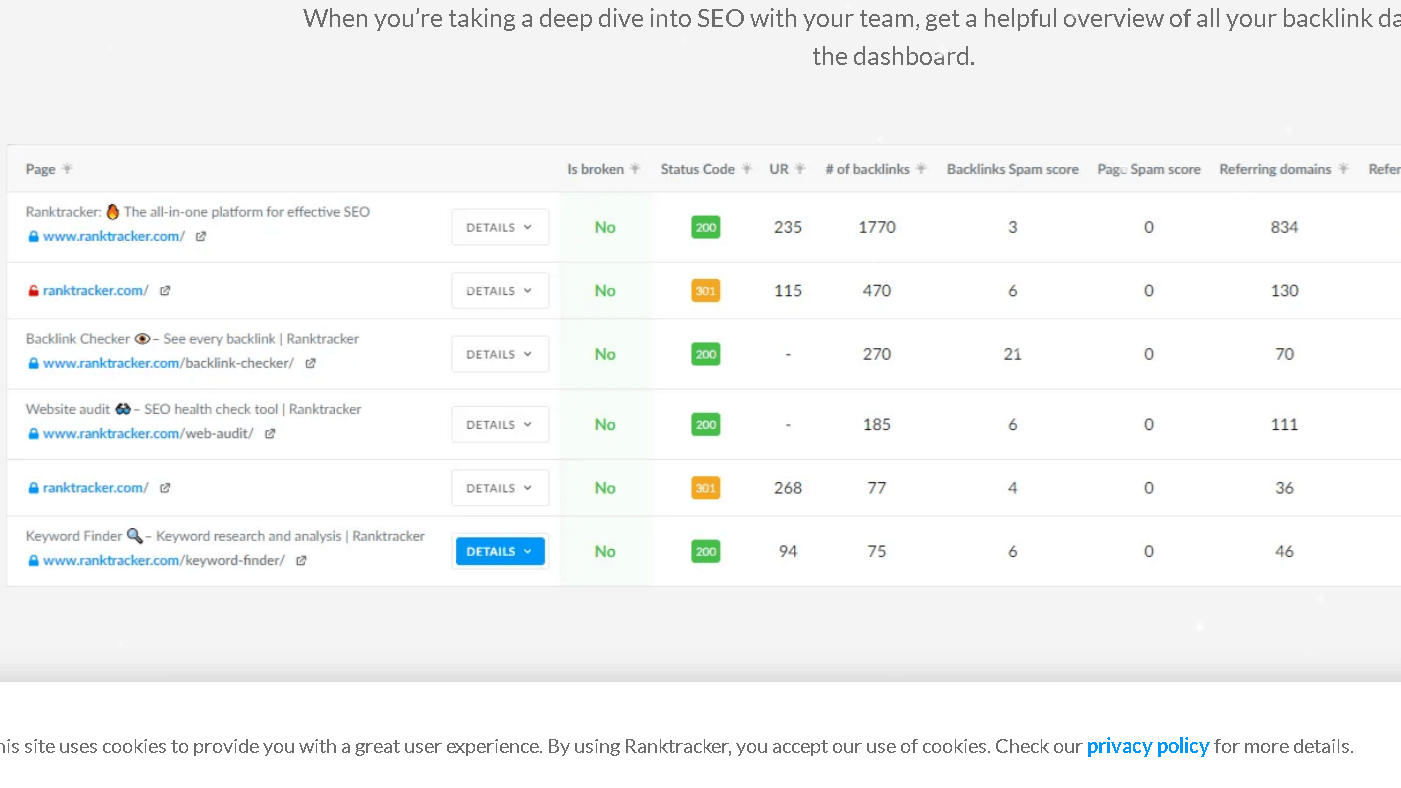
Track backlink profiles including who is linking both to you and your competitors.
On top of that, use a backlink checker to record referring domains, anchor text and the type of link (follow/nofollow).
Discover and track lost and new links, and receive notifications of high authority links.
Try to link back to the same pages and group your backlinks by domain authority and also by topical relevance.
Target sites that link to several of your competitors but not you – they are ideal sites to target for linking.
Don’t be afraid to engage them with personalized pitches and reference certain pages you successfully earned links to.
Next, if necessary due to the disavow files, use the data to clean up harmful links.
Monitor link velocity to prevent unnatural peaks.
Use backlink tracking in tandem with competitor intelligence to create a link building strategy that actually increases your authority.
Website Site Audit and Technical SEO
Here’s how each tool finds technical problems, measures site health, and flags issues that hurt crawlability and rankings.
You’ll see what scan depth looks like, which fixes matter, and how broken links or duplicate content show up in reports.
Features of Site Audit
SE Ranking and Ranktracker each perform website audits but vary in terms of extent and reporting .
SE Ranking is one of the best tools I’ve found at a glance to check a bunch of technical items like indexability, Core Web Vitals, HTTP status codes.
It gives you one overall Health Score with color coding so you can tell easily the severity.
You can schedule regular scans and can compare audit runs.
Instead, Ranktracker is more to the point with lists and solutions.
It shows you crawlable pages, sitemap issues, and the usual on-page errors.
Each allows export of reports in PDF and CSV format.
SE Ranking is more detailed in that it does provide more specific metrics and reports down to the page level.
Key report items to look for:
- Health Score and trend comparisons
- Page-level issue lists (title, meta, hreflang)
- JS rendering for JavaScript-heavy sites
- Export and scheduling controls
Technical SEO Tools
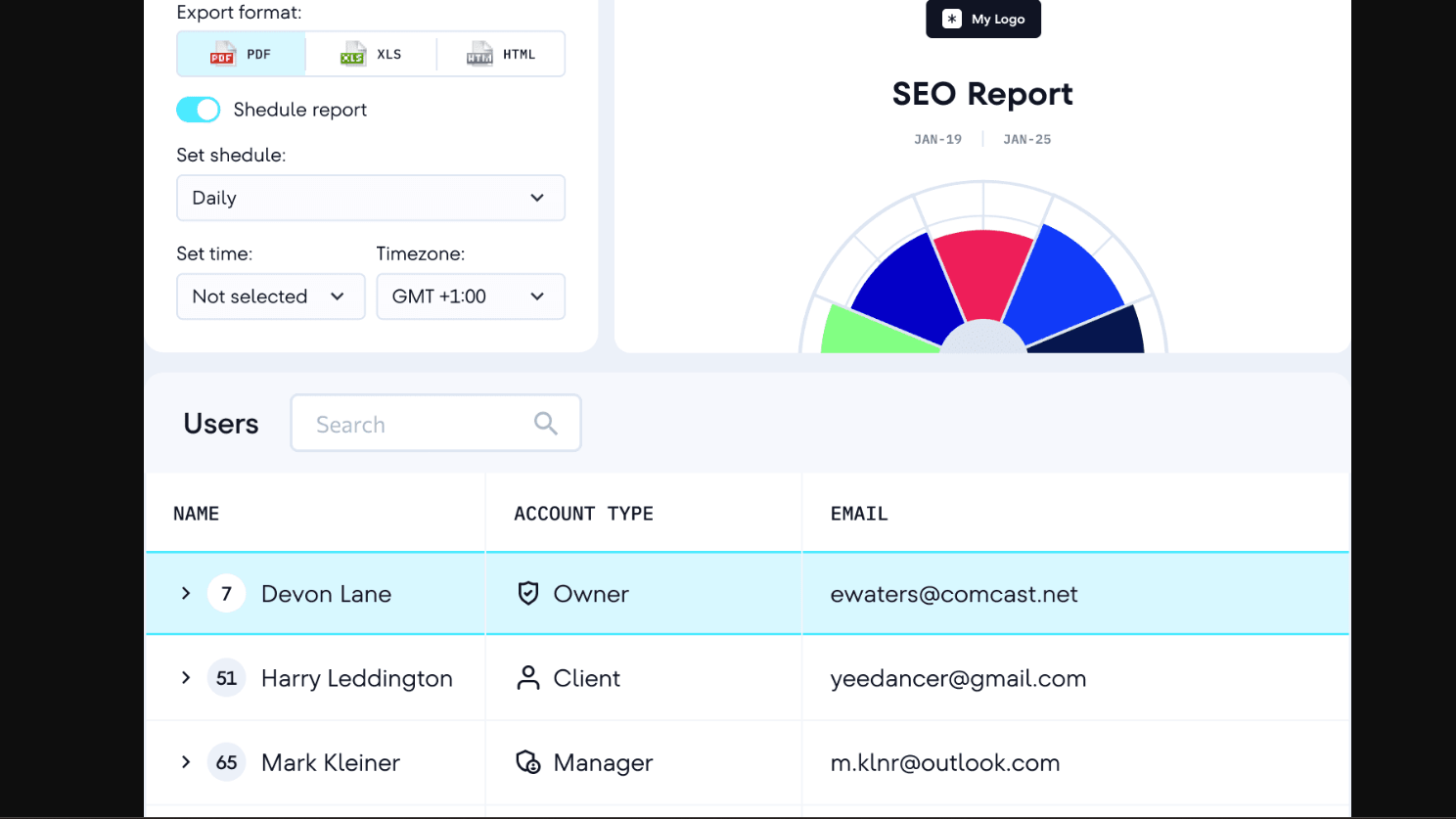
This means that technical SEO checks need to include checks for crawlability, indexability, page speed, and tag correctness in general.
SE Ranking inspects robots and meta tags, canonical and hreflang usage, redirect chains, and mixed-content warning.
It also monitors Core Web Vitals, those performance signals that impact your SEO.
Ranktracker alerts you of things that are actionable, like errors in an XML sitemap, response codes, and errors on the server-side.
It will warn if you have slow pages or no viewport tags to help avoid breaking the mobile layout of your site.
Both allow you to re-scan after corrections so you ca see if things improved.
Look for these features when choosing:
- JavaScript rendering for SPA or client-side content
- Redirect chain detection and fix suggestions
- Core Web Vitals and page speed checks
- API or automated scheduling for ongoing monitoring
Broken links and duplicate content
Both identify broken links (4XX/5XX) and redirect chains.
SE Ranking identifies the pages that link to 404 and suggest to make 301 redirects or eliminate these internal links.
Ranktracker alerts you to backlink targets and internal links that are causing an error, letting you fix those errors based on traffic or importance.
SE Ranking provides warnings about title/meta duplicates, as well as hreflang and canonical issues, as they can mislead search engines.
It helps find pages that contains the same or similar content, thus you can apply Canonical tags, or merge duplicate pages.
Ranktracker highlights duplicate meta tags, duplicate content and overlap content and sitemap entries to no index pages.
Use these reports to resolve indexing problems and maintain high crawl efficiency on your site.
Pricing, Plans, and Value
SE Ranking targets agencies with tiered plans that add projects and seats.
Ranktracker offers lower-entry plans focused on rank tracking and flexible data limits.
Both include monthly and annual billing, with the best per-unit value on annual plans.
Pricing Models and Tiers
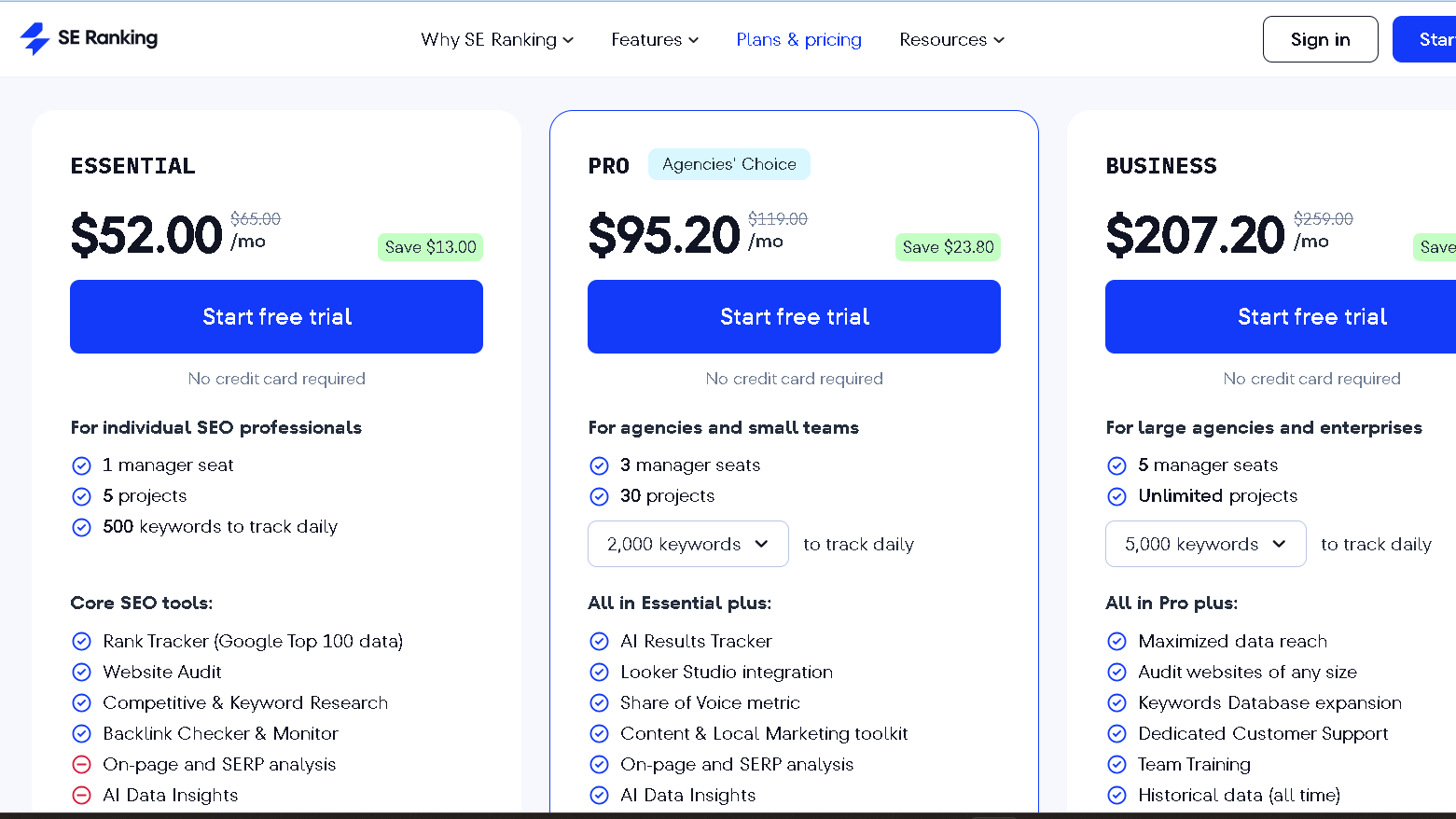
SE Ranking pricing, per year generally occurs at 3 levels:
- Essential (about $52/mo) for small projects,
- Pro (about $95/mo) for more projects,
- Business (around $207/mo) for unlimited projects, access to more data.
Tracked keywords, amongst other features like projects and manager seats, increase with each tier.
The higher the pay, the higher the rewards – pretty cut and dry?
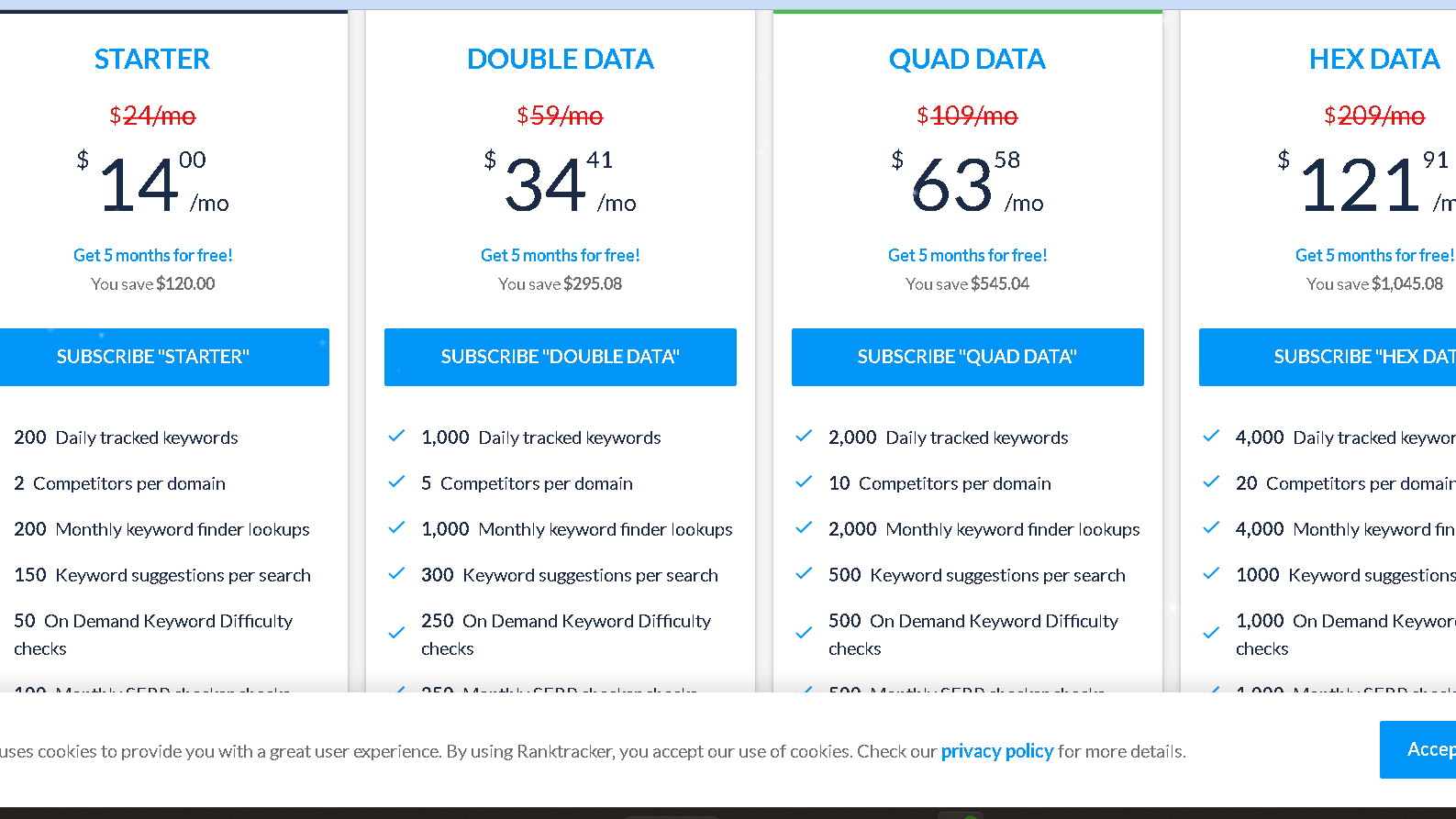
Ranktracker does so at a lower entry point, with a minimum
Starter plan of about $14/mo.
“Double Data, “Quad Data,” and “Hex Data” options expand the keyword and data limits as you move up.
Ranktracker essentially attempts to provide more tracking units in your lower plans.
If you’re concerned about price, then keep that in mind.
When you do this, look at the seat counts, daily rank checks, and the limitations of the project.
Also, look at the billing methods: while you’ll obviously pay less with an annual price, you’re going to be committing to a year at a time.
Need more projects and team seats?
If you do then SE Ranking’s tiers tend to be more cost effective for scaling up.
There is the post about Similarweb alternative, you may like to read.
Return on Investment for Agencies
Running an Agency?
SE Ranking’s Business plan has increased manager seats and increased project caps, meaning that as you take on more clients, the per-site cost drops.
Since it’s white-label reporting and allows one to customize the dashboards, it’s simple to put together very polished reports for clients…there is no need for additional tools.
This will save you time and billable hours.
Alternatively, for simple rank-tracking tasks, Ranktracker is useful.
The monthly rate is less for basic tracking, which is suitable for clients with only one site or require only simple reports.
But, if you begin to add a lot of clients, you will hit higher data tiers or need multiple accounts, which can be cumbersome.
Be sure to take into account what you would pay for third-party tools when comparing feature value.
If you require audits, backlink monitoring, team seats etc then SE Ranking is usually the better ROI .
On a budget or just looking for basic rank tracking?
Ranktracker may be the preferable choice for budget users.
White-Label and API Access
You can white label reports and dashboards in SE Ranking on higher plans or as an add-on.
You can white-label it, don’t need to use their template and you can also embed branded dashboards for your clients.
The API access can be useful if you have needs to automate dashboards or custom reporting flows.
On the lower tiers you can’t fully white-label Ranktracker.
It has straightforward and clean reports, but if you want to have a branded client portal you will need to use a workaround or upgrade to a higher plan.
There is an API access as well, though less extensive than SE Ranking’s.
If you require branded dashboards for your clients, and/or automated data flows, be sure to clarify which plan allows for white-label reporting and API keys.
This is what allows you to automate invoices, create your own dashboards, or link client portals directly- no more manually exporting.
Additional Features and Integrations
On top of that, both tools offer more than just rank tracking, and aid SEO and marketing on a daily basis.
There are integrations for data import/export, reporting, and integration with social/advertising platforms making it easy to work within the platform.
Social Media Management
SE Ranking offers tools for posting and scheduling across Facebook, Twitter, LinkedIn and Instagram.
You have the option to schedule posts, post images, and monitor some basic engagement such as likes and shares.
It can be helpful if you wish to integrate content scheduling with keyword campaigns and track social activity in addition to your SEO progress.
Ranktracker isn’t too concerned with native social publishing.
Instead, it allows you to pipe in social signals to reports and to see how social profiles appear in SERPs.
Require full social media management?
Combine Ranktracker with a scheduler like Buffer or Hootsuite, and use its reporting to show social’s role in influencing search visibility.
Both offer export of social activities and CSV or API integrations.
Those exports can be leveraged to create consolidated dashboards within Google Data Studio, or another reporting stack of your choosing.
Marketing Plan and Online Strategy
SE Ranking provides an integrated Marketing Plan tool that divides tasks by channel:
- On-Page SEO,
- Link Building,
- Content and
- Technical Fixes .
It provides you with a to do list of items, deadlines and who is responsible that are carried out on a daily basis, rather than theoretical.
You can link keyword research, audit results, and competitive research directly to tasks.
And that makes it very much clearer then.
Ranktracker is more about the information – keyword gaps, competitor ranks, SERP features etc.
You don’t get a checklist, but you get the reports to develop your own plan .
Use its exports to populate your projects tracker or your agency SOPs.
Both are designed to work with Google Analytics and Search Console.
Retrieving such information is what will anchor your marketing plan in real traffic, real conversions, and real user behavior.
Paid Advertising Support
SE Ranking ties paid and organic work together.
You can even upload PPC keywords and compare paid vs organic visibility, so you are able to choose keywords to bid on and which ones to try to gain organically.
It also sports ad tagging and reporting that marry ad performance with SEO metrics.
Ranktracker includes search volume and difficulty, paid keyword metrics and cpc estimates.
This one does real-time rank and tracking of serp features so you can see if your paid placements are changing quickly.
It will allow you to track where and when ads and organic positions overlap so that you can either increase bids or improve content.
Paid-data can also be exported for ad platforms and reporting on both.
If you use PPC, you can upload the keyword lists and CPC data to Google Ads or Microsoft Ads to improve the targeting and budgeting.
User Experience and Support
There is a tonal distinction in both the dashboards, learning curves and support resources of these tools.
One is directly related to fast and easy clear rank checks.
The other one teeters towards more customizable reporting, deeper SEO management.
User Interface and Usability
In exchange, SE Ranking provides you with a more tightly packed, but organized, dashboard complete with rank tracking, site audits, backlink monitoring, and white-label reports .
These are task groupings, so you can go straight from keyword lists to audits without getting lost in menus.
It is nice for managing multiple SEO campaigns and needing the data for multiple clients or projects.
Ranktracker is focusing on rank tracking and keyword tools.
You will immediately view main statistics such as positions, SERP features and local rankings.
This is less cluttered if you just want to make some quick checks on the movement of keywords, but you may lose some of the advanced controls for more complex SEO strategies.
Both offer customizable reports and exporting of CSVs.
Ranktracker loads faster and is simpler to use for daily checks, but SE Ranking provides more widgets and drag-and-drop.
Customer Support and Training
SE Ranking provides online support as well as email, and a knowledge base with tutorials and videos.
You receive onboarding assistance with SEO processes, and have white label training materials for agency efforts.
Docs on dashboard functionality and project set up, custom reporting are detailed as well and response times are usually fast.
Ranktracker offers help via email, chat, and help articles about rank tracking and keyword research.
The tutorials are also shorter and more intended to get you up and running faster.
You will receive good assistance on set up and tracking positions, just not as much on in depth how to with complete SEO campaigns.
They both integrate with Google’s Search Console and analytics.
SE Ranking has some resources more catered towards team workflows and agency setups, while Ranktracker keeps things simple for solo users.
Best Fit for SEO Beginners vs Professionals
If you are new to SEO, Ranktracker is pretty user friendly.
It is quick and easy to launch projects and look at rankings on keywords across different cities.
Ideal for newbie’s starting to learn the basics of tracking ranks or for small, local campaigns.
Have experience with agency-level SEO or sophisticated ad campaigns?
The better suited one is probably SE Ranking.
You receive more dashboard widgets, white-label reports and thorough audits to support a complete SEO strategy.
The experienced will love being able to handle multi projects, allocate team seats don’t create client unfriendly reports in one place.
In the case of SEO management, the issue is really one of scale.
Ranktracker is great for simple daily tracking.
SE Ranking is better for broader campaign control and reporting.
Integration with Other SEO Tools
Se Ranking and Ranktracker also allow you to connect outside data and work flows.
You can import keyword, backlink, and audit data from the different services.
You may use the reporting and tracking for each platform for day to day checks or more in-depth analyses.
Compatibility with Semrush, Mangools, and Others
Keyword lists, CSVs, and backlink exports from Semrush, Mangools, SpyFu, Ubersuggest, and Serpstat can be imported into either tool.
In particular, the availability import templates for CSV and standard Semrush exports lets you keep your historical tracking in a new tool in a familiar format.
Ranktracker also accepts CSV imports and tends to refresh keywords more often, which can be useful for quickly evolving campaigns.
Surfer SEO and Raven Tools are more front-end tools.
They both interpret data in practical ways: export Surfer keyword suggestions or audits as a CSV that you can upload to run rank test, or just watch the fluctuations instead.
Using SpyFu, Ubersuggest, or Mangools, export the competitor keyword sets and upload them as different projects in order to compare them next to each other.
There may be some quick manual corrections needed for column headers when switching between tools.
Expanding with Third-Party Tools
Both are able to integrate third party connections and API integrations in order to automatically report and alert.
SE Ranking has an API to push rank updates to dashboards or Google Sheets.
It allows an easy integration of Semrush audit reports and SE Ranking’s rank reports to be used in monthly reports.
Ranktracker provides API access, uploaded for better refreshes.
Feed Surfer SEO content suggestions or Raven Tools audit flags into a continuous monitoring system using this.
You can connect data between Ubersuggest or Serpstat and your rank tracking information using simply CSV exports or automation capabilities like Zapier / Integromat in the case there is no native API integration.
Frequently Asked Questions
This section covers common questions about capabilities, local tracking, AI features, strengths, budget alternatives, and practical benefits you get from each product. Here’s what you need to know when picking a tool.
What are the key differences in features offered by SE Ranking and Ranktracker?
SE Ranking offers you a full SEO suite including site audit, backlink monitor, keyword research tool, white-label reports and team seats. It is designed to be a complete campaign solution particularly for agencies and in- house teams.
Ranktracker has very powerful rank tracking and keyword research features and less so audit and SERP tools. It just seems to favor precise position, constant updates, and simple keyword lists.
Can both SE Ranking and Ranktracker track local SEO rankings effectively?
The answer here is yes for both of the tools as for local rank tracking by city or region. Tracking visibility in specific markets isn’t too cumbersome.
The local tracking capabilities and reporting seem to be more integrated with SE Ranking’s product which seems to be more effective for agencies.
Ranktracker covers many cities and is updated very frequently, so it’s ok if you require a lot of local checks and it comes at a cheaper price.
How does the Falcon rank AI feature influence Ranktracker’s analysis?
Falcon rank AI is an optional part of your Ranktracker plan and it will offer keyword suggestions and predicted rank potential based on pattern detection.
It accelerates the process of keyword discovery and helps you find keywords you never would have otherwise.
It is no substitute for human inspection, but. Use the AI recommendations in conjunction with your own data and testing to decide on which targets to pick.
What makes SE Ranking stand out when compared to similar tools like Ranktracker?
SE Ranking stands out with its wider feature set and scalability. You get deeper backlink data, a full site audit, white-label reporting, and multiple user seats—great for agencies.
It also integrates with Google Analytics and Search Console, so you can combine rank data and traffic metrics for smarter campaign decisions.
Are there any cost-effective alternatives to SE Ranking and Ranktracker that still provide comprehensive tracking?
Yes. On the low end, Mangools and Ubersuggest offer cheap keyword tracking and basic site audit and backlink checks. They are good for small sites or solo marketers.
You can get more than that by using standalone free combo of Google Search Console for basic rankings and Google Analytics for traffic. Less automation, but you save money.
What are the benefits of using Ranktracker’s local rank tracking capabilities?
Ranktracker has a lot more cities for local tracking and updates daily. You can identify short-term shifts and watch local SERP features as they unfold.
It allows you to respond to changes in rankings immediately, which quite frankly feels critical today.
This means that because the reports are easy to read I have all of the local performance information at my fingertips for sharing with clients or teammates. Little to no customization really is cumbersome, especially if you have a lot of locations running.


