


Conducting keyword research is the basis of solid SEO plans. SE Ranking is a versatile all-in-one SEO toolkit, and honestly, it is one of the best tools for organic traffic.
If you’re serious about content optimization or digital marketing, you’ll want to learn to use SE Ranking’s keyword research tools.
Incorporating these tools into your SEO process allows you to understand what your audience truly searches for. Basically, your content can reach the right people—that’s the whole point of marketing, right?
This platform offers insights you need to optimize a winning search engine optimization strategy. Once you get used to it, it is robust but not overwhelming.
This handy guide shows you how to conduct keyword research with SE Ranking. With the SE Ranking keyword research, you will know the keywords that matter for your business. We will help you identify promising keywords, understand search volume, difficulty, and other metrics.
This platform can help you track local keywords and discover business opportunities. Like any leading SEO tool, it offers enticing data to help you enhance your growth and expansion.
You get to try out all features by a free trial of 14 days. It’s a great way to see whether it fits your workflow before completely diving in.
From starting a new site from scratch to conducting a tune-up of an old one, using SE Ranking makes research a lot less painful. The instrument provides lucid information on which keywords are worth your efforts and which you might want to ignore.
It makes optimizing your content easier from the outset. By using competitive insights and keyword grouping features in SEO strategy, you become smarter.
1) Access SE Ranking‘s Keyword Research tool from the left menu
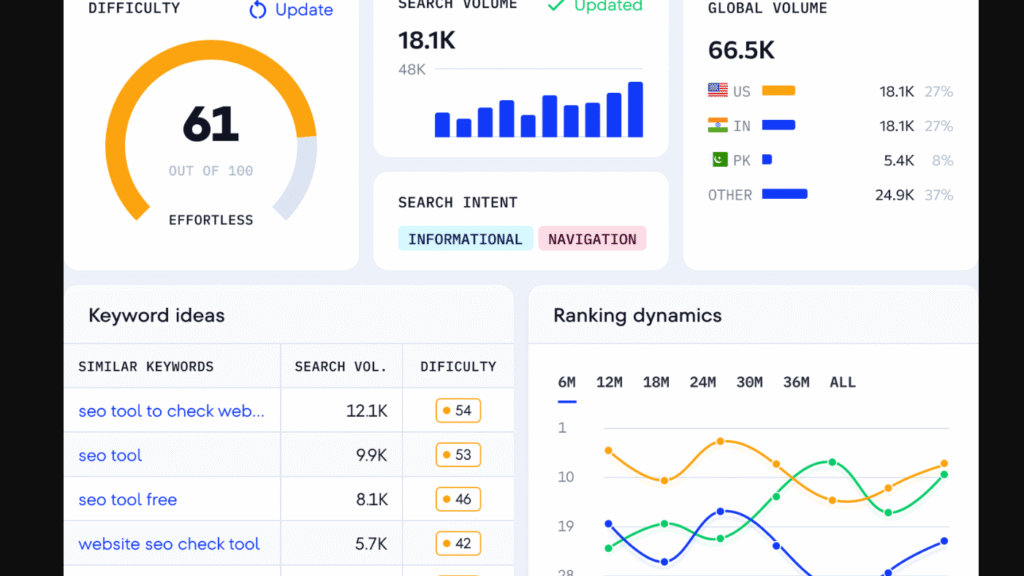
To get started, click “Keyword Research” in the left menu. That opens up the main keyword research dashboard inside SE Ranking.
You can use it on desktop or mobile. Once you’re in, you’ll see a search box—just enter your seed keyword or main topic to kick things off.
2) Enter a seed keyword related to your niche or topic
Enter your seed keyword into the search box. A seed keyword refers to a word or phrase that broadly describes your business or topic.
If you sold coffee gear, for example, you could try a coffee maker or espresso machine. These shorter phrases can lead you to more specific keyword ideas.
It enables you to analyze user intention and see what information people need. To match your content to their needs, you need to know what they want.
Check out what search engines are suggesting in that area as well—you’ll see what people are typing in for something similar.
3) Review search volume to find popular keywords
Search volume shows how many times people look up a keyword each month. SE Ranking displays this number for every keyword in your results.
More searches usually mean more demand, but high-volume keywords often come with more competition. Balancing these two is critical for growing organic traffic. Selecting the right terms helps you drive traffic that is more likely to convert into customers.
4) Analyze competition level for strategic targeting
SE Ranking gives each keyword a difficulty score. This tells you how tough it’ll be to rank for specific keywords.
If your site is new, stick with keywords that have lower competition. Established sites can go after tougher terms.
The competition data sits right next to search volume, so comparing is quick. This tool simplifies competitor analysis by showing exactly who is holding the top spots for your chosen terms. Some people like to check these numbers against Ahrefs for a second opinion.
This data helps you find your best shot at outranking leaders in your niche.
5)Organize Similar Keywords through Keyword Grouping
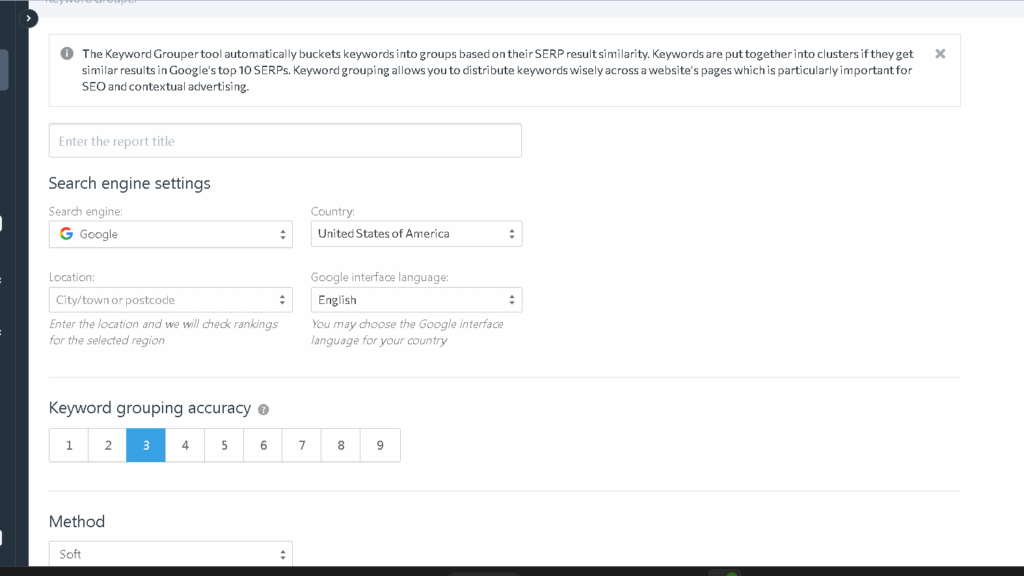
SE Ranking’s Keyword Grouper organizes extensive keyword lists into targeted groups according to intent. The tool groups them for you, letting you target multiple keywords in one piece of content.
This clustering provides you with a lot of sorting time savings and identifies content gaps you may have missed. It is an essential aspect of smart content planning.
Moreover, this method helps you improve your site structure for crawling and indexing.
6) Investigate keyword ideas for long-tail opportunities.
The keyword suggestion feature will help you find long-tail keywords and similar phrases with less competition. Using similar keywords allows you to cover a subject from multiple angles while reaching a wider audience.
Refer to the Questions section to see what people are actually asking about your seed keyword. It retrieves information from search engines, forums, and Q&A sites.
Long-tail keywords generally have better conversion rates since they match exactly what users want. It is much easier to rank for these keywords, which can be beneficial for someone just starting out or in a competitive niche.
7) Check keyword difficulty scores for ranking potential
SE Ranking assigns a difficulty score between 0 and 100 to each keyword. This score tells you how difficult that keyword will be to rank for on the first page.
It is easier to get ranks for keywords with a lower number than those with a higher number, which will be quite competitive. Sites with solid domain trust are able to rank for those high-difficulty keywords easier.
8) Evaluate CPC data to understand commercial value
The cost per click (CPC) shows the advertiser’s cost for a keyword. A greater CPC typically indicates solid commercial value. By understanding average cost per click, you can find which keywords bring most value to your business.
SE Ranking places CPC alongside search volume and competition. Seek keywords with moderate to high cost-per-click (CPC) for buyers.
If you’re organizing a paid search campaign, these insights also come in handy. By analyzing both organic and paid data, you can fully evaluate your opportunities.
Typically sourced from Google Ads, this data reflects significant buyer intent.
9) Track keyword rankings over time within SE Ranking
After selecting your keywords, it is important to monitor their performance.
SE Ranking automatically monitors and periodically updates the search engine ranking of your website.
Include target keywords in a project to get tracking started. Location and device rankings are available.
By utilizing backlink monitoring and a good backlink checker, you can see how referring domains and outbound links affect your progress. Keeping your rankings up requires a healthy backlink profile.
With this data, you can track ranking fluctuations and get ahead of updates. Monitoring your rankings will show you how the algorithm changes can affect your rankings. Making changes based on new information that makes you more visible.
10) Identify local keywords to boost regional SEO
Keyword research for local SEO is very important. This tool helps you discover the search terms that people use for nearby products or services.
They often consist of city or neighborhood names and reflect localized intent.
SE Ranking’s SEO Tools can unearth local keywords with the help of location modifiers. You may also conduct a website audit to assess your technical health and optimize your local landing pages further.
The optimal approach to detect crawl errors is constant site audits. Frequent Audits Maintain Your Technical Health.
Trial-tested strategies are sometimes used by advanced marketers for effectiveness and value. Technical SEO optimizes your pages for indexing and speed.
Quickly fixing technical issues helps to prevent your rankings from slipping. Make sure your content is fully optimized by pairing this with targeted on-page SEO.
Search engines will be able to see that you are relevant to the area with effective on-page work.
Understanding Keyword Metrics in SE Ranking
SE Ranking gives you several metrics to help decide if a keyword’s worth your time. Search volume shows demand, difficulty tells you about the competition, and SERP features highlight what Google likes to display.
Search Volume and Keyword Difficulty
Keyword search volume is measured by the number of times a keyword is entered in a search engine. This will help you determine whether it’s worth targeting if there’s enough demand.
The average search volume for the bottom keyword over the past year will be reported by SE Ranking. Higher numbers indicate more potential traffic, although high volume is not always right.
Keyword difficulty ranges from 0 to 100. It measures the difficulty of ranking on Google’s first page. Usually easier under 30 years. You’re over seventy? That’s truly a struggle.
A keyword with 1,000 searches and a difficulty of 25 is often smarter to chase than one with 10,000 searches and a difficulty of 80; the best keywords balance both metrics. Cost-per-click (CPC) for each keyword is also listed. Which is the money paid per click. If a keyword has a higher CPC, it is more likely to attract buyers.
Analyzing SERP Features
SERP features are additional components of the search results, like featured snippets, images, shopping results, local packs, etc. They help to analyze the user query or search intent.
The SE Ranking tool displays keyword-level features of competitors. This enables you to determine the content that Google desires.
When you notice a shopping carousel, the keyword is likely transactional, according to Google.
Moreover, featured snippets earn the topmost but coveted position when ranked in one of the three spots at the top. If it sees a snippet for your keyword, you can modify your content with the aim of hijacking that snippet.
Some elements in the SERP can reduce clicks. For instance, if the response is in the snippet provided by Google, people will not click on your site.
In spite of being a high-volume term, keywords with a zero-click SERP hold no value. Keep an eye on how many ads show up for a keyword; more ads mean less space for organic results and probably fewer clicks for you.
Traffic Forecasting and Opportunity Sizing
If you were to rank for a keyword, SE Ranking predicts how much traffic you will get. The prediction analyses search volume and average click rates for each position.
The program verifies the estimated traffic levels for positions 1 to 10. Position 1 receives roughly 30% of total clicks. Placed at position 10? Perhaps only 2-3%.
This data helps in prioritizing keywords based on actual traffic targets. For example, the keyword might be searched on average 5000 times a month, but if you sit at position five for that keyword, you will only get around 150 visitors from it per month.
Similarly, SE Ranking can also sum up the opportunity for a cluster of relevant keywords. When you target a cluster of 20 similar terms, you see their unified traffic potential.
It assists you in determining whether a subject is worthwhile for creating content. Effective keyword clustering ensures that the primary topic of the content gets adequate coverage.
Leveraging SE Ranking’s Competitive Research Tools
SE Ranking’s competitive research tools let you see what’s working for other sites in your space. You can track competitor keywords, analyze backlinks, and spot search trends.
Regular site audits and competitor research reveal where your rivals are gaining an edge. Doing a deep competitor keyword analysis is a great way to see what’s working for others.
Uncovering Competitor Keyword Gaps
The SE Ranking software allows you to contrast your competitors’ keyword lists with your own. The system identifies keywords your competitors rank for that your competitors don’t.
Input your competitor’s domain in the research tool. SE Ranking will show their top-ranking keywords and where they land in search results.
Identify keywords for which your competitors rank in the top 10 but your site does not rank anywhere. Your biggest opportunities are there.
Focus on keywords that have a good search volume but lower competition. These are simpler to rank for and can yield some rapid victories.
The difficulty of a keyword is displayed by the tool. Use terms that suit your site’s current authority level.
Tougher terms are more easily targeted by sites that are trusted. Choose easy keywords at first if you’re new to this niche.
Evaluating Content Strategies using SE Ranking
With the analysis tool you can see how your competitors create their content and what topics drive traffic. A content strategy creates a plan for your marketing efforts.
You can see which competitor pages rank for the most keywords and use those insights to drive more visitors to your own site.
Verify the character count as well as content depth of these top-ranking pages. It provides you with an understanding of what is considered “comprehensive” by search engines.
SE Ranking displays the number of keywords each competitor page appears for. If a web page is ranking for a lot of related terms, it’s probably covering the topic very well.
What content formats do competitors use: product comparison, guide, list, or something else? This information may assist you in choosing formats suitable for your niche.
By analyzing competitors’ backlinks, you get a view of which content earns links organically. Monitoring your own backlink profile allows you to know whether you’re gaining authority or losing authority.
These insights can assist with your content strategy and help you adjust on the go.
Recognizing Seasonal Trends
SE Ranking monitors how search volume changes through time so you can see seasonal spikes and plan ahead. Refer to the volume chart of your target keywords for 12 months.
There are opportunities at certain times of year because of big jumps. Draft your editorial calendar as per these trends.
You should create and optimize pages several months before peak season so they have time to rise in the rankings. Analyze the interest of keywords over a period of time to see if they fade away or grow in popularity.
New opportunities may arise with the rise of trends. Manipulate your keywords based on seasonality. Use these 5 seasonal insights.
Some keywords are only worth going after in their busy season, while others are fairly steady throughout the year. It’s all about knowing when to cling on and when to let go.
Frequently Asked Questions
SE Ranking’s keyword research tools can seriously cut down on common workflow headaches. You’ll find low-competition terms and check keyword potential before pouring in time or energy.
What’s the best way to find low-competition, high-intent keywords for an ecommerce site?
Enter product seed keywords into the Keyword Research tool on SE Ranking. Keep your search volume between 100 and 1,000 and difficulty score under 30.
Filtering for commercial intent words like “buy,” “best,” “review,” or “vs” usually means someone is ready to buy. These keywords usually yield better conversions than those broad high-volume keywords.
Take a gander at the SERP analysis. If you see primarily blog entries rather than product pages, then that’s a good sign—an optimized product page could easily break in here.
How can you uncover keyword gaps by analyzing competitor rankings?
Drop a competitor’s domain into SE Ranking’s competitive research tool. You’ll spot keywords driving traffic to them that you’re missing out on.
Sort those keywords by search volume and difficulty. Focus on ones where your competitors rank between positions 4 and 10—those are realistic targets to try and outrank.
Export the gap list and compare it with your product catalog. If you find keywords that fit your products but you haven’t targeted yet, well, there’s your opportunity.
How do you group keywords by search intent and map them to product, category, and blog pages?
Let keyword grouping of SE Ranking do the heavy lifting. It saves a lot of time by clustering similar and intent-based terms together.
The keywords on a product page often refer to the product name, model number, or words like ‘buy,’ ‘price,’ etc. The keywords on a category page feel more generic, as they refer to product types or collections. For blog content, focus on informational queries like “how,” “guide,” or “tips. ”.
Create a spreadsheet consisting of keyword, search volume, and intent columns. Keyword clustering assists you to allocate the group of which page. This helps make sure your content matches what people are actually looking for.
How do you validate keyword ideas using search volume, difficulty, and SERP features before targeting them?
First, check the monthly search volume in SE Ranking. If no one’s searching for it, probably not worth the hassle—unless it’s a super niche product with obvious buyers.
Glance at the keyword difficulty score. For smaller or newer sites, targeting scores under 40 feels way more doable.
If the score’s over 60, you’ll need a strong domain and a bunch of backlinks to stand a chance. That’s a big ask for most folks just starting out, honestly.
Don’t forget to scan the SERP for features like shopping ads, featured snippets, or local packs. These can push organic results down, so you might get fewer clicks even if you rank.
What’s the fastest workflow to build a keyword list for a small business without wasting time on irrelevant terms?
Choose 3 to 5 core seed keywords that really reflect your main products or services. Use SE Ranking for them, then look at the related keywords and save yourself a lot of time.
Eliminate keywords with either very low search volume or keywords that are just too tough to rank via filters. Set goals that work for your business from the start.
Export your filtered list, then quickly scan it manually. A clarification: If it doesn’t sync up with what you presently offer or could likely write about, just delete it. No need to clutter things up.
How can you cross-check keyword ideas using Google Keyword Planner, Ubersuggest, or Semrush to confirm demand?
Start by grabbing your top 20-30 keywords from SE Ranking. Plug those into Google Keyword Planner and check the search volumes that show up.
Then, use Ubersuggest or Semrush in order to utilize that keyword. Compare the search volume and difficulty score from all three tools.
If the data seems pretty close, it is probably safe to believe it. On occasion, though, one tool will show way more opportunity than the others.
Either it’s a red flag, or this is something that is special. Don’t get too carried away; check a little further; it could be a technical error or just a regional issue.


