


Ahrefs gratis, free tools are awesome for improving your SEO on your website, if you’re looking to do it for free. Ahrefs Webmaster Tools allows you to “check your site for SEO issues, research backlinks, and track rankings” without having to start stringing out your credit card.
These are tools that will give you insight that will actually help. You will see what is working and what does need fixing, which is also what most of us want.
I believe these free tools are a godsend for bloggers, small business folks, or anyone who is getting their feet wet in the world of SEO tasks. Sure, you don’t get all the premium features of ‘pro’ accounts, but the essentials like site audits, backlink checks, etc. are included.
Likewise, it will help you get the ball rolling with your SEO plan at no additional cost.
Understanding Ahrefs Free SEO Tools
Ahrefs created a suite of free SEO tools for website owners that want to rank better in search results but aren’t yet willing to pay. You get basics like keyword research, backlink analysis and site auditing.
This isn’t a hassle free interface though and so can view your site and others to a certain extent.
What Makes Ahrefs Stand Out
Honestly, I feel that Ahrefs does a better job at acquiring the data. Even their” free” tools get you some juice such as being able to see a sites backlink profile and keyword ideas.
While other free SEO tools tend to disperse things across a lot of different sites or platforms, Ahrefs sort of keeps everything in one place, which I like.
They also seem to track backlinks and research keywords with really good accuracy. Their indexes are updated frequently, which is fairly crucial if you are concerned about keeping up with SEO.
Laid out for beginners, with enough complexity that beginners won’t out grow it too quickly.
Ahrefs Free SEO Tools- Overview Features
The free version includes access to tools like Keyword Generator, Backlink Checker, Website Traffic Checker, and more. I have these for brainstorming keywords, who’s linking to any site, and estimating traffic – none of these require a payment.
They also have an SEO Toolbar for instant on-page reports, broken link checks, and redirect tracking. It doesn’t provide everything offered by the paid plan, but you should get the necessities you need for competitor research and site audits.
These allow me to see how my site is doing in terms of SEO. Also helps create more focused content and related relevant links.
Accessing Ahrefs Tools
The cornerstone of their free plan is Ahrefs Webmaster Tools (AWT). Once I register and verify my site, I can use Site Explorer and Site Audit – albeit it is limited but still useful.
Ahrefs allows me to check the quality of backlinks and identify technical SEO problems. The site audit tool will let you know things like broken links or duplicate content. That information is gold for correcting errors and climbing in search ranks.
Of course, they ask that I create a free Ahrefs account and verify that I am the owner, but after that, I have a continuous free check of my site’s SEO status .
You may be interested to learn about Ahrefs Competitors.
Ahref SEO Tools: Core Functionality
So, Ahrefs Tools provides me with tools that could help me tracking and improve SEO on my site for free. I really have done much more things with it, like verify ownership, set the crawl limits and link it with Google Search Console to have a 360° view of the health of my site.
Website Verification and Setup
In order to use Ahref gratis Tools I must first verify my site. The only thing I do is add a verification file or meta tag.
Once accepted I can track all of my site’s backlinks, and keyword rankings in one place.
It is also quickly set up. Once confirmed, Ahrefs begins crawling my site using their Site Audit tool. It scans over 170 technical and on-page issues like links, duplicate content and slow pages.
The dashboard lets me know what my site’s Health is and what I need to address first. This is important in identifying how my site functions, and where it fails.
Limitations and Usage Credits
You will have some free access to Ahrefs gratis Tools, but with restrictions. I receive 5,000 credits per month per verified site. Ahrefs will burn these credits by crawling HTML pages that return a status code 200 .
Pages that are incorrect or redirect do not count against your credits. Backlink reports and keyword reports each will display a maximum of 1,000 entries. This is usually sufficient for smaller sites, but for large sites it may be limiting.
If I need more I can pay for the upgrade. On the downside it’s free and makes me responsible only for my crawl usage and keeps me in the loop of a lot of critical data .
Integrating Google Console
For more in-depth analysis I pair Ahrefs Tools with Google Console. This is how they are able to scrape search performance data directly from Google.
Having this extra context, especially keyword rankings, click-through rate, and impressions. It provide me with better visibility around how people are locating my pages.
I use both and they compliment each other in terms of analyzing SEO and helping me decide what to focus on. And connecting the two platforms means I don’t have to switch dashboards, it just makes the workflow a bit smoother and I can get a more comprehensive look at the SEO.
Site Audit: Uncovering Technical SEO
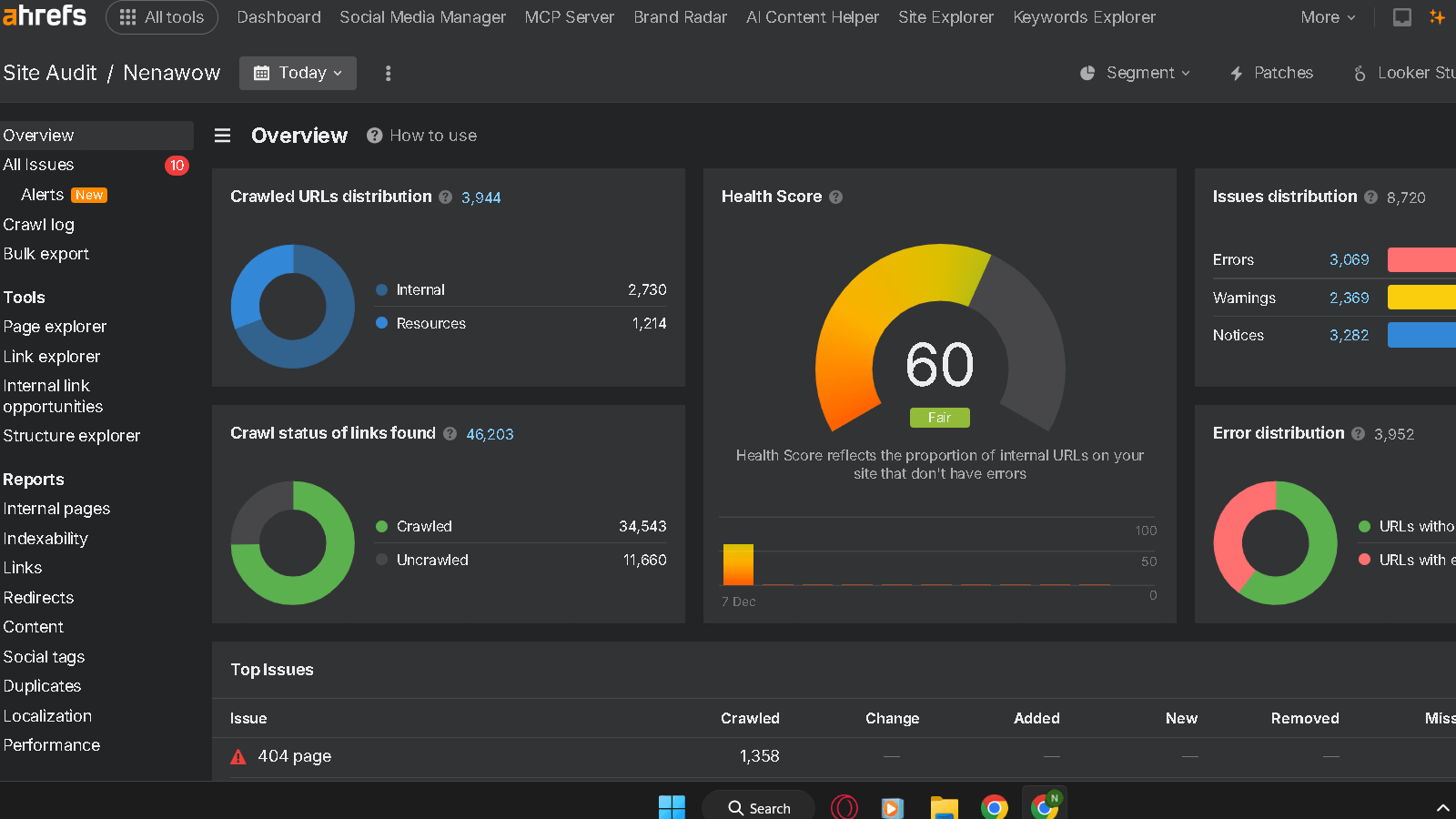
Ahrefs website audit feature
Performing a site audit, should allow me to gain more insight into what might be impacting my site’s performance. I can tell what is dragging me down, if my pages are loading fast and I have no duplicate content.
It’s very cut and dry with the audit and tells me exactly what I need to go and make better on my site to improve the SEO.
Identifying SEO Issues
As an example when I run a site audit it is checking every page for over 170 potential issues. It immediately shows you links, missing meta tags, or slow loads.
Ahrefs allows me prioritize, because the issues are categorized by severity: errors, warnings, notices. It will also detect other factors that engines descriminate against, such as duplicate title or meta descriptions as well as spotting problems like loops or bad types on redirects.
Health Score and Reporting
It’s almost like an SEO health scorecard. I get to look at tables and charts for things like page speed and indexability.
With this sort of visual data, it is easier to see what is working and what is not . I can download all of these as a CSV or ZIP file, with instructions on how to handle each.
Technical SEO Insights
The site audit includes some technical SEO as well. It verifies crawlability. Are engines indexing my pages correctly? It looks for issues in the robots.txt and sitemap files.
I also monitor multi-location and multi-language targeting in international SEO by looking at hreflang tags. It also assesses real user experience metrics like Core Web Vitals and Lighthouse scores.
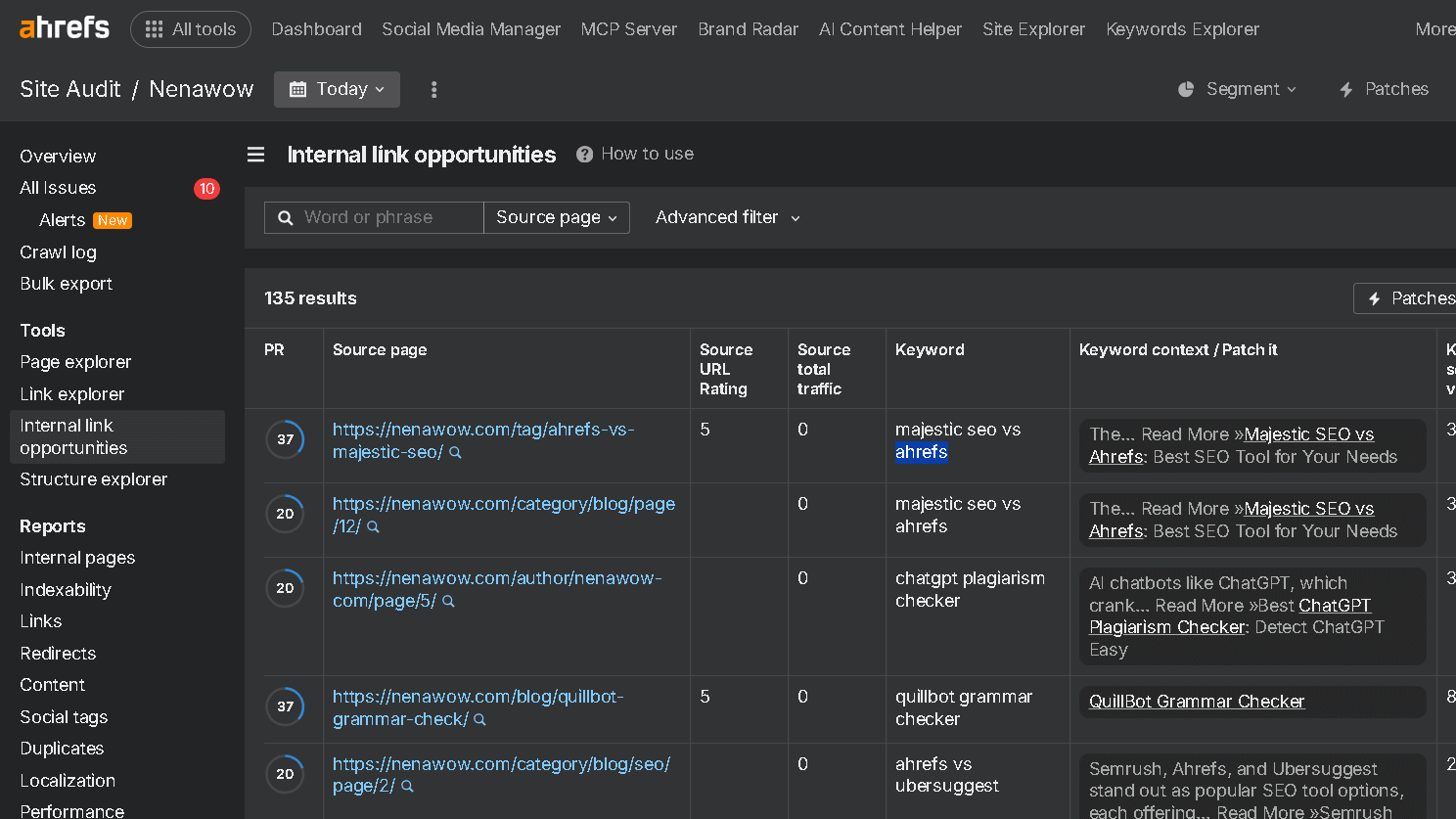
It even provides tips for better internal linking, which, despite my best efforts, apparently I have not done and would help me connect related pages and improve my site structure overall.
Backlink Analysis and Link Opportunities
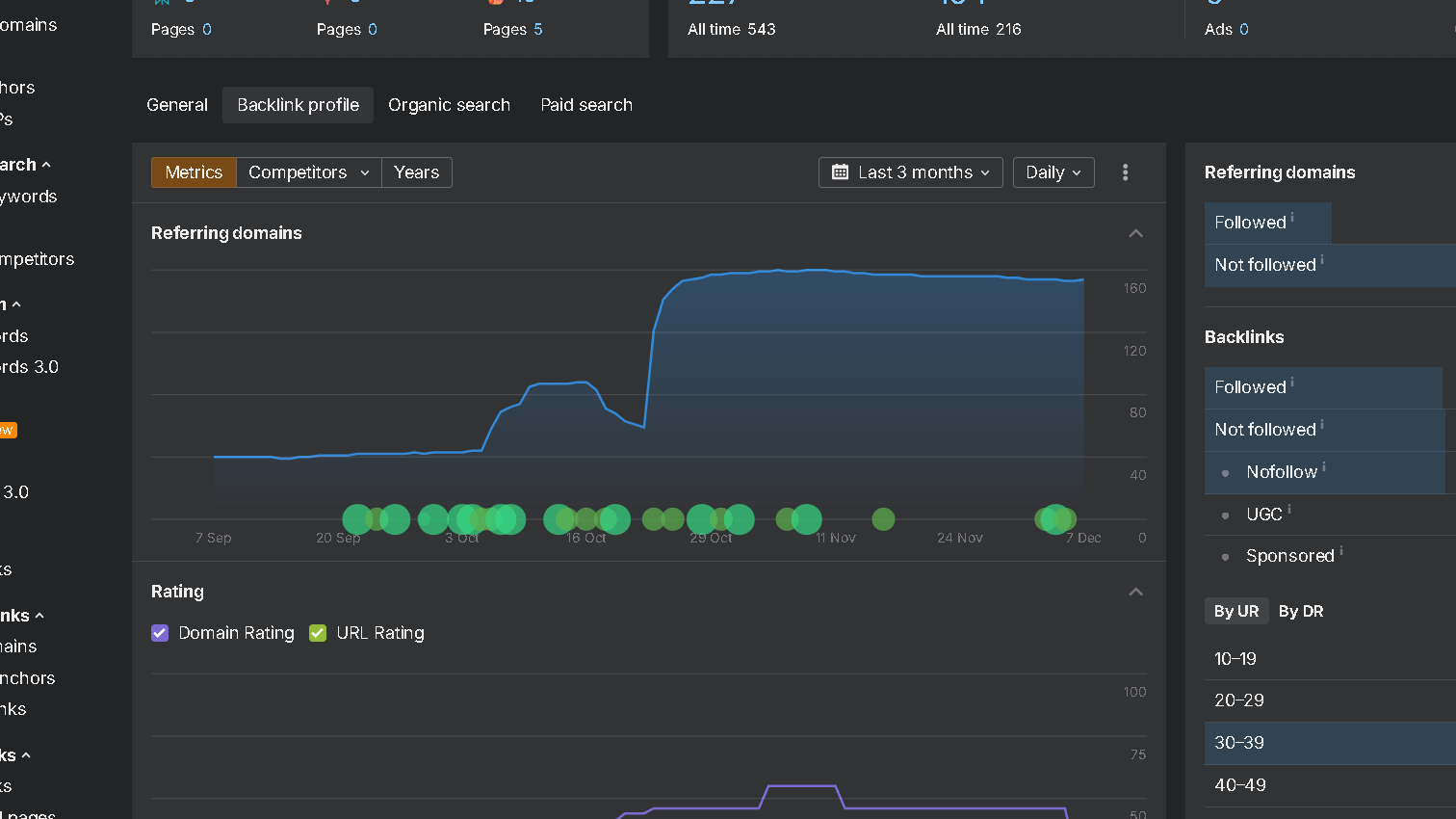
I do focus quite heavily on the quality and integrity of backlinks. Understanding what sorts of sites are linking to me and what the links are is very helpful in order to be able to discover new opportunities and to fix problems which could be hurting my rankings.
Analyzing Your Backlink Profile
I use a free checker to check backlinks to my site. It informs me of those backlinks; with the amount, quality and anchor text.
The most valuable are backlinks from reputable sites with relevant anchors. I also keep tabs on (DR) to gauge the strength of the linking sites – higher DR is usually a better backlink.
I am also weary of spammy or low quality links . It helps me to stay on top of my profile and keep it clean and authoritative.
Discovering Referring Domains
Referring domains represents how many unique websites are linking to mine. What I have realized is that quality referring domains is more important that just getting a ton of backlinks from the same domain.
Additionally, I find the domains with good DR and how much traffic they send, with a free link checker with Ahrefs. This has helped me tailor my out reach and link building.
Identifying top referring domains also helps me see where I need to establish relationships or earn additional links.
Broken Links and Link Types
Broken links give visitors a bad experience and are also bad for my SEO. It’s a free tool that enables me to find and repair broken backlinks to or from my site.
The nice thing about fixing them is it makes my link equity feel good but the best part is that it helps user experience. I also look at the dofollow or nofollow link types. I always want the dofollow links to get as much SEO value as possible, but the nofollow links can get me visitors, and create this brand.
Knowing the combination helps me in maintaining a natural backlink profile with a good link building strategy.
Tracking Traffic and Keyword Rankings
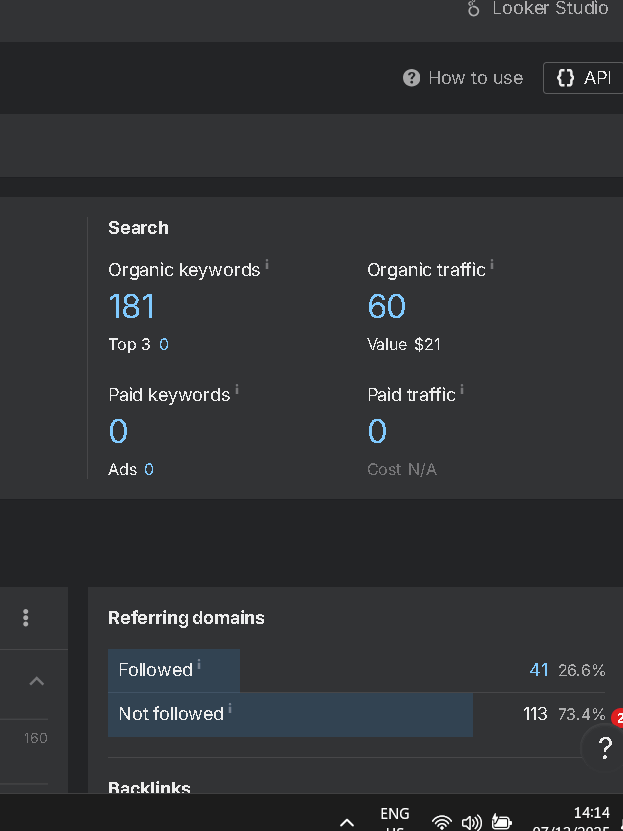
I regularly monitor my key words and the progress of my website in the search engines. Tracking this stuff lets me know where my organic traffic is coming from and if my SEO efforts are actually work.
I rely on some specific metrics and reports to help inform me of this without drowning me in data.
Monitoring Search Performance
For performance tracking purposes I monitor organic traffic quantities and qualities. I monitor search statistics in terms of number of visit and which pages they go to.
It just allows me to keep my eye over a long period of time on things growing or declining, season peaks, lows in traffic, etc…
My primary focus is on CTR, Impressions and average position in search results. These tell me how successful my presence on my site is and my listings in bringing in the clicks.
I also track a ‘share of voice’ column, which indicates my percentage of the search market with respect to particular keywords versus other competing websites.
Using Site Explorer for SEO Metrics
I usually use Site Explorer for examining SEO data. It provides quality backlink, keyword ranking and website health reports.
It tells me a page or a sites estimated organic search traffic so I can tell how I stack up against competitors.
- Pages with most traffic received
- What word attracts most visits
- The kinds of backlinks the site has
I also look at traffic value as an indication of the value of my organic traffic. These figures also help me to decide where and work to focus on next.
Keyword Ranking Tracking
I regularly keep an eye on keyword rankings. The keyword positioner I use is one that refreshes your keywords every week, so I do know each week where I am with specific phrases.
This lets me know whether or not my content tweaks are working. For me, the estimated traffic per keyword and the SERP features are the most relevant elements to focus on, in addition to the average position.
Immediate notification of position changes let’s me know when a keyword as dropped or a competitor has jumped. It allows me to track new opportunities and ideas as well as to keep my search engine visibility.
Free Keyword Checker from Ahrefs
I personally use Ahrefs keyword tool free to find out keywords that actually matter for website traffic. These tools provide quick ideas and data for me. so I know what keywords to chase, how competitive they are, and where I can get into them ranking higher.
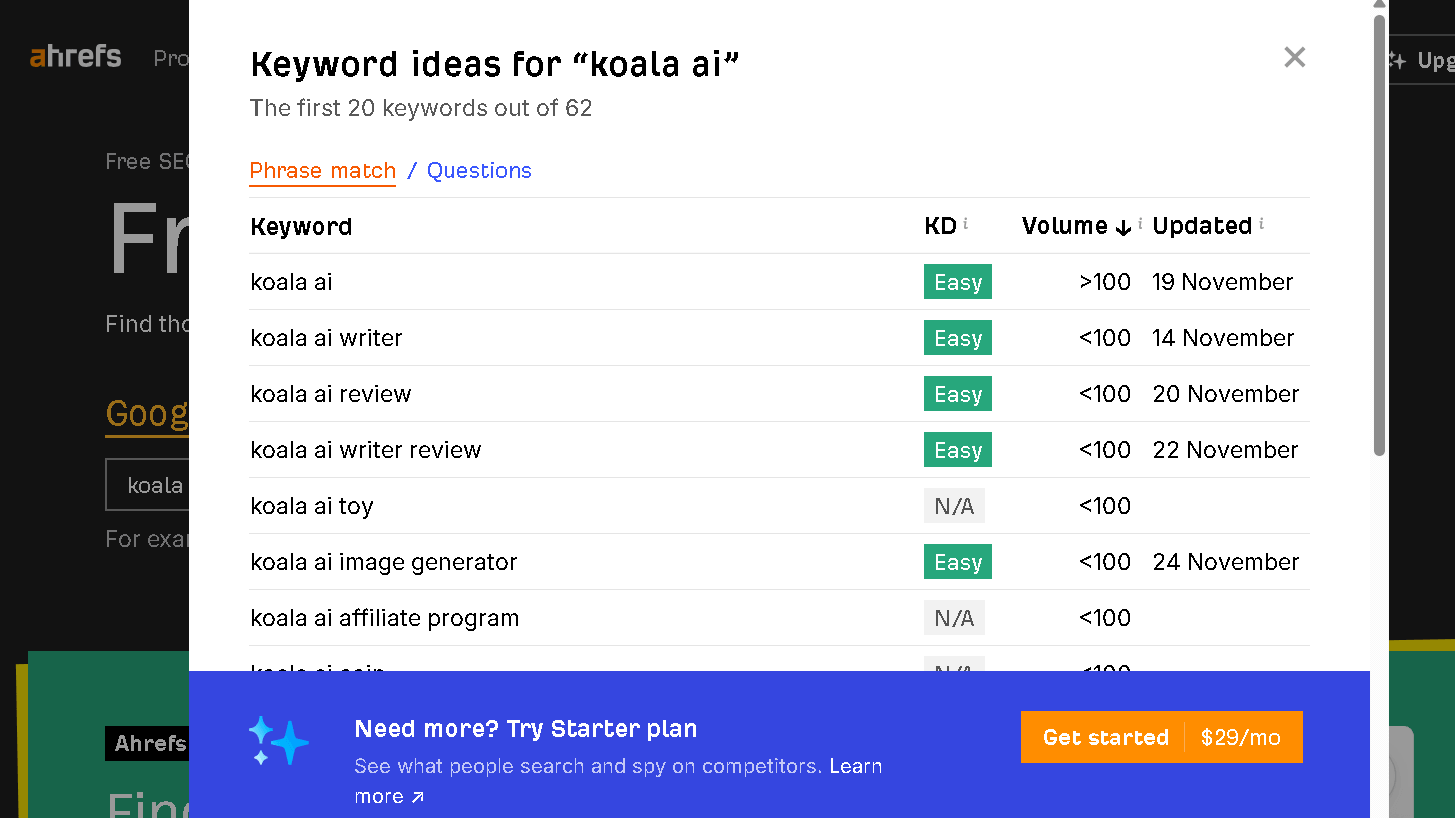
Using the Free Keyword Generator
The Ahrefs gratis keyword tool is fast and simple. I input a single seed keyword, and it poops out a bunch of long-tail variations of related keywords.
Given it is based on billions of search queries, the concepts are new and relevant. It also functions for Google, YouTube, Amazon, and Bing, which is convenient if your viewers hang out on a variety of platforms.
I can have hundreds of keyword ideas in seconds and I don’t need a paid account.
Here s my Ahrefs vs Google Keyword Planner review.
Keyword Suggestions and Opportunities

The keyword generator does not simply muse aimlessly. It also organizes these into themes that I keep track of to have an idea of any new opportunities I may miss.
I seek keywords that get coverage properly and that have a balance in activity and promise. Ahrefs gives me the keyword difficulty and related terms so I can go in and know what the best ones are so I’m not wasting my time.
Understanding Search Volume
And it gives me volume, which is how often people search for a particular keyword on a monthly basis. Ahrefs very helpfully provides even estimated search volume along each keyword, making the decision of which ones to target easier.
Now I can have a smarter plan, I can check volume against keyword difficulty. I try to stick to keywords that are being searched, but not overly saturated, thus I avoid wasting my time on unobtainable terms.
Enhancing On-Page and Content SEO

Better on-page SEO involves reviewing things like links, keywords, and the structure of the page. Content SEO means creating your text in such a way that it’s clear, relevant and optimized.
Both count if you associate your websites appearing on the results page higher in searches.
Ahrefs SEO Toolbar Features
Overall I believe Ahrefs SEO tool bar is a must, allowing me to see the basic SEO metrics of any page I am on. I can access on page reports, backlinks, check redirects and keyword metrics all from right within my browser tab.
Switching Google regions and languages is a piece of cake, which interestingly is fairly useful if you’re optimizing for other countries. I also receive backlink info and keyword ideas right in search results, which saves me a ton of time.
The toolbar is excellent to quickly find missing meta tags, duplicate content or broken backlinks.
Here is my Ahrefs vs Mangools review.
On-Page Elements Analysis
Ahrefs allows me to quickly audit title tags, meta descriptions, headings, and URL’s. These parts are what tell Google what each page is about, so I can’t ignore them entirely.
I make sure that my titles are of the proper length and they contain my primary keywords. They should make sense and be enticers but I do my best to not load them with keywords.
Headings such as H1 and H2 should be clear and listed in proper order. I also try to keep URLs short, clean, and use keywords that are relevant when I can. Correcting those details will help my pages get crawled and ranked more effectively.
Content Optimization Insights
It should be content that is easy to read and also good for SEO. As an example, Ahrefs indicates keyword gaps and makes suggestions as to what other terms I should add, which is honestly pretty handy.
Its tools help me gauge the volume and difficulty for a keyword so I can then know which keyword phrases are worth targeting. This ensures my written content remains relevant without becoming keyword soup.
If I find redundant or shallow text, I revise or delete it. Well-organized, quality generated content in alignment with my keyword plan has attracted more visitors and engagement among my sites, at least in my experience.
Maximizing SEO Strategy with Free Ahrefs Tools
I have gained actually useful data through Ahrefs’ free tools that have direct application to my SEO. They are my means of understanding competitors.
Competitor Analysis for Free
Having Ahrefs allows me to see which websites are ranking for the keywords I want, for free. I always look at pages on top competitors, backlinks, and pages they are missing, which also gives me insight to what to try next.
You can use the Site Explorer tool to find backlinks that my competitors already have, and try and get some of those links as well. I use the SERP Checker in order to understand keyword difficulty and what pages are ranking for the term.
That’s the sort of free data that allows me to select the key words and target my efforts where it is meaningful.
Combining Data with Analytics
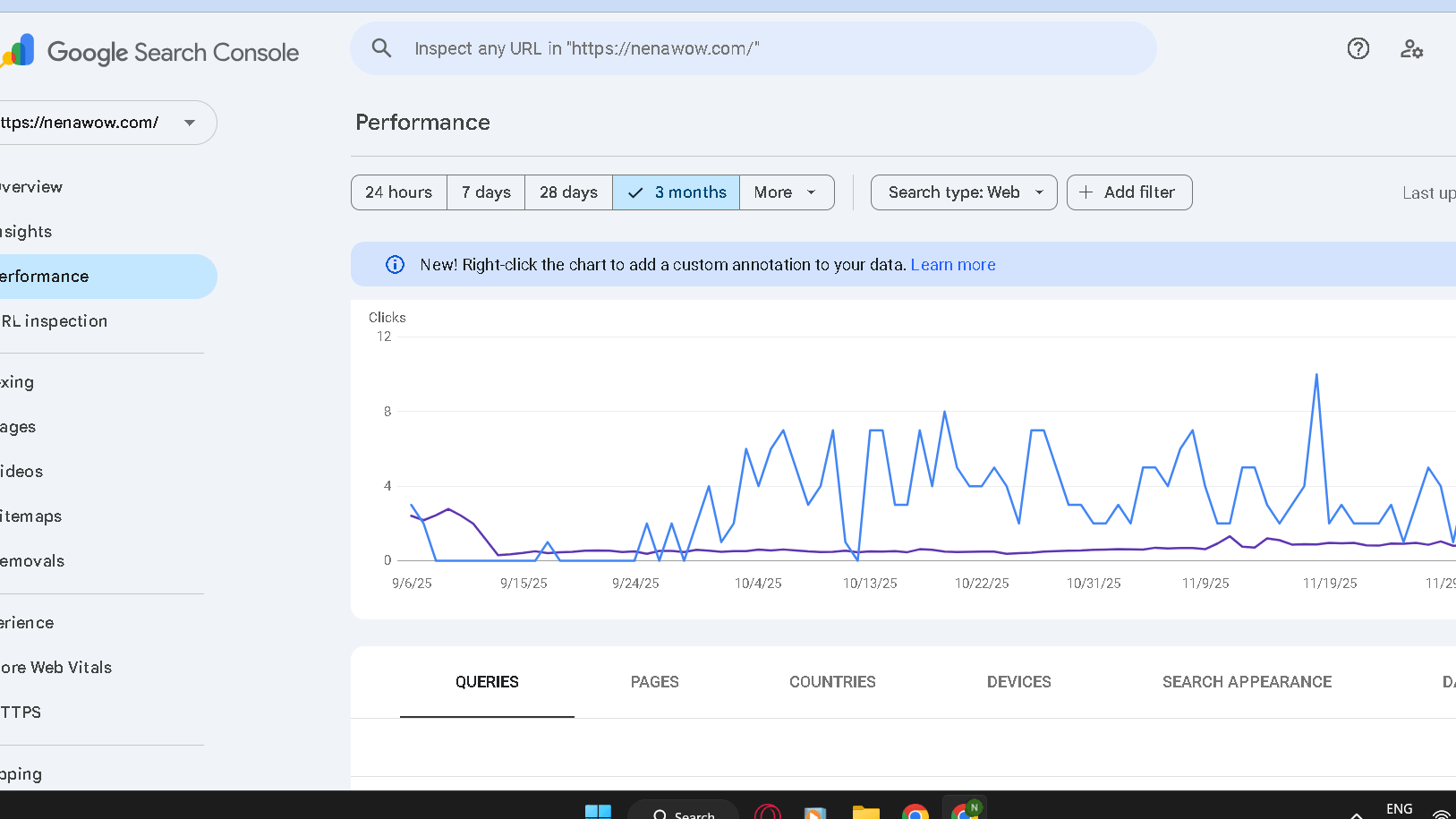
Google Search Console- performance for nenawow.com
Even my tools vary. I combine Google Analytics and Ahrefs data to understand what people are looking for and how they are finding my site.
Ahrefs gives me keyword and backlink ideas. Analytics lets me know where traffic is coming from and how they are interacting with my site. Cross-checking both helps to avoid chasing stuff that doesn’t really move the needle.
I can, however, see what is and isn’t working by syncing them often.
My Insights and Comparison with Search Data
Let’s take a look and compare some data on my website example. Thus, you will be able to gain insight into the accuracy of the data and the reliability of Ahrefs.
This is the the traffic of my website:
Google Console Traffic Table
| Country | Traffic % |
| United States | 36% |
| Turkey | 14% |
| United Kingdom | 8% |
| India | 7% |
| Canada | 3% |
Ahrefs Data Traffic Table
| Country | Traffic % |
| United States | 37.3% |
| Indonesia | 30.5% |
| Turkey | 22% |
| Brasil | 1.7% |
| Canada | 1.7% |
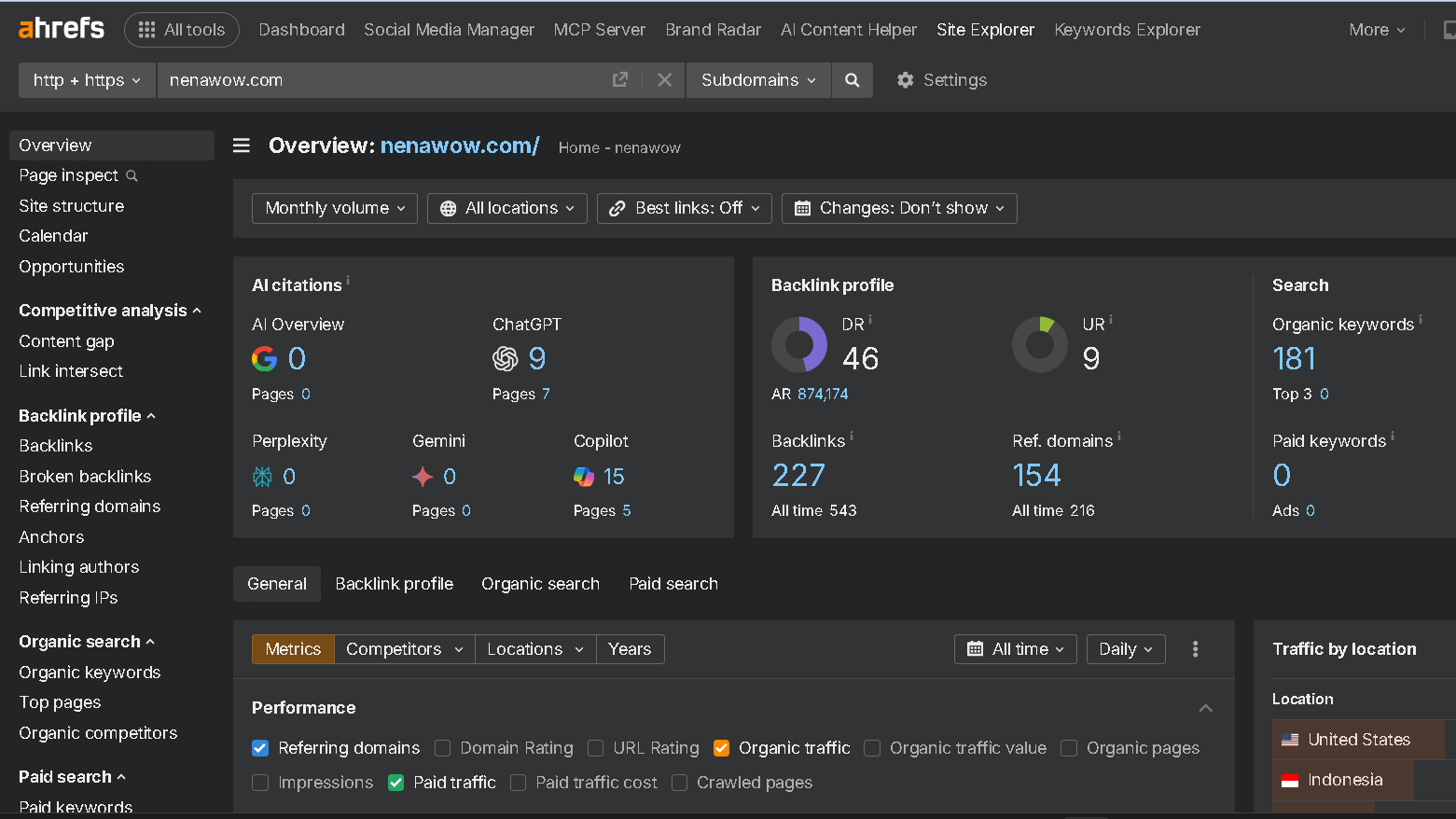
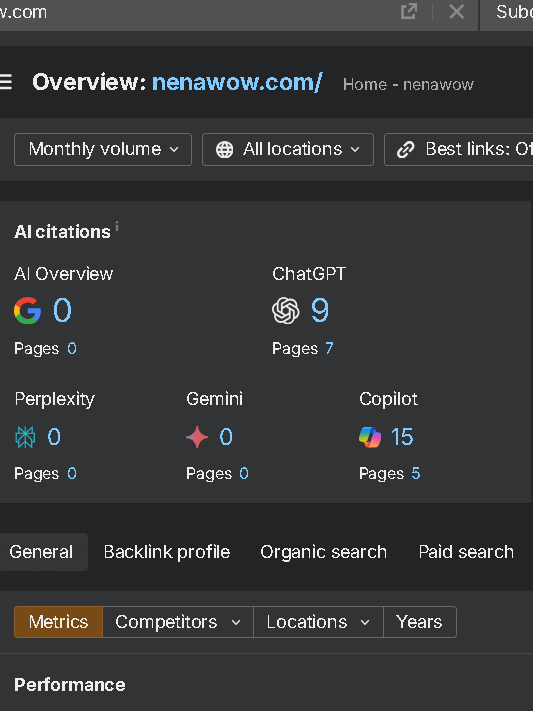
As you can see in the screenshot below, you can see the AI Overview for the given website.
My website has gained a couple of mentions on ChatGPT and Copilot.
Perplexity and Gemini have a score of 0.
I realize that I need to pay much more attention to gaining credibility in AI searches.
Building an Actionable SEO Plan

This information combined is what I base my SEO plan of action on. To begin, I pull a list of keywords from Ahrefs, based on difficulty and traffic potential. I also base content or page edits around those keywords when I set out to do so.
Afterwards, I concentrate on outreach, building links by contacting sites my competitors are already ranking with. Ahrefs Tools kind of lets me keep track of the progress. I’m auditing audits let me try and catch any issues and see what’s improving.
Adhering to this plan also permits me to make efficient use of free data and continue focusing on my SEO – no more guessing, and less wasted effort.
Here is my Ahrefs vs Ubersuggest review.
Frequently Asked Questions
Here are some FAQs regarding gratis Ahref tools. I will discuss the alternatives, backlink checks, keyword research, as well as tracking traffic and how the free features compare to paid for ones. I hope this clarifies what is possible without having to pay for a subscription.
What are the best free alternatives to Ahrefs for SEO analysis?
I tend to suggest Ubersuggest, Moz Link Explorer, and Google Console. It gives you fairly good information about backlinks, keywords, and site health, but you may end up having daily limits, or not get as much depth.
How to check backlink quality without an Ahrefs subscription?
I can go into Google Console and check backlinks and see where they’re coming from. Moz’s Link Explorer is a free tool that provides some link data but is a little more limited . I consider quality, based on DA and relevance.
What free resources are available for comprehensive keyword research?
To find keywords I use Google Keyword Planner, Ubersuggest, as well as the free Ahrefs Keywords Explorer version. They provide volume, keyword difficulty, and basic suggestions – enough to get you started .
Can you monitor web traffic effectively with free Ahrefs tools?
I use Ahrefs free Tools accessible by Ahrefs.com for insights into the organic traffic of my site as well as ranking on keywords. It doesn’t have the amount of detail of the paid plans. Still, it lets me know what has changed and more or less where the traffic is coming from.
How does Ahrefs Gratis Tools compare to paid SEO tool features?
I use gratis Ahref tools for site audits and backlinks, but, again, there’s a ceiling on what you can access. The premium offerings provide complete access to the Site Explorer, more powerful keyword research capabilities and more in-depth competitor analysis.
What are the limitations of free gratis Ahrefs tools compared to Ahrefs premium offerings?
Free tools have limitations on the number of queries you can make in a given day and on which data you can view. You loose the richer details and more in depth reporting on you site and even your competitors.
They don’t really provide you with the full competitor insights or the advanced link building features that you might desire. The paid plans, however, do update more frequently and provide access to substantially enriching and more valuable datasets.


