


Ahrefs vs KWFinder is not so much a matter of which is ‘better’ than the other, but which suits your individual requirements and budget.
I have put in plenty of time with both and they are designed for different people.
Ahrefs is a huge enterprise-level solution with 35 trillion backlinks, and 28+ billion keywords in their tool.
It’s made for agencies, and experienced SEOs who want to do very in-depth competitive analysis.
KWFinder, but, specializes in user-friendly keyword research, easy to use interfaces, and a low price point, around $30 per month.
Ahrefs costs $129 per month and provides a technical audits, and competitor intelligence that is tough to beat.
Because KWFinder is Mangools’ tool, you actually get five specialized tools for cheaper than just basic Ahrefs entry .
You likely don’t need Ahrefs’ monster link index if you’re a blogger in need of only low-competition keywords.
But, if you are running an agency and have dozens of clients then KWFinder’s limitations may infuriate you.
Let’s do an overview of these tools and compare each one for keyword research, backlinks, audit, rank tracking and pricing.
I will also show you where each of these two products excel and lack.
By the time finished you should have a pretty good idea of which one is really the one that fits your workflow.
Understanding the Core Differences

Ahrefs and KWFinder are meant for different folks, with their own features and price tags.
Ahrefs acts as a full-blown SEO platform loaded with tools for backlink analysis and site audits.
KWFinder zeroes in on keyword research as part of the Mangools suite.
What Is Ahrefs?
Ahrefs is a robust SEO platform packed with tools for every corner of search engine optimization.
You get a keyword explorer, site audit, backlink checker, content explorer, all in one place.
Ahrefs has one of the largest backlink databases out there, which is great for analyzing competitor link profiles and hunting for link-building opportunities.
They update their data all the time, so you’re always working with fresh info.
It’s not cheap—plans start around $99 a month, but you’re paying for a wide range of features.
Ahrefs is a good fit for agencies, bigger businesses, and seasoned SEO pros who need detailed data and deeper analysis.
You’ll also find things like content gap and historical data tracking, which help spot opportunities your competitors are ranking for but you haven’t tapped yet.
What Is KWFinder?

KWFinder is a keyword research tool in the Mangools family.
It’s built to help you find long-tail keywords with lower competition.
The interface is super simple, which is great if you just want quick, straightforward keyword data.
It gives you search volume, keyword difficulty, and basic SERP analysis.
I really like how KWFinder lays out results.
It’s clean and easy to grasp at a glance.
The difficulty score is on a 0-100 scale, so you can quickly spot easier keywords.
KWFinder is way more affordable than Ahrefs, starting at about $29 a month.
That makes it appealing for bloggers, freelancers, or small businesses on a budget.
You can also use it with other Mangools tools like SERPChecker and LinkMiner.
It’s best for focused keyword research, not full-scale SEO analysis. You won’t find site audits or deep backlink tools here like you do in Ahrefs.
Who Should Use Each Tool?
If you’re a content creator or blogger, KWFinder’s focused approach to keyword research just makes sense.
The price and simplicity work for people mainly looking to find keywords for their content.
Small businesses with basic SEO needs often find KWFinder covers the essentials.
Ahrefs is more for agencies, and bigger businesses that want comprehensive data.
It’s especially handy if you’re juggling multiple clients or large sites.
Freelancers could land in either camp, depending on their clients and budget.
If you’re working with enterprise clients or handling complex campaigns, Ahrefs is worth it.
If your main gig is writing and simple keyword research, KWFinder does the job.
Ahrefs or KWFinder-Keyword Research

Both tools handle keyword research, but their styles are pretty different.
Ahrefs gives you more data, while KWFinder aims for simplicity and ease of use.
Keyword Database Size and Accuracy
Ahrefs has a keyword database with over 28 billion keywords from multiple search engines.
That’s a massive pool, and I can usually dig up suggestions for just about any seed keyword I try.
They update the data often to keep up with search trends.
KWFinder’s database is smaller but still covers the main markets I need.
The data feels accurate enough for most projects.
Both tools give you search volume and related keyword suggestions right from the start.
Ahrefs’ Keywords Explorer also shows advanced stuff like clicks per search and parent topics.
Keyword Difficulty Metrics
Both Ahrefs and KWFinder use a keyword difficulty score to help you judge ranking chances.
Ahrefs bases its score on the backlinks profiles of the top 10 ranking pages, ranging from 0 to 100—higher means tougher competition.
KWFinder also uses a 0-100 scale, but it’s a bit more beginner-friendly.
You can quickly spot low-competition keywords that are easier to go after.
The main difference is how much each tool weighs different ranking factors.
Ahrefs looks at more variables, while KWFinder keeps it simple.
Long-Tail Keywords
Both tools are solid for finding long-tail keywords, but they go about it differently.
Ahrefs gives you huge lists of variations and pulls in autocomplete data from search engines.
Their Keywords Explorer can spit out hundreds or thousands of related terms from just one seed keyword.
KWFinder is great for surfacing long-tail keywords with its straightforward layout.
It organizes suggestions in a way that makes it easy to spot good opportunities.
You can filter results to zero in on low-competition keywords that fit your content goals.
Both let you sort and filter by search volume, difficulty, and other metrics.
That makes it easier to pick out the best long-tail opportunities for your strategy.
Backlink and Competitor Analysis
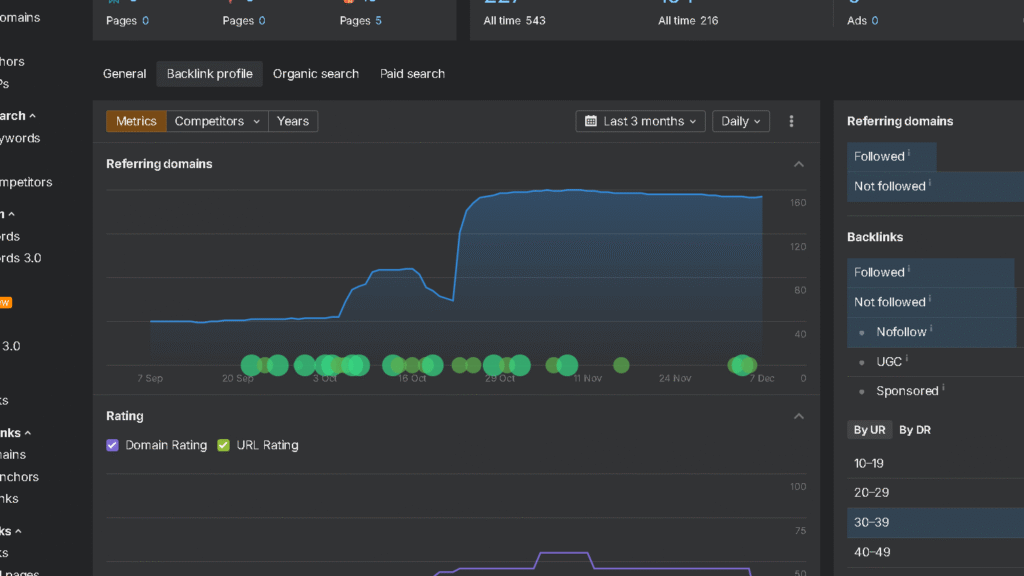
Ahrefs really owns backlink analysis with its 35 trillion link database.
KWFinder’s LinkMiner is there for basic backlink checking—good enough for simpler needs.
The biggest gap is in competitive research, where Ahrefs gives you detailed traffic estimates and ranking data that KWFinder just can’t match.
Backlink Database and Index

Ahrefs made its name by building the web’s largest backlink index.
They crawl 8 billion pages a day and refresh their database every 15 minutes.
That means you can spot new backlinks almost as soon as they appear.
The backlink data shows every link to any domain, plus anchor text, referring domains, and link velocity over time.
You can check domain and page authority to judge link quality.
Site Explorer lets you look back at historical backlink data to see how a site’s link profile has changed.
KWFinder throws in LinkMiner for basic backlink checks, but the database is much smaller.
You can see referring domains and find some link opportunities, but it’s not enough for serious link building campaigns.
It works for occasional checks, but if you need deep competitive link intel, you’ll hit its ceiling fast.
Competitor Research Features

Ahrefs lets you dig into competitor research by showing organic traffic estimates, top pages, and every keyword a domain ranks for.
You can see which keywords drive the most traffic to your competitors and peek at their content strategy.
You can compare multiple domains side by side to get a sense of market positioning.
KWFinder’s SiteProfiler gives you basic domain overviews with authority metrics and top pages, but you don’t get traffic estimates or deep keyword data.
It’s good for a quick snapshot, but you can’t really reverse-engineer a competitor’s SEO strategy like you can with Ahrefs.
Content Gap Analysis
Ahrefs has a content gap tool that shows keywords your competitors rank for, but you don’t.
Just enter your domain and up to 10 competitors, and it spits out ranking opportunities you’re missing.
This helps you find quick wins.
Places where your competitors are already ranking, but your site hasn’t even targeted those keywords.
You can filter by difficulty to focus on realistic opportunities.
KWFinder doesn’t have a content gap tool.
You’ll need to manually compare keyword lists between domains, which takes more time and isn’t as systematic as what Ahrefs offers.
Site Audit and Technical SEO

Ahrefs website audit feature
Ahrefs comes with a full site audit tool that crawls your site to flag technical SEO problems.
KWFinder doesn’t really offer this.
Mangools’ SiteProfiler gives you basic metrics, but it won’t catch technical issues that hurt rankings.
Ahrefs Site Audit checks your site for over 100 SEO issues.
It looks for crawlability problems, duplicate content, missing meta tags, slow page speed, and HTTPS errors.
The tool gives you a health score so you can quickly see how your site’s doing technically.
The Site Audit tool flags all internal and external broken links during crawls.
You get a list of pages with broken links and the exact URLs to fix.
The backlink analysis also spots broken pages that still get links from other sites.
SERP Analysis and Features
Both tools analyze search engine results pages, but they have different strengths.
Ahrefs shows detailed SERP features—think featured snippets, People Also Ask, knowledge panels, local packs.
Keywords Explorer tells you which SERP features show up for specific keywords and estimates how they impact click-through rates.
This helps you figure out if a keyword will actually send traffic, even if you rank well.
Some keywords trigger so many SERP features that organic listings get buried and barely get clicks.
KWFinder’s analysis is simpler but still handy.
SERPChecker shows which features pop up for target keywords and gives you domain metrics for the top 10 results.
You can quickly spot weak competitors and find ranking opportunities.
The visual layout makes it easy to size up competition at a glance, though you don’t get traffic estimates or feature impact analysis like with Ahrefs.
Rank Tracking and Performance Monitoring

Ahrefs Rank Tracker gives you enterprise-grade monitoring, including competitor comparisons.
KWFinder’s SERPWatcher sticks to the basics with visual performance indicators.
The real difference?
It’s whether you want deep competitive analysis or just straightforward position monitoring.
Rank Tracker Comparison
Ahrefs Tracker lets you monitor unlimited keywords across multiple projects with daily updates.
You can track rankings in 170 countries, even down to city-level precision.
The interface shows your position changes, and estimated traffic for each tracked keyword.
Ahrefs stands out with its competitor comparison feature.
You can add up to five competitors and see their rankings change alongside yours.
This lets you spot who’s gaining ground in your space and helps you identify threats early—before they get out of hand.
SERPWatcher from Mangools goes for a different vibe.
The tool shows your rankings with a simple dominance score that sums up your overall performance.
You get color-coded position changes, making trends pop out at a glance.
The interface favors visual clarity over sheer data depth.
Tracked Keywords and Visibility
Ahrefs lets you track unlimited keywords on higher-tier plans, but the Lite plan caps you at 750.
You can organize keywords into projects and tag them by category or priority.
The visibility score shows what percentage of clicks you’re capturing from your tracked keyword set.
Ahrefs tracks SERP features, showing when your pages appear in featured snippets, local packs, or knowledge panels.
These spots can drive big traffic even if you’re not #1.
Traffic Estimates and Reporting
Ahrefs’ traffic estimates are based on how much traffic the top ranking page gets for a given keyword.
That provides you with your maximum ceiling considering position and click thru rates.
The Value metric indicates what the traffic would have cost you to purchase through ads.
You can also set and export reports in various file formats. Personalized dashboards allow you to concentrate on the metrics that pertain to you.
Historical data extends back months, enabling identification of long-term trends.
Which Tool Fits Your Strategy?
If you are a content blogger, freelancer or small business owner, choose KWFinder.
Choose Ahrefs if you are an SEO agency, oversee multiple client sites, or require more complex competitive intelligence. The all-in-one platform deals with everything from technical audits to content research.
Consider what your monthly requirements are. Heavy users must also be aware that KWFinder has a maximum number of searches per day, unlike Ahrefs, which includes an unlimited number of searches in their paid plans.
Your content strategy is important as well. If you write a few articles a week that focus on particular keywords, then KWFinder has everything you’ll require.
Budget is huge. KWFinder is a little more budget friendly at $46/month. Ahrefs actually begins at $129, so you just need to rationalize it with client revenue or business growth.


